The 8 best web search tools for AI agents in 2026

Web search has become a standard tool for AI agents. It lets a model move beyond its training data, investigate unfamiliar topics, check current information, and follow new leads as it works through a task.
This is the problem Exa was built around. We provide search and retrieval infrastructure specifically for AI applications, including production agents such as Cognition’s Devin. Exa Search gives an agent live web results and page contents through an API, while Agent can take over the multi-step searching and research itself.
This guide compares eight web search tools for AI agents, including dedicated search APIs and the search built into models from OpenAI and Anthropic. We’ll look at what each returns, how it fits into an agent loop, and when a dedicated search layer makes sense.
How a web search tool works
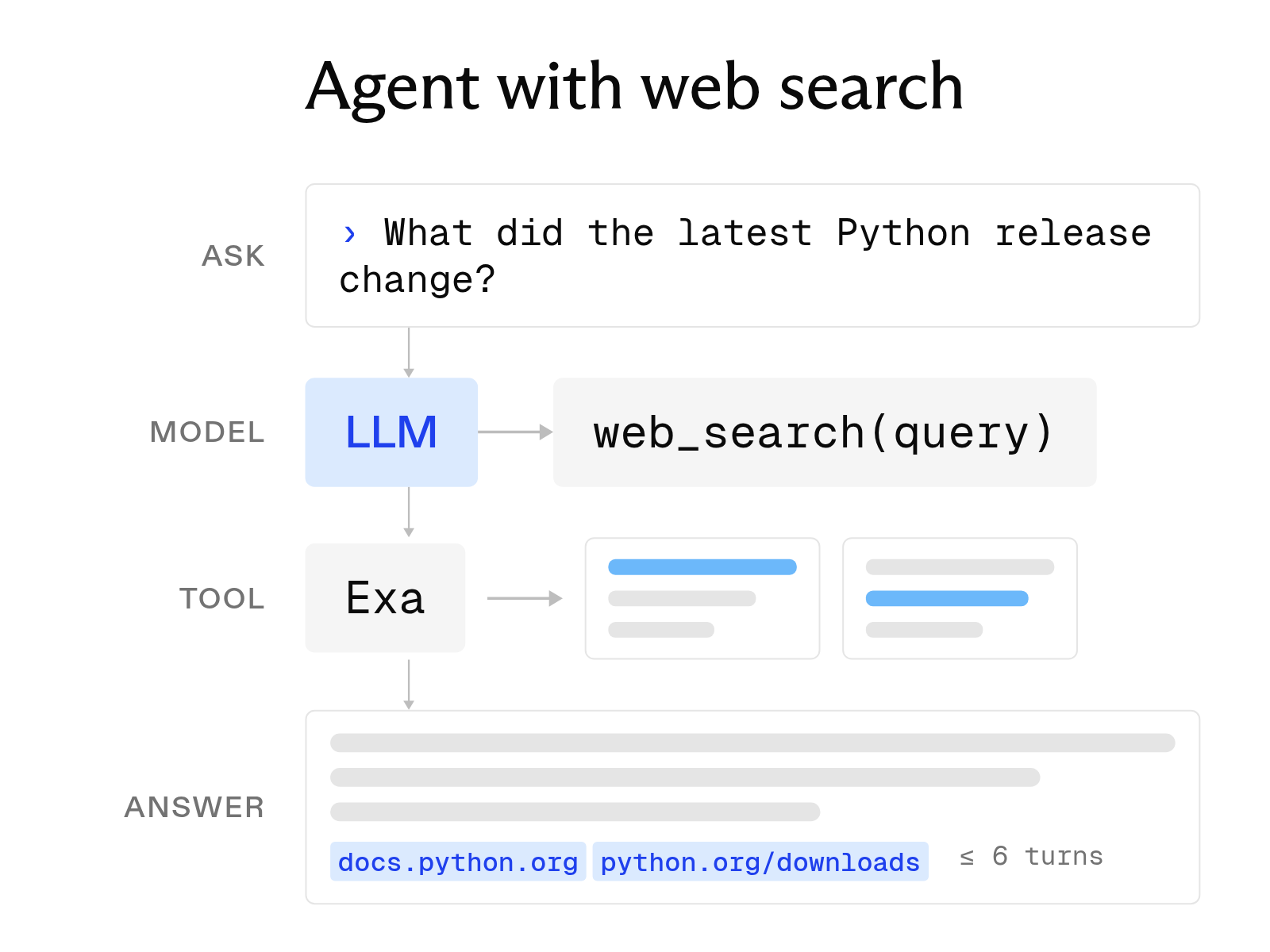
Every web search tool, whether native or third-party, follows the same three-step process to turn a user's question into an informed answer.
-
Query processing. First, the model decides whether a question requires current information and writes a search query. Some tools require keywords, so the model must rewrite the question. Others accept plain-language queries. Exa accepts natural-language queries and lets users choose a search type, from Lite for speed-sensitive queries to Deep Search for complex analysis.
-
Result filtering and structuring. Next, the tool runs the query against an index, ranks the pages, and returns a structured list of titles, snippets, and links. The tools differ most in how much text they return. Some provide short snippets, while others provide full pages. Exa returns highlights, each containing a passage that answers the query.
-
Context integration. Finally, the results enter the prompt as tool output. The model reads them, writes an answer, and cites the URLs it used. At this stage, every irrelevant token adds cost and latency.
Base model versus model with search
The table shows what changes when you add a search tool to a model call.
| Base model | Model with a search tool | |
|---|---|---|
| Knowledge cutoff | Fixed at training time | The model can read past its cutoff |
| Freshness | None | As fresh as the index, or live when the tool crawls on request |
| Latency | One model call | One model call plus each search call, from about 200 ms to several seconds |
| Setup | A prompt and a model | A tool definition or an MCP server |
| Cost | Tokens only | Tokens, a per-search fee, and the tokens in the results |
These differences matter even more in agent loops. An agent that searches five times per task pays five search fees and processes five sets of results. Dense, relevant results can therefore reduce both search fees and token costs.
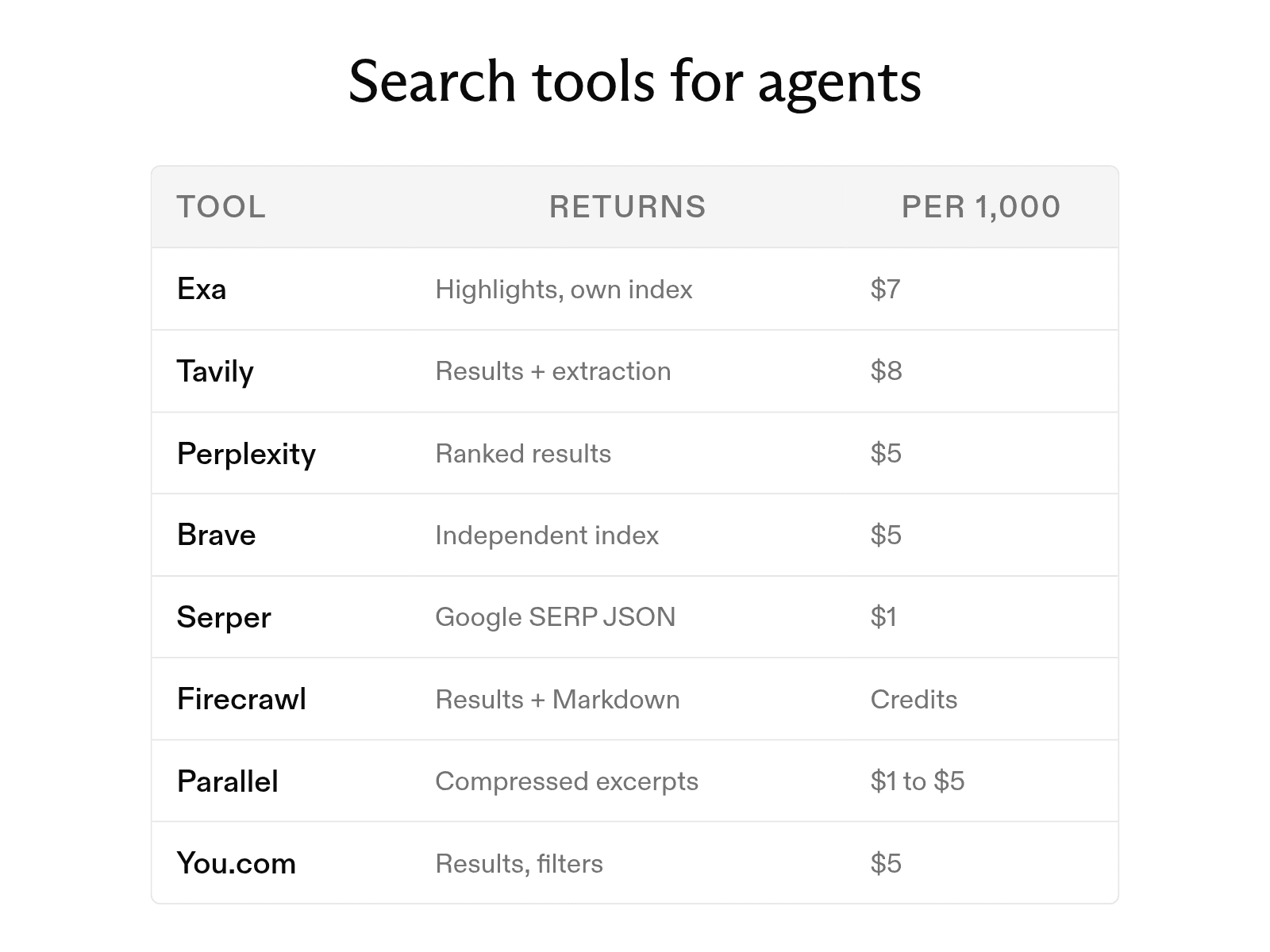
The 8 web search tools compared
1. Exa Search API
Exa is a search API that builds and maintains its own index of the live web and structured data on companies, people, financial markets, code, and documents. Our pricing page lists separate indexes for the web, people, companies, and scholarly works. Exa Connect also adds third-party providers such as Similarweb and Financial Datasets. Search starts at $4 per 1,000 requests with up to 10 results, and the search type sets the latency: about 450 milliseconds on Lite and about 1 second on Auto. The free plan includes $20 in credits at sign-up and $10 each month.
2. Tavily Search API
Tavily is a search and extraction API built for agent frameworks. Nebius announced an agreement to acquire Tavily in February 2026. The free plan includes 1,000 API credits each month. Pay-as-you-go credits cost $0.008, and a basic search uses one credit.
3. Perplexity Search API
Perplexity Search API returns ranked web results as structured data. It is separate from Perplexity's answer-generating Agent API. The Search API costs $5 per 1,000 requests. Each request can include up to five queries, and max_results can range from 1 to 20.
4. Brave Search API
Brave Search API uses Brave's independent index of more than 30 billion pages. It costs $5 per 1,000 requests and includes $5 in free credits each month. In AIMultiple's benchmark of eight agentic search APIs, updated May 25, 2026, Brave earned the highest Agent Score and recorded the lowest latency at 669 milliseconds.
5. Serper
Serper is a Google SERP API that returns organic results, People Also Ask boxes, images, and place results as JSON. New accounts receive 2,500 free queries. The Starter pack costs $50 for 50,000 credits, or $1 per 1,000 credits.
6. Firecrawl Search
Firecrawl began as a scraping API and later added a /search endpoint. The endpoint returns titles, descriptions, and URLs. Its scrapeOptions setting can also retrieve the Markdown for each result in the same call. The free plan includes 1,000 monthly credits, enough for 500 searches.
7. Parallel Search API
Parallel Search API accepts a natural-language objective and returns ranked URLs with compressed excerpts. Users choose a mode based on their latency needs. Turbo runs in about 200 milliseconds and Fast in about 700 milliseconds, both at $1 per 1,000 requests. Basic takes about one second and Advanced about three seconds, both at $5 per 1,000 requests. Because requests default to Advanced when no mode is set, an unconfigured call costs five times more and takes fifteen times longer than Turbo.
8. You.com Web Search API
You.com Web Search API costs $5 per 1,000 calls and returns 1 to 100 results per call. It includes filters for country, language, and freshness. The free tier allows 100 queries each day. The API is SOC 2 certified, and zero data retention is available.
Native search versus a search API
OpenAI and Anthropic both offer web search tools in their APIs. After you add the tool to a request, the model decides when to search and includes citations in its answer. Anthropic's tool supports a max_uses limit, allowed or blocked domains, and a user location. OpenAI's tool offers low, medium, and high search_context_size settings. For a chatbot that needs occasional lookups from one provider, native search provides the simplest setup.
More demanding workloads, however, can benefit from three advantages of a dedicated search API.
-
Precision with fewer tokens. A dedicated API can return the passages on each page that answer the query, along with each source URL. Exa calls these passages highlights, which can use up to 17 times fewer tokens than full-page text. The model receives cited evidence without having to process the rest of the page.
-
Portability across models. You call Exa through your own function tool, so the same configuration works with Claude, GPT, or Gemini. By contrast, native search works only within its provider's API, so switching models requires rebuilding the retrieval setup.
-
A lower price per search. OpenAI and Anthropic each charge $10 per 1,000 searches, plus model-token rates for the search content. Exa runs its own search infrastructure and starts at $4 per 1,000 requests. Because an agent may search several times per task, that price difference compounds. Shorter highlights can reduce token costs as well.
How to integrate a web search tool
You can connect a search tool to a model in four ways. Many production agents combine two of them.
-
Search APIs through function calling. You define a search function in the tool list, and the model produces a call with a query. Your code runs the request and returns the results as tool output. This method works with every major model API and agent framework. Exa publishes ready-made tool definitions for Anthropic and OpenAI, along with guides for LangChain, CrewAI, LlamaIndex, and Pydantic AI.
-
Scraping tools. When the agent already has a URL, a scraper such as Firecrawl fetches the page and converts it to Markdown. A scraper reads pages you name. It does not find new ones.
-
Native features. The provider's own web search tool, enabled with one entry in the request, is the fastest setup and stays tied to that provider.
-
MCP. The Model Context Protocol offers another way to connect assistants such as Claude, Cursor, and ChatGPT to a hosted search server without custom code. Exa's MCP server runs at
https://mcp.exa.ai/mcp. In Claude Code, install it withclaude plugin install exa@claude-plugins-official.
LLM search tools for finding models
The term "LLM search" also refers to tools that help users find and compare language models. Three examples are worth knowing.
-
WhatLLM ranks 174 models across 565 endpoints and 67 providers. It uses the Artificial Analysis Intelligence Index as its quality score. Its comparison view shows two to four models side by side, including their benchmarks, pricing, and speed.
-
LLM Explorer indexes 61,249 open-source language models and 150 AI agents. You can filter for quantized models or for models that fit in a set amount of VRAM, such as 8 GB.
-
Run This LLM helps answer a hardware question. You enter your GPU VRAM, system RAM, and inference engine. The tool then sorts its 506 indexed models into three groups: models that run on your GPU, models that require CPU offloading, and models that will not run on your system.
Unlike the APIs discussed above, these tools help users choose language models rather than search the web for an agent.
How to choose a web search tool
Use the following five questions to compare providers.
-
How precise are the results? Send a hard, specific query and count how many results contain the answer. Precise results let the model answer from fewer searches.
-
What does the index cover? Some answers do not appear in the public HTML of the top 10 Google results. Ask whether the provider maintains its own index and which sources it includes beyond the open web.
-
How many tokens does each result use? Compare the amount of text returned for each result. Snippets, highlights, and full pages can differ by an order of magnitude, and every token becomes part of the prompt.
-
What can you configure? Look for control over latency, depth, freshness, date ranges, domains, and categories. A tool with a single mode fits a single workload.
-
Which compliance options are available? Ask about SOC 2, HIPAA, and zero data retention. Exa answers yes to all three, with HIPAA support and zero data retention on its Enterprise plan.
FAQ
Do I need a search API if my model already has web search?
For occasional lookups in a chatbot that uses one provider, native search is usually enough. A search API becomes useful when you need more control over the index, output format, or cost per search, or when one agent must work across several model providers. Exa addresses the first need with its own index and the second through a provider-independent function call.
Is there a free web search tool for AI agents?
All eight tools offer free allowances. Exa gives $10 in credits each month plus a $10 onboarding bonus. Tavily includes 1,000 credits, Brave includes $5 in credits, Serper includes 2,500 queries, Firecrawl includes enough credits for 500 searches, Parallel includes $5 each month, and You.com allows 100 queries a day. OpenAI and Anthropic offer no free tier for native search; each charges $10 per 1,000 searches plus token fees.
Cheers,
Keep learning
Browse all Learn articles →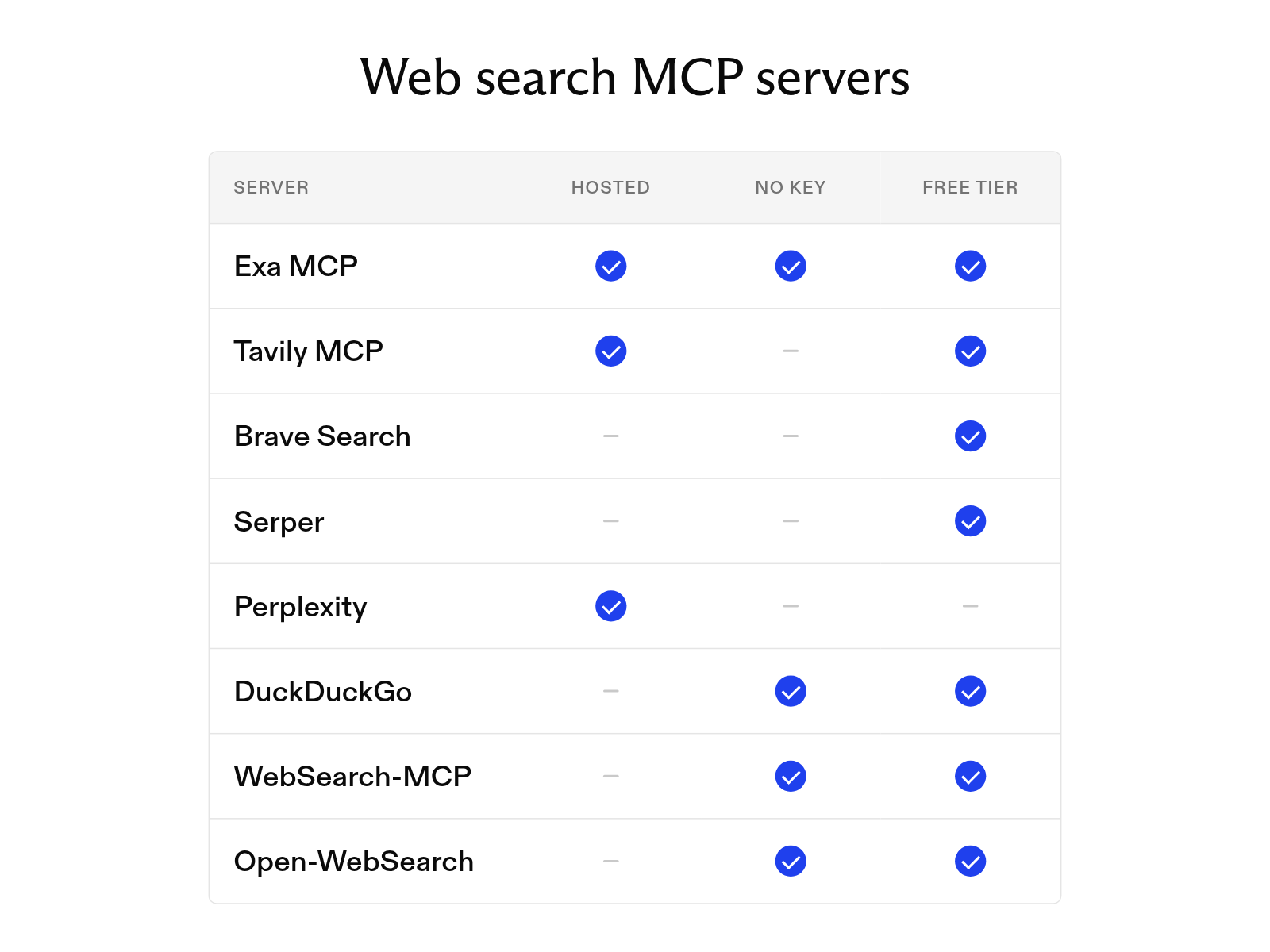
The best web search MCP servers for Claude, Cursor, and Cline
October 19, 2026
The 10 best AI agent tools for 2026 (and how tool calling works)
October 19, 2026
How to build an AI agent with web search
October 6, 2026
What is a search agent? How they work and how to build one
October 1, 2026
What is an AI agent? How it works, key components, and examples
October 1, 2026
Does Claude have real-time web search? How it works
September 30, 2026