The 8 best AI search APIs in 2026
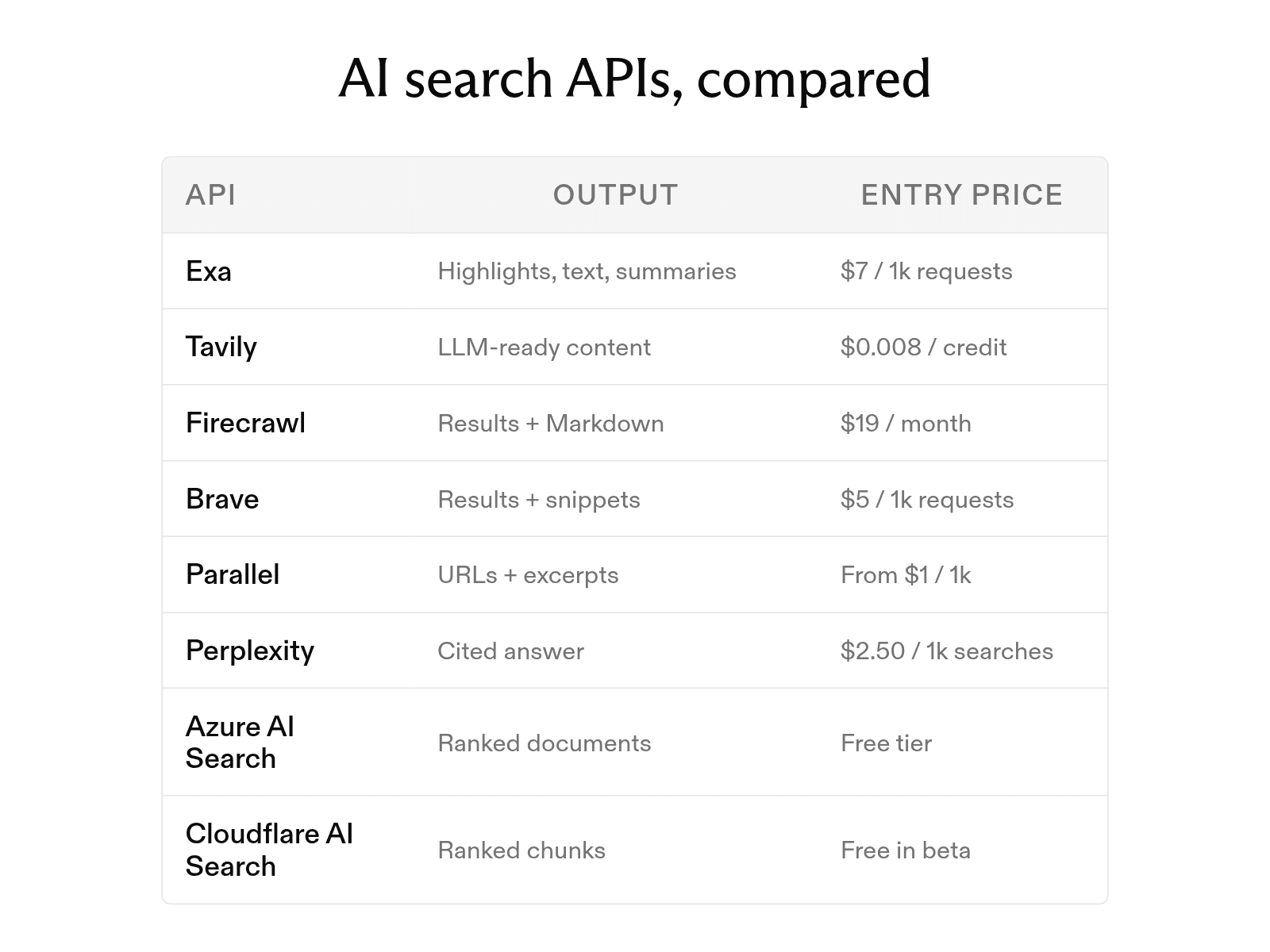

Search is core infrastructure for AI products. Agents and retrieval-augmented generation applications need current information they can process quickly, reliably, and with clear sourcing. AI search APIs meet that need by connecting agents, LLMs, and applications to the web or internal data.
Unlike a search results page built for people to click through, an AI search API returns structured results that models can use directly as tool output. At Exa, we build search infrastructure specifically for this use case, combining web search, content retrieval, and research capabilities in an API designed for AI applications.
This guide compares eight AI search APIs, including Exa, across public-web and private-data search. We’ll cover how they differ, what to evaluate, and how to send your first search request.
Web search APIs for agents and RAG
The six APIs below search the public web and return results that a model can read as tool output.
-
Exa. Exa builds and maintains its own index and search models, and it returns each result with query-relevant highlights, full page text, or a summary. This design suits agents that run many searches per task and need cited passages while limiting token use. Search types range from Lite for speed-sensitive queries to Deep Search for complex analysis.
-
Tavily. Tavily offers search, extract, map, and crawl endpoints that return clean, LLM-ready content from the web. This combination suits agent frameworks that need search and page extraction from one provider. A basic search costs one credit, or $0.008 at the pay-as-you-go rate.
-
Firecrawl. Firecrawl's
/searchendpoint returns titles, descriptions, and URLs, and itsscrapeOptionssetting scrapes each result into Markdown in the same call. This setup suits pipelines that need complete search-result content without a separate scraping step. -
Brave Search API. Brave queries its own independent index of more than 30 billion pages, and Brave reports that it receives more than 100 million page updates each day. The independent index suits teams that want an alternative to Google and Bing, and it had the lowest latency, 669 ms, in AIMultiple's benchmark of seven search providers.
-
Parallel Search API. Parallel takes a natural-language objective with optional keyword queries and returns ranked URLs with compressed excerpts. Four modes let agents balance speed and depth. Options range from turbo, at about 200 ms for high-volume lookups, to advanced, at about 3 seconds for multi-hop research.
-
Perplexity Agent API. Perplexity models search the web and generate an answer with inline citations and supporting results. Perplexity deprecated Sonar in favor of the Agent API, which runs web search and reasoning in a single call for applications that need complete, cited answers.
Search APIs for internal and enterprise data
The two APIs below search content you load into them. Both support hybrid search. A hybrid query runs a BM25-ranked keyword search and an embedding-based vector search at the same time. It then merges the two result lists.
-
Azure AI Search. Azure AI Search is Microsoft's cloud search service for full-text, vector, and hybrid search over enterprise content. Its hybrid queries merge results with Reciprocal Rank Fusion, and knowledge bases add agentic retrieval over indexed and remote data. This setup suits organizations that already use Azure and need to search documents, product data, or support content.
-
Cloudflare AI Search. Cloudflare AI Search lets you create an instance, connect or upload data, and search it in natural language without building retrieval infrastructure. New instances use vector search by default, and you can turn on keyword or hybrid modes. This setup suits documentation search, internal knowledge agents, and apps in which each tenant searches its own files.
How to evaluate an AI search API
Score each API on the six criteria below. Each criterion includes a test you can run.
-
Precision to the query. Good results directly answer the query. To compare providers, run 20 real queries and count how many results answer each one. Exa is built for precise queries that describe the exact information needed and return cited information.
-
Coverage. Some answers do not appear in the public HTML of the top ten Google results. Test questions that your current tool cannot answer. Then check whether each provider maintains its own index. Exa runs its own index, including separate indexes for people, companies, and scholarly works.
-
Output format and token density. Every token in a result becomes part of your prompt. Compare the number of tokens per result across the same query set. Exa's highlights are up to 17x more token-efficient than full-page text.
-
Citations. A grounded answer needs a source for each claim. Confirm that every result or generated field links to a URL. Exa returns a URL with each result, and structured outputs provide grounding through citations.
-
Depth and latency control. Voice agents and research agents have different speed and cost requirements. Check whether a single API can support both workloads. Exa's search types run from about 450 ms for Lite to about 1 second for Auto, and Deep Search handles multi-step research.
maxAgeHourssets how fresh page content must be. -
Compliance. Data regulations can limit provider choices. Before sending production data, require written confirmation of SOC 2 compliance, zero data retention, or HIPAA support. Exa is SOC 2 Type II certified and offers zero data retention and HIPAA on its Enterprise plan.
Common AI search API use cases
-
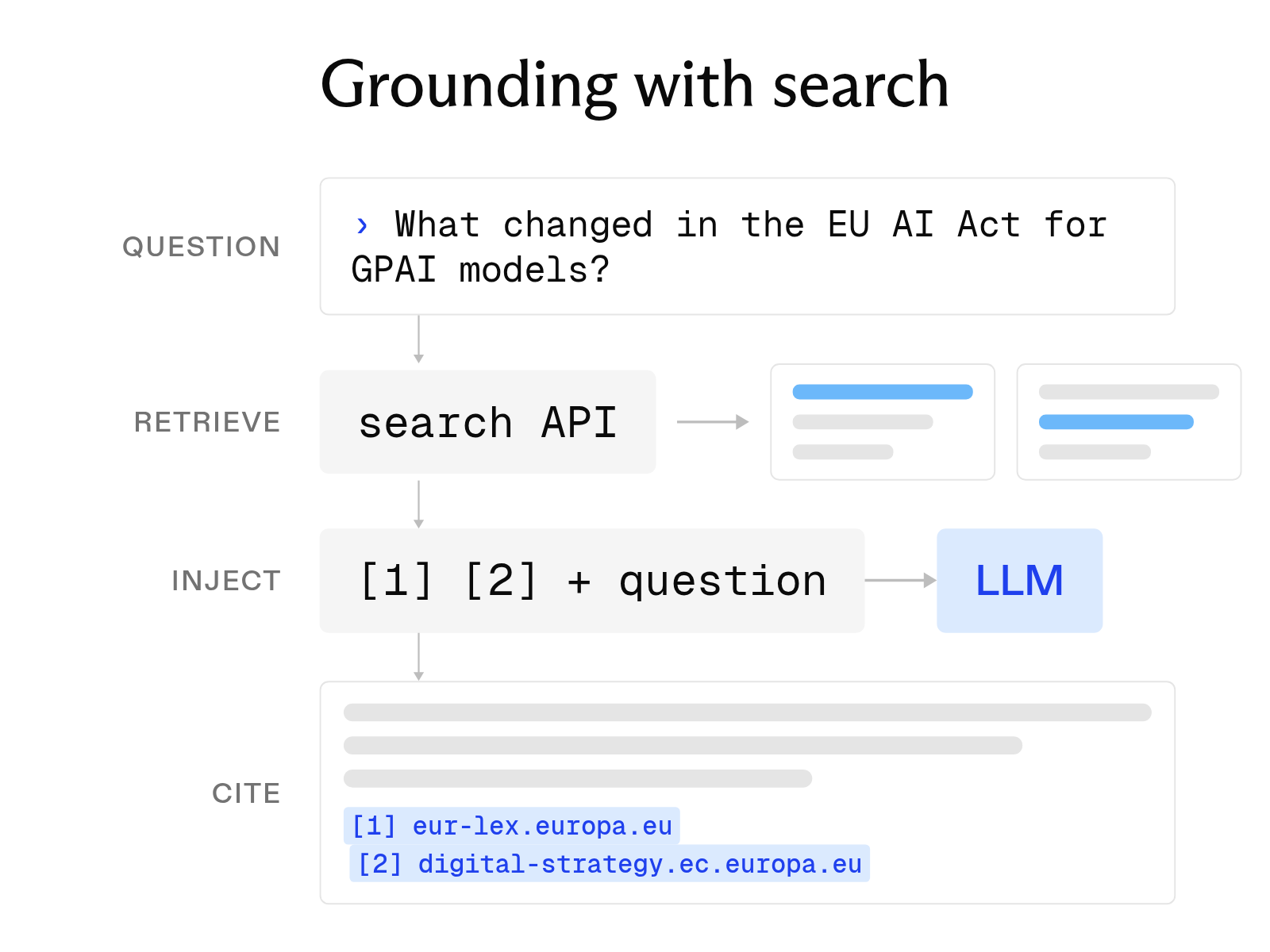
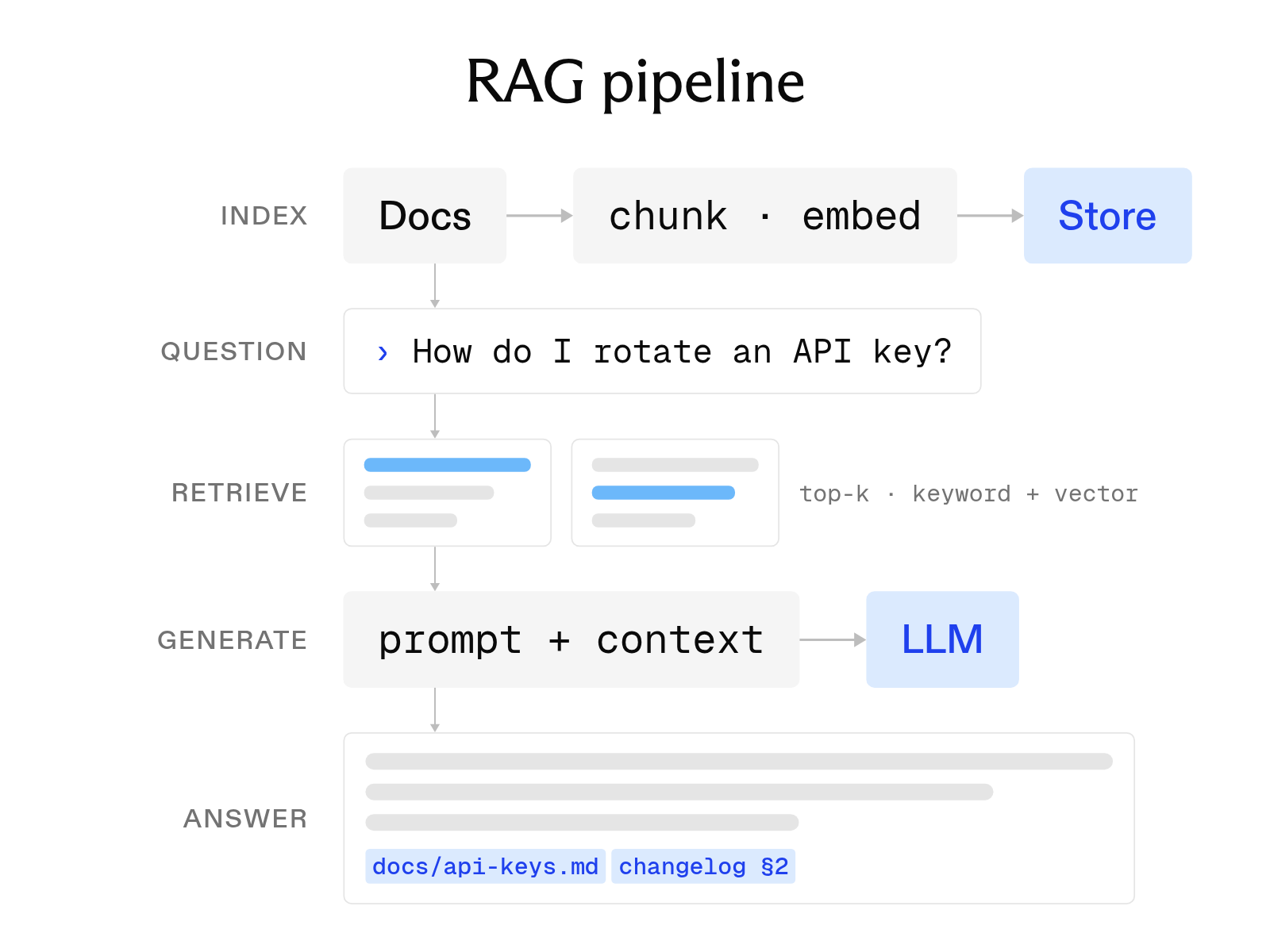
RAG. An application retrieves current passages from the web or an internal index and gives them to the model as context. The model can then cite sources newer than its training data.
-
Research agents. An agent runs a series of searches, reviews the best results, and writes a cited report. Token density matters because each search adds more content to the prompt.
-
Market intelligence. A team tracks competitors, funding news, and product launches with date filters and news categories. It sends new results to a dashboard or Slack channel.
-
Lead enrichment. A sales workflow searches for a business or person and adds structured details, such as headquarters, headcount, or role, to a CRM record.
Compare AI search APIs
Prices were taken from each vendor's pricing page on September 28, 2026.
| API | Best for | Core strength | Output | Price entry point |
|---|---|---|---|---|
| Exa | Agents and RAG | Own index, token-efficient highlights | Results with highlights, text, or summaries | From $4 per 1,000 requests |
| Tavily | Agent frameworks | Search plus extract, map, and crawl | LLM-ready content | $0.008 per credit |
| Firecrawl | Search plus full pages | Scrapes results in the same call | Results with Markdown | Hobby: $19 a month |
| Brave | Independent web results | Index of over 30 billion pages | Web results with snippets | $5 per 1,000 requests |
| Parallel | Latency-tiered agents | Four speed and depth modes | Ranked URLs with excerpts | From $1 per 1,000 requests |
| Perplexity Agent API | Cited answers | Search and answer in one call | Answer with citations | Model tokens plus $2.50 per 1,000 web searches |
| Azure AI Search | Enterprise content | Hybrid search with RRF | Ranked index documents | Free tier, Basic $73.73 per search unit a month |
| Cloudflare AI Search | Internal docs and tenants | Managed indexing | Ranked chunks | Free within limits during open beta |
How to send your first search API request with Exa
Install the SDK with pip install exa-py. It requires Python 3.9 or later. Set EXA_API_KEY in your environment, then run a search. The request asks for highlights. Exa's SDK documentation recommends highlights as a starting point for retrieval workflows.
from exa_py import Exa

exa = Exa()  # reads EXA_API_KEY from the environment

results = exa.search(
    "Latest developments in LLM capabilities",
    type="auto",
    num_results=10,
    contents={"highlights": True},
)
The response below is shortened from the example in Exa's API reference.
{
  "results": [
    {
      "title": "A Comprehensive Overview of Large Language Models",
      "url": "https://arxiv.org/pdf/2307.06435.pdf",
      "publishedDate": "2023-11-16T01:36:32.547Z",
      "highlights": ["Such requirements have limited their adoption..."]
    }
  ],
  "costDollars": { "total": 0.007 }
}
Each result carries a title, a URL, a publish date, and the highlights that match the query. Pass the highlights and URLs to the model as tool output. The model can then cite those URLs in its answer. The costDollars field shows the request charge. A charge of $0.007 matches the rate of $7 per 1,000 requests. If the highlights leave a gap, call exa.get_contents on the best URL to read the full page.
FAQ
What is the difference between an AI search API and a SERP API?
A SERP API returns a search engine results page, such as one from Google, as JSON. An AI search API is designed for model input, so it often returns page text, highlights, or a cited answer that a model can use directly.
Is there a free AI search API?
Most providers offer a free usage allowance. Exa gives $10 in credits every month, Tavily and Firecrawl each give 1,000 credits a month, and Brave and Parallel each give $5 in credits a month. Cloudflare AI Search is free within its limits during the open beta.
Do I need a web search API or an internal search API?
Use a web search API when answers live on the public web. Use Azure AI Search or Cloudflare AI Search when answers live in your own documents. Many agents call both.
Cheers,
Keep learning
Browse all Learn articles →
The 8 best GNews API alternatives in 2026
October 1, 2026
What is LLM grounding, and how does it work with a search API?
October 6, 2026
What is a RAG API? RAG as a service explained
October 1, 2026
The 12 best AI tools for academic research in 2026
October 6, 2026
The 6 best people search APIs in 2026
October 6, 2026
The 8 best web search tools for AI agents in 2026
October 6, 2026