How to build an AI agent with web search
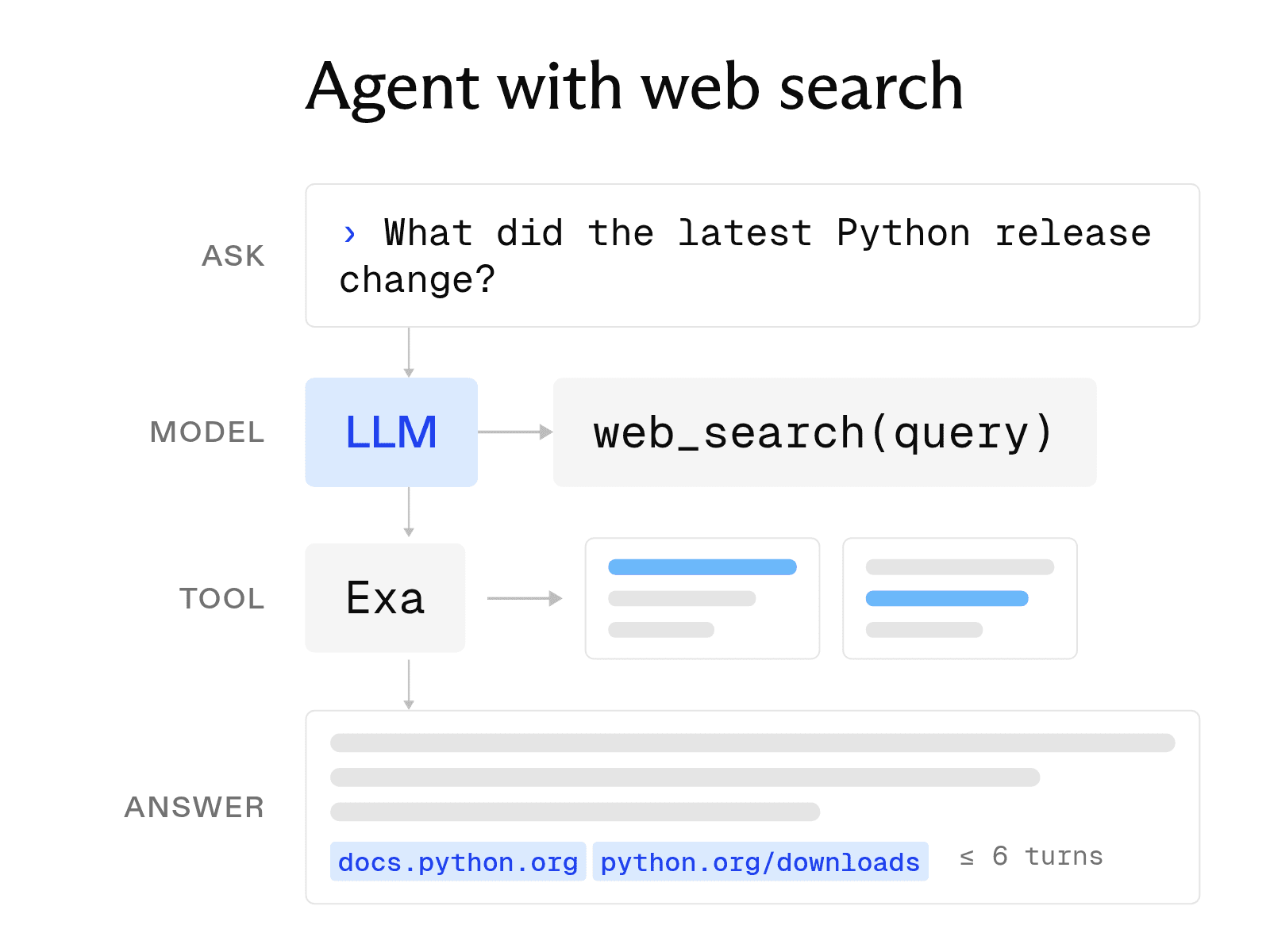

AI agents get much more useful once they can reach beyond the model itself. Give an agent web search, and it can look up current information, follow leads, read sources, and decide what to search for next instead of relying entirely on what the model already knows.
This is a problem we work on every day at Exa. We build search and research infrastructure specifically for AI agents, from a Search API that agents can call as a tool to an Agent API that handles the multi-step search process itself. Exa also powers web search for production agents such as Cognition’s Devin.
This guide starts with the core components of an agent, compares no-code, low-code, and full-code approaches, and walks through building a working Python agent with Exa Search.
Design the core components
An agent is a small system whose parts must work together. Before writing code, decide how each part should work.
-
Model. The model reads the conversation, decides whether to call a tool, and writes the answer. Its reasoning quality determines the agent's capabilities. Its price affects the cost of each task, and its latency affects response time.
-
Instructions. The system prompt defines the model's role, the steps it should follow, and the actions it must avoid. Clear instructions matter more for an agent than for a chatbot because the model makes several decisions without a person reviewing each one.
-
Tools. Tools are functions the model can call, such as web search, database queries, and email services. Each tool needs a name, a clear description, and a JSON Schema that defines its inputs. The model selects tools based on their descriptions, so vague wording can lead to incorrect calls.
-
The loop. The agent loop connects the components. It sends the conversation to the model, runs any requested tool, and returns the result. This process continues until the model provides a final answer or reaches a set limit.
Choose your development path
The right path depends on who will build the agent and how much control the task requires.
-
No-code builders let users describe an agent in plain language and connect it to apps through a web interface. Zapier Agents, for example, can connect agents to more than 9,000 apps. This approach works well for simple internal automations that business users manage.
-
Low-code workflow tools such as n8n place an AI agent inside a visual workflow. n8n offers more than 500 integrations, can run on your own servers, and supports code and human approval steps where needed. Exa offers an n8n node that works as either a standard workflow step or a tool for an n8n AI Agent.
-
Full-code frameworks give developers control over state, branching, and deployment. LangGraph is a low-level orchestration framework for long-running, stateful agents. CrewAI coordinates teams of agents. LlamaIndex focuses on agents that work over your documents and data. Exa has integration guides for LangChain (whose tools LangGraph agents use), CrewAI, and LlamaIndex.
Build an agent that searches the web
This tutorial builds a research agent with the Anthropic and Exa Python SDKs. To follow it, you need Python 3.10 or later, an Anthropic API key, and an Exa API key. Anthropic's current SDK requires Python 3.10 or later. Exa's free plan includes $10 in credits every month plus a $10 onboarding bonus.
pip install anthropic exa_py
export ANTHROPIC_API_KEY="your-anthropic-key"
export EXA_API_KEY="your-exa-key"-
Step 1: Pick a model. Start with a capable model. This example uses claude-sonnet-5. The model selection section below explains when to test a smaller model.
-
Step 2: Write the system prompt. Give the agent a role, a numbered process, and a search limit.
-
Step 3: Define the search tool. The tool definition follows Anthropic's format and includes a name, a description, and an
input_schema. Theweb_searchfunction then calls Exa and returns titles, URLs, and highlights, which are passages from each page that match the query. -
Step 4: Run the loop. The loop sends the conversation to the model. When
stop_reasonistool_use, the loop runs each requested search and returns the output in a tool_result block. The process stops when the model answers or reaches MAX_TURNS.
Put the three blocks below into one file, agent.py, in order. The first block creates both clients and sets the model, the turn limit, and the system prompt from steps 1 and 2.
import anthropic
from exa_py import Exa

client = anthropic.Anthropic()  # reads ANTHROPIC_API_KEY from the environment
exa = Exa()  # reads EXA_API_KEY from the environment

MODEL = "claude-sonnet-5"
MAX_TURNS = 6  # hard stop so the loop cannot run forever

SYSTEM_PROMPT = """You are a research assistant that answers questions about current
events and products.
1. If the question depends on facts that may have changed recently, call web_search.
2. Search at most three times. Rewrite the query instead of repeating it.
3. Answer only from the search results. Cite each claim with its source URL.
4. If the results do not answer the question, say so."""
The second block defines the search tool from step 3. TOOLS tells the model what web_search does and what input it takes, and the web_search function calls Exa and joins each result's title, URL, and highlights into one string.
TOOLS = [
    {
        "name": "web_search",
        "description": "Search the live web. Returns titles, URLs, and the passages that match the query.",
        "input_schema": {
            "type": "object",
            "properties": {
                "query": {"type": "string", "description": "A specific search query"},
            },
            "required": ["query"],
        },
    }
]

def web_search(query: str) -> str:
    response = exa.search(
        query,
        type="auto",
        num_results=5,
        contents={"highlights": {"max_characters": 2000}},
    )
    return "\n\n".join(
        f"{r.title}\n{r.url}\n" + "\n".join(r.highlights or [])
        for r in response.results
    )
The third block is the loop from step 4. run_agent sends the conversation to the model, runs each search the model asks for, and returns the answer or stops at MAX_TURNS.
def run_agent(question: str) -> str:
    messages = [{"role": "user", "content": question}]
    for _ in range(MAX_TURNS):
        response = client.messages.create(
            model=MODEL,
            max_tokens=2048,
            system=SYSTEM_PROMPT,
            tools=TOOLS,
            messages=messages,
        )
        if response.stop_reason != "tool_use":
            answer = "".join(b.text for b in response.content if b.type == "text")
            if response.stop_reason == "max_tokens":
                return answer + "\n\n[Truncated: raise max_tokens.]"
            return answer

        messages.append({"role": "assistant", "content": response.content})
        tool_results = []
        for block in response.content:
            if block.type != "tool_use":
                continue
            if block.name == "web_search":
                output = web_search(**block.input)
            else:
                output = f"Unknown tool: {block.name}"
            tool_results.append(
                {"type": "tool_result", "tool_use_id": block.id, "content": output}
            )
        messages.append({"role": "user", "content": tool_results})
    return "Stopped after reaching the turn limit."

if __name__ == "__main__":
    print(run_agent("What did the latest Python release change?"))
Before testing the agent, note that the loop must add the model's full response before sending the tool results. The API requires each
tool_resultto follow the assistant turn that requested it. Everytool_useblock must receive a matching result, even when the agent requests an unavailable tool; otherwise, the next request fails. Each search returns five results, while themax_characterssetting limits each page's highlight text to 2,000 characters.
-
Step 5: Test the agent. Run the script with five questions: two that require current facts, two the model can answer from its training data, and one with no reliable answer online. Confirm that the agent searches only when needed, cites a URL for each claim, and clearly states when it cannot find an answer.
The same structure works with other models because the web_search function contains no model-specific logic. To move the agent to GPT or Gemini, change the client call and tool wrapper while keeping the Exa configuration. Search costs are also straightforward to compare. Exa Search starts at $4 per 1,000 requests. The built-in web search tools from OpenAI and Anthropic cost $10 per 1,000 searches, plus search content tokens billed at model rates.
Write reliable agent instructions
Effective instructions have three parts.
-
Role. In one or two sentences, state who the agent is and whom it serves. A research assistant for a finance team should behave differently from one built for a support desk.
-
Steps. Number the steps the agent should follow in order. Models follow numbered procedures more reliably than paragraphs of guidance, and numbered steps are easier to debug when a run fails.
-
Guardrails. Define limits in concrete terms. Set a maximum number of searches, list sources the agent may not use, and explain what to do when evidence is missing. A rule such as "If no source answers the question, say you could not find the answer" gives the model a specific action to take.
Choose a model
Build the first version with a capable model. When a weaker model fails, you may not know whether the model, prompt, or tools caused the problem. The tutorial uses Claude Sonnet 5 for this reason.
After the agent passes your test questions, run the same set on a smaller, less expensive model such as Claude Haiku 4.5. Compare how well each model calls tools, writes specific queries, cites sources, and provides correct answers. Use the smaller model if its results match those of the larger model. If it fails at one stage, use it for simple steps and reserve the larger model for the final answer.
Common failure modes
-
Tool spam. The agent repeatedly searches for small variations of the same query. Limit the number of searches in both the system prompt and the code. Tell the model to revise a failed query instead of repeating it.
-
Stale data. The model relies on training data when the question requires a web search. List the types of questions that always require a search, such as questions about prices, releases, and news.
-
Unbounded loops. Each turn resends the full conversation, so the context grows with every tool result. A firm turn limit prevents runaway loops. Smaller tool outputs also slow context growth. Exa highlights use up to 17 times fewer tokens than full-page text, so each search adds less text to later turns.
FAQ
Do I need a framework to build an AI agent?
No. The tutorial above builds a complete agent in about 75 lines of Python without a framework. A framework earns its place when you need to save state across sessions, coordinate several agents, or add human approval steps. The Exa SDK also ships ready-made tool definitions for Anthropic and OpenAI if you would rather not hand-write the schema.
What is the difference between an AI agent and a workflow?
A workflow follows steps that a developer defines in advance, while an agent chooses its next step at runtime based on the information it receives. Many production systems combine both approaches by placing a small agent loop inside a fixed workflow.
How much does it cost to run an agent with web search?
Costs come from model tokens and search requests. Search results count as input tokens on every later turn, so compact results cut both cost and latency. Exa Search starts at $4 per 1,000 requests, and the free tier ($10 in credits a month plus a $10 onboarding bonus) covers early testing.
Cheers,
Keep learning
Browse all Learn articles →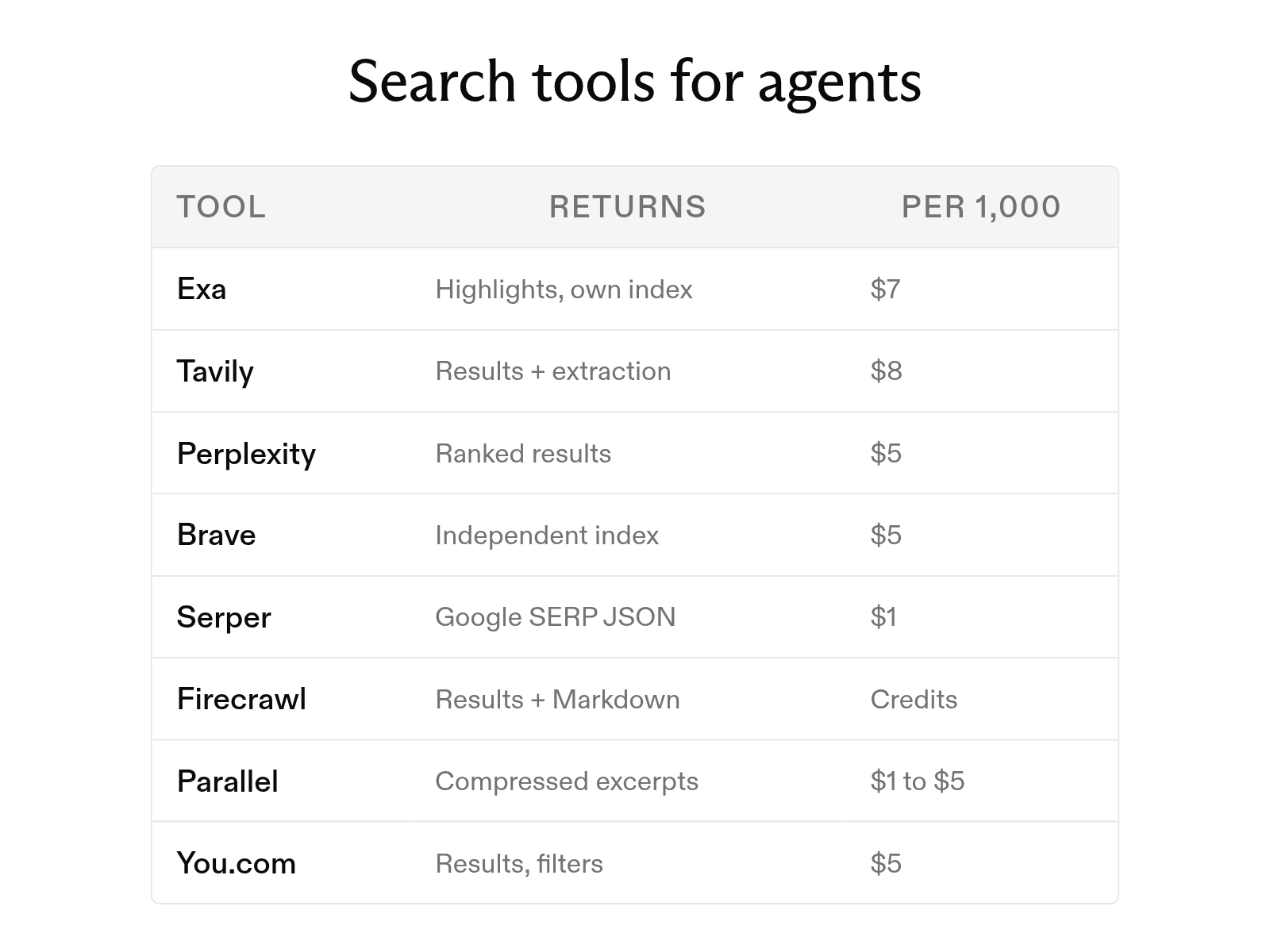
The 8 best web search tools for AI agents in 2026
October 6, 2026
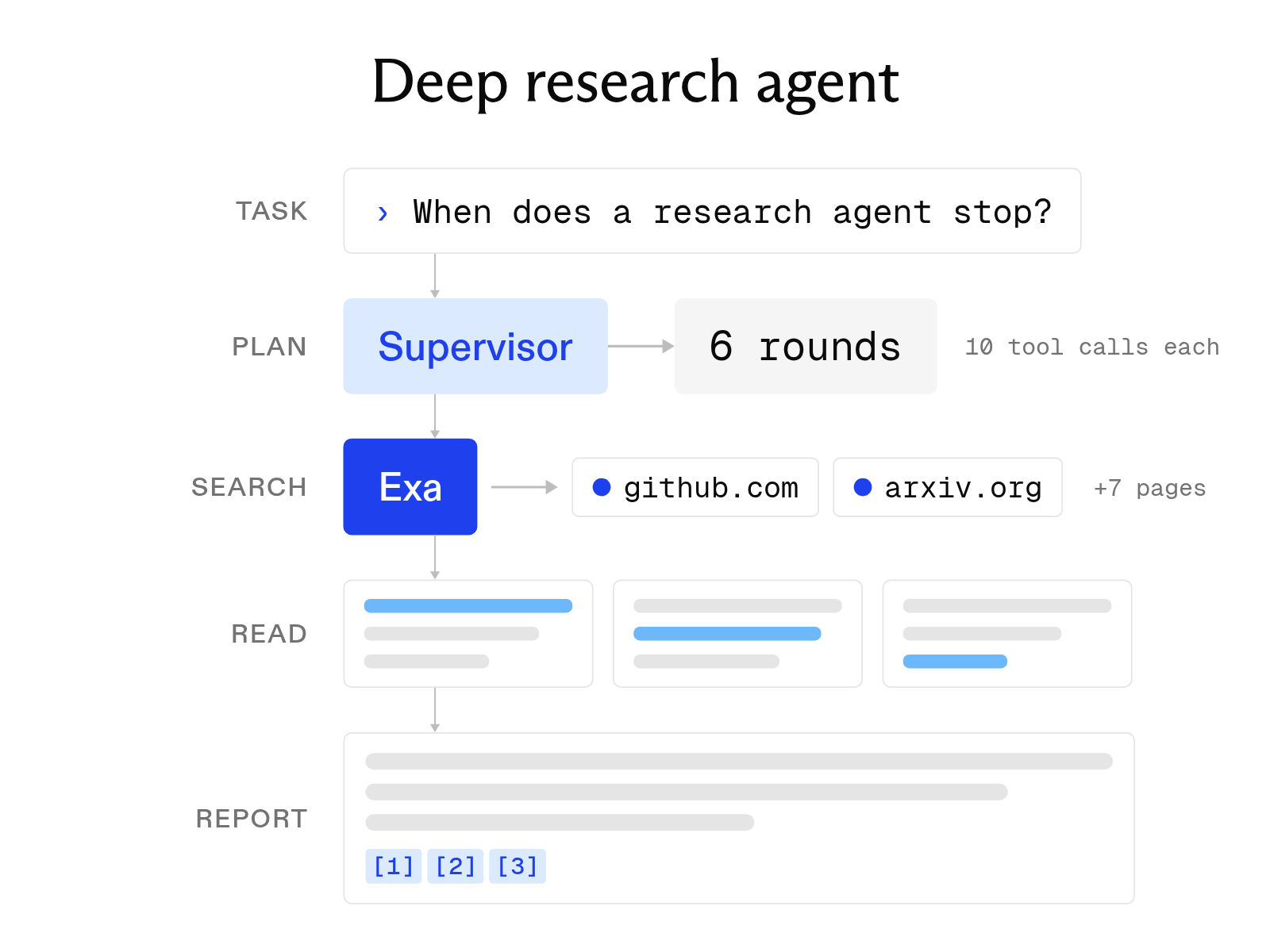
Open-source deep research agents: how they work and how to use them
October 1, 2026
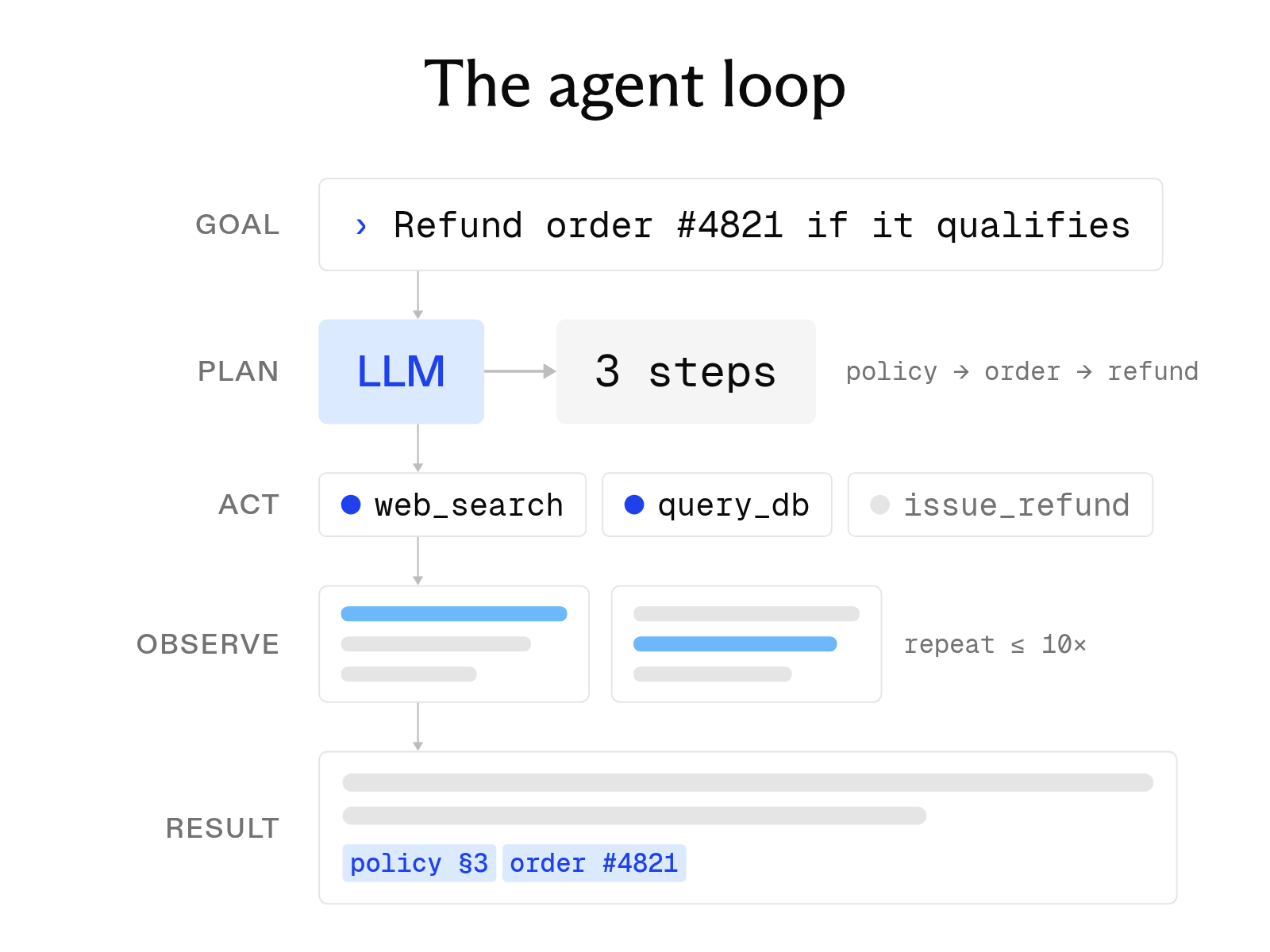
What is an AI agent? How it works, key components, and examples
October 1, 2026
How to scrape a website: 9 tools and methods compared
October 20, 2026
The 10 best AI agent tools for 2026 (and how tool calling works)
October 19, 2026
The 12 best AI tools for academic research in 2026
October 6, 2026