What is a search agent? How they work and how to build one
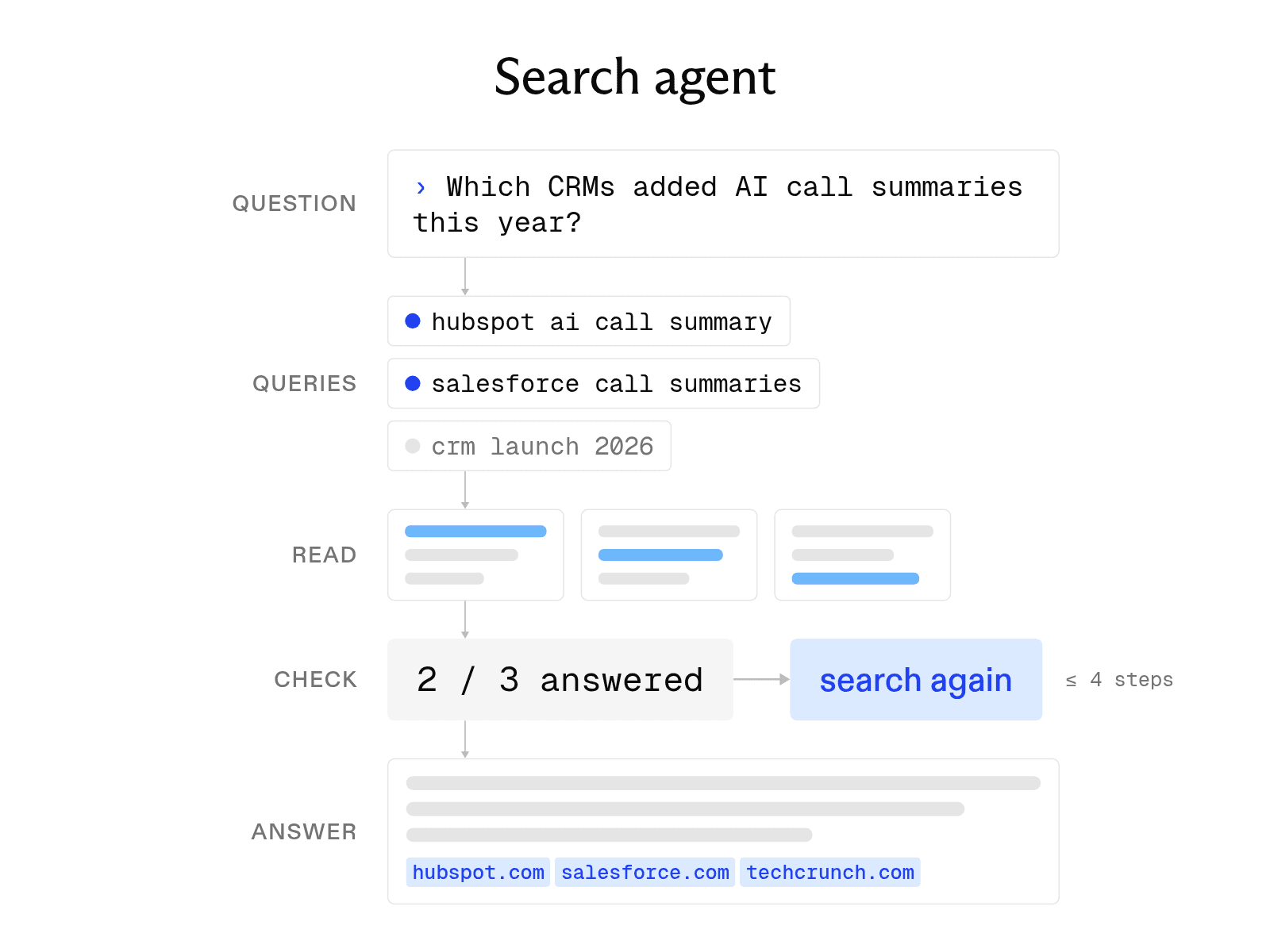

A search agent is an AI system that determines what a user wants, splits a complex question into sub-queries, searches several sources, and writes one answer with citations. A search engine returns a list of links and leaves the reading to you. A search agent does the reading, notices what is still missing, and searches again.
At Exa, we offer our own search agent via the Exa Agent API, but you can also use the Exa Search API to build your own search agent.
This guide explains how search agents work, compares leading frameworks and tools, shows how to use a managed API, and walks through building a small agent on Exa Search.
Key search agent capabilities
Three capabilities distinguish a search agent from a standard search box.
-
Intent detection. The agent reads the question and determines what kind of answer it needs, such as a fact, comparison, list, or summary of recent events. It then rewrites the question as queries that a search index can match. For example, "Which CRMs added AI call summaries this year?" becomes one query for each vendor and another for recent launch announcements.
-
Multi-source retrieval. The agent sends those queries to one or more sources, such as a web search API, internal document store, or code index. It reads the results, keeps the passages relevant to the question, and removes the rest.
-
Synthesis and ranking. The agent weighs the evidence, resolves conflicts among sources, and writes the answer. Each claim links to the page that supports it, allowing readers to verify the work.
Search agents vs. one-shot search and RAG
All three approaches retrieve information before a model answers. They differ mainly in how often they retrieve information and whether they check the results.
One-shot search sends a single query and returns ranked results. It is fast and inexpensive. However, if the query misses important information, the system does not notice. The user or model simply receives the available results.
Retrieval-augmented generation (RAG) adds a model to the process. The system retrieves passages once, places them in the prompt, and asks the model to write an answer from them. RAG is still a single-pass method. If the first retrieval does not contain the answer, the model either acknowledges the gap or relies on its training data.
A search agent works in a loop. It retrieves information, reads it, and checks whether the evidence answers the question. If the evidence is incomplete, the agent creates a new query that targets the gap and searches again. The loop stops when the evidence supports an answer or the agent reaches a step limit. This process uses more time and tokens per question, but it can find information that one-shot search and RAG overlook.
Search agent frameworks and tools
Search agents come in three main forms: open-source frameworks, enterprise platforms, and tools from model providers. The following examples illustrate these approaches.
-
SciPhi AgentSearch is an open-source framework for building search agents and running a customizable local search engine. It connects a search-focused model, such as Sensei-7B, to a search engine. Hosted options include Bing, SERP API, and SciPhi's AgentSearch dataset. The repository uses the Apache-2.0 license. However, because its most recent commit was in April 2024, it is best suited as a reference design.
-
Google Cloud Agent Search represents the enterprise platform approach. Formerly called Vertex AI Search, it supports generative AI applications for search and recommendations across an organization's data. Some tooling still uses the older names. For example, the endpoint remains
discoveryengine.googleapis.com, and the console labels the page AI Applications. -
Mistral Agentic Search represents the model-provider approach. This orchestration layer handles questions that the first retrieved chunk cannot answer. The agent can open a source, review nearby chunks, grep for exact terms, and search again. It is available through MCP tools or Mistral's Search Toolkit SDK. For live web results, Mistral's Agents API offers separate
web_searchandweb_search_premiumtools.
Using a search agent API
Instead of building this process from scratch, you can use a managed search agent that accepts a task and returns a complete answer. The Exa Agent API provides one endpoint that replaces a custom agent loop. It runs searches, reads pages, checks candidates against your criteria, and fills an output schema that you define.
from exa_py import Exa

exa = Exa()
run = exa.agent.runs.create(
    query="Find open-source vector databases that support hybrid search. Return the name, license, and GitHub URL.",
    effort="low",
    output_schema={"type": "object", "required": ["databases"], "properties": {"databases": {
        "type": "array", "maxItems": 5, "items": {"type": "object", "required": ["name", "license", "github_url"],
        "properties": {"name": {"type": "string"}, "license": {"type": "string"}, "github_url": {"type": "string", "format": "uri"}}}}}},
)
run = exa.agent.runs.poll_until_finished(run.id)
{
"status": "completed",
"output": {
"structured": {"databases": [{"name": "Project A", "license": "Apache-2.0", "github_url": "https://github.com/example/project-a"}]},
"grounding": [{"field": "structured.databases[0].license", "citations": [{"url": "https://github.com/example/project-a"}], "confidence": "high"}]
},
"costDollars": {"total": 0.025}
}You do not need to write search code, retry logic, or a stop rule. Each run is asynchronous, so the SDK's poll_until_finished helper waits for completion. The API then returns structured JSON validated against your schema. The output.grounding field cites the sources for each field, allowing readers to trace every value to its source. Fields without supporting evidence can return null. The values above are placeholders.
In addition to the structured object, the run returns output.text, a written answer based on the same evidence. It also returns stopReason, which indicates whether the run ended because it satisfied the schema or reached a limit.
The HTTP API and Python SDK use different naming conventions. The HTTP API returns camelCase keys such as costDollars, while the Python SDK returns cost_dollars. The effort parameter controls cost and depth. Fixed modes range from minimal at $0.012 to xhigh at $1.00 per request. Auto meters usage instead, subject to a default $5 ceiling that you can set with budget.maxCostDollars.
How to build a search agent
If you need more control, you can build your own search agent with a search tool, a stop condition, and a place to collect citations. The example below uses Exa Search for retrieval and an OpenAI model to choose each next step. Exa returns query-relevant highlights rather than whole pages, which use up to 17 times fewer tokens than full-page text.
import json
from exa_py import Exa
from openai import OpenAI

exa, llm = Exa(), OpenAI()
MAX_STEPS = 4

def search_agent(question):
    notes, sources, query = [], {}, question
    for _ in range(MAX_STEPS):
        results = exa.search(query, type="auto", num_results=5, contents={"highlights": True})
        for r in results.results:
            sources[r.url] = r.title
            notes.append(f"[{r.url}] {' '.join(r.highlights)}")
        step = llm.responses.create(
            model="gpt-5.4-mini",
            input=f"Question: {question}\nNotes:\n" + "\n".join(notes)
            + '\nReply only with JSON: {"done": true or false, "next_query": "..."}',
        )
        decision = json.loads(step.output_text)
        if decision["done"]:
            break
        query = decision["next_query"]
    answer = llm.responses.create(
        model="gpt-5.4-mini",
        input=f"Answer using only these notes. Cite [url] after each claim.\nQuestion: {question}\nNotes:\n" + "\n".join(notes),
    )
    return answer.output_text, sources
The loop stops when the model sets done because the notes answer the question, or when MAX_STEPS ends the run after four searches. This limit controls costs if the model continues to request searches. Meanwhile, the sources dictionary stores every URL the agent reads.
After the loop produces a final answer, confirm that each cited [url] appears as a key in sources. If a citation points to a page the agent did not read, reject the answer or run one more step.
Also monitor the size of notes as the loop runs. Highlights are much smaller than full pages, but four steps with five results each can still accumulate, and this example does not cap them. To set a ceiling per URL, pass max_characters inside the highlights option. For example, use contents={"highlights": {"max_characters": 1500}}.
This example is intentionally small. A production agent should also handle malformed JSON, run sub-queries in parallel, and remove duplicate passages before the notes exceed the model's context window.
Search agent benchmarks
The following benchmarks come from results that vendors publish on their own pages. BrowseComp measures whether an agent can find hard-to-locate facts on the web. Because vendors use different test settings, treat each result as a separate data point rather than a direct comparison.
-
Exa Agent reports 74 percent on BrowseComp at high effort and a Row-F1 score of 52 on WideSearch. Each result cost $0.50 per query and appears on Exa's Agent page.
-
OpenAI Deep Research reports a BrowseComp score of 51.5 percent on OpenAI's BrowseComp page.
-
The Tongyi launch post reports scores of 43.4 on BrowseComp and 32.9 on Humanity's Last Exam for Tongyi DeepResearch.
FAQ
What is a search agent?
A search agent is an AI system that plans searches, reads the results, and searches again until the evidence supports an answer. It then returns the answer with citations. By contrast, a search engine returns a ranked list of links.
Should I build a search agent or use an API?
Build a search agent when you need control over every step or already use your own agent framework. Choose an API such as Exa Agent when you want structured, cited output without maintaining the search loop, retry logic, and stop rules. With Exa Agent, you define the desired structure in output_schema and select an effort mode ranging from $0.012 to $1.00 per request.
Cheers,
Keep learning
Browse all Learn articles →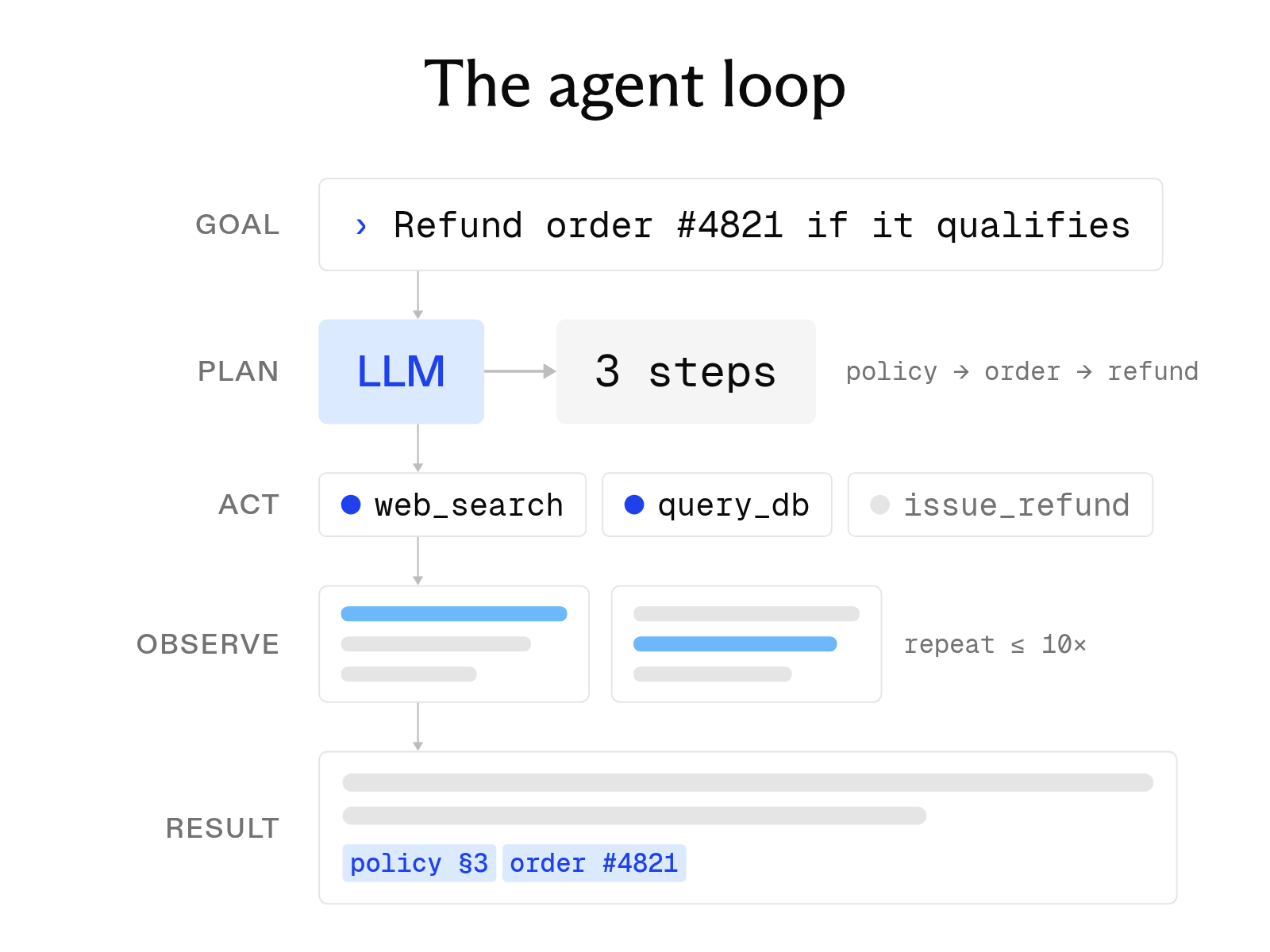
What is an AI agent? How it works, key components, and examples
October 1, 2026
The 8 best web search tools for AI agents in 2026
October 6, 2026
What a web scraping API is and how to choose one
October 6, 2026
What is LLM grounding, and how does it work with a search API?
October 6, 2026
What is a RAG API? RAG as a service explained
October 1, 2026
How to build an AI agent with web search
October 6, 2026