The 10 best AI agent tools for 2026 (and how tool calling works)

AI agents can do more than generate text. With the right tools, they can search databases, run code, use software, and retain information across sessions. These capabilities all depend on tool calling, the process that connects a language model to external systems.
At Exa, our products are frequently used to build agents – especially if they need access to live web data or private data. Below are ten tools popular with those developers, plus a primer on how tool calling works.
10 AI agent tools by category
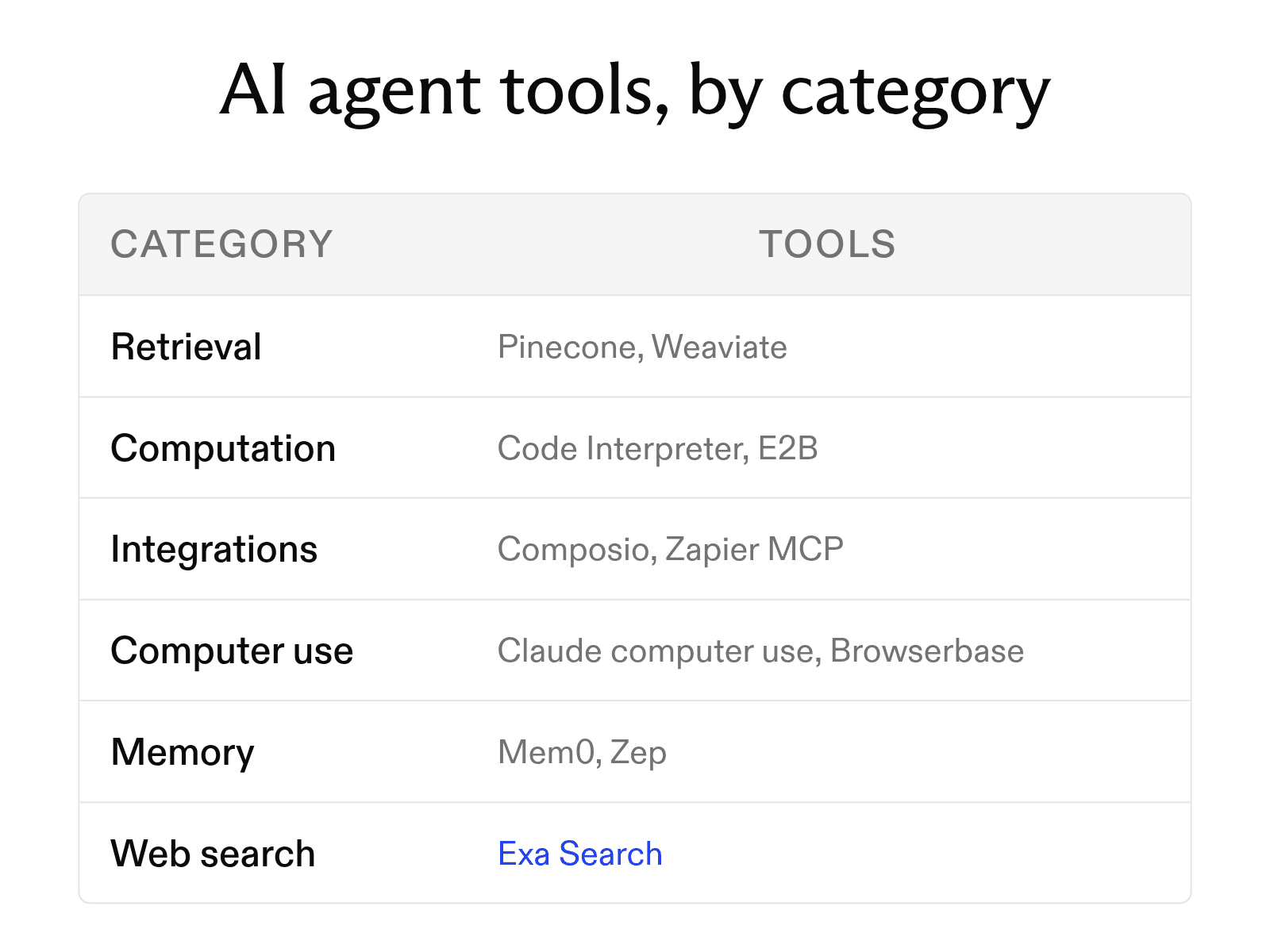
Most agent tools fall into five categories: retrieval, computation, web and API integrations, file and computer use, and memory.
Retrieval
Retrieval tools pull stored or private data, such as documents in a vector database, into the model's context when needed. Web search, the other kind of retrieval, gets its own section below.
- Pinecone, a vector database that Pinecone calls a knowledge platform for AI agents, supports full-text search alongside vector retrieval.
- Weaviate is an open-source platform for vector search, retrieval-augmented generation, and memory. Its Query Agent turns natural-language questions into database queries.
Computation
Computation tools let the model write and run code to answer math and data questions.
- OpenAI Code Interpreter lets OpenAI models write and run Python in a sandboxed container for data analysis, coding, and math.
- E2B gives each agent an isolated machine hosted in E2B's cloud or yours.
Web and API integrations
Integration tools connect an agent to a team's existing business apps so it can send messages or update records.
- Composio gives an agent secure access to more than 1,500 tools without hand-built integrations.
- Zapier MCP connects Claude, ChatGPT, Cursor, and other AI clients to more than 9,000 apps through one MCP setup.
File and computer use
These tools let an agent use software through the screens, browsers, and files a person uses.
- Anthropic's computer use tool gives Claude screenshots and mouse and keyboard control through 17 component tools. Web-only tasks go to Anthropic's separate browser use tool.
- Browserbase runs real browsers that agents control to log in, navigate interactive sites, and take actions on the web.
Memory
Memory tools store what an agent learns for reuse in later sessions.
- Mem0 is drop-in memory infrastructure that keeps context across sessions and agents.
- Zep builds a context graph from chat history, business data, and user interactions, then returns the relevant facts for each request.
How tool calling works
Major model APIs use the same three steps; the examples use Anthropic's and OpenAI's formats.
- The developer describes each tool. Each description has a name, a summary, and a JSON Schema for its inputs, and sits beside the system prompt in the model's context, where the model uses it to choose a tool.
- The model emits a structured call. When a request needs a tool, the model returns its name and arguments matching its schema: a
tool_useblock withstop_reason: "tool_use"in Anthropic's API,tool_callsin OpenAI's Chat Completions API. - The runtime executes the call and returns the observation. Your code runs the function and returns its output as a tool result; for server tools such as Anthropic's built-in web search, the provider runs it. The model reads the observation, then answers or calls another tool.
The cycle repeats until the model replies without a tool call.
Adding a web search tool to an agent
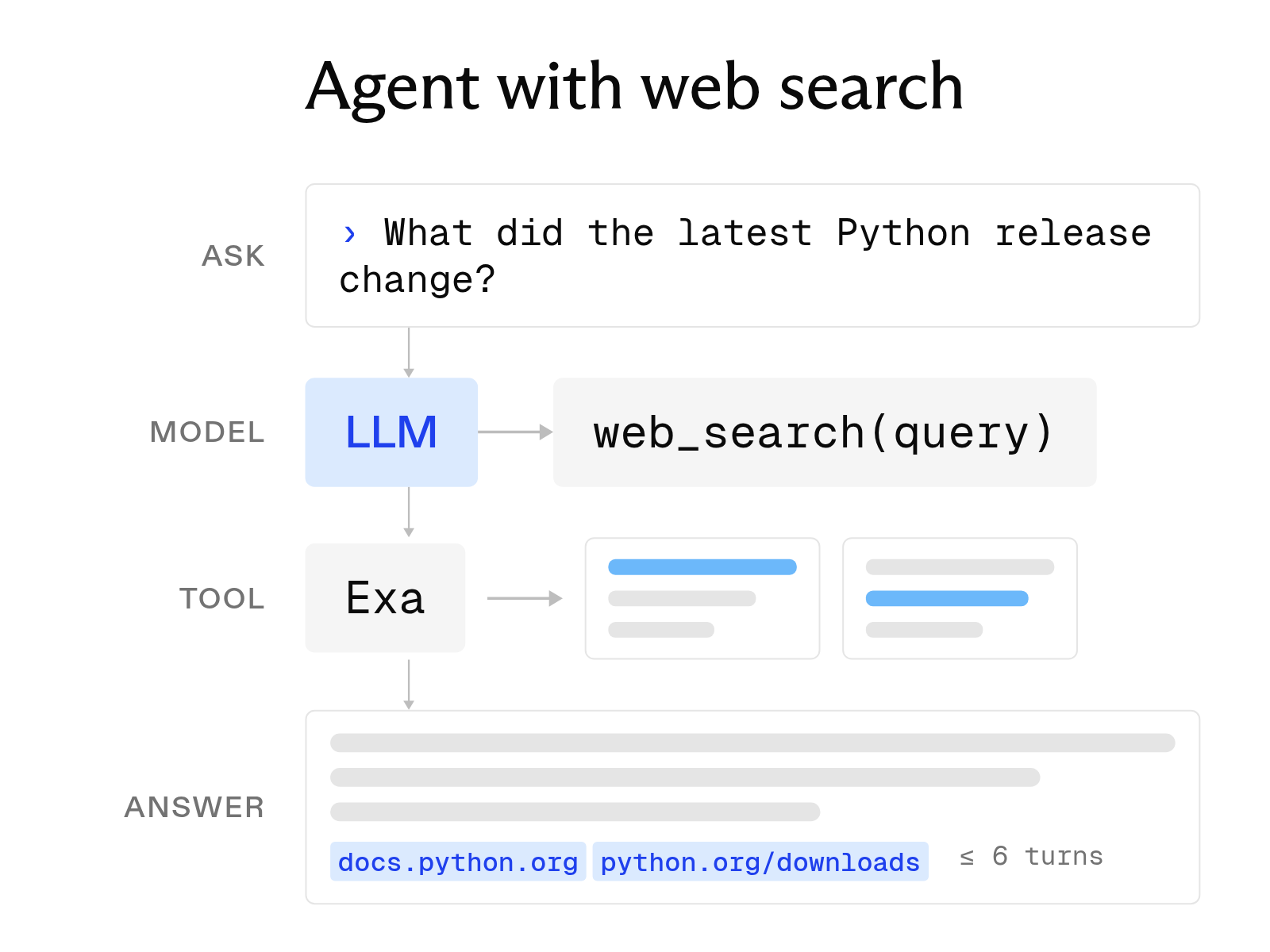
A library released last month or a price changed this week is past a model's training cutoff, and without retrieval it may guess. With web search, it writes a query, reads current pages, and answers from them, which is why search is often the first tool teams add to a new agent.
We built Exa Search as a web search API for agents. This example defines a search tool in Anthropic's format and runs it with our Python SDK.
from exa_py import Exa

exa = Exa()  # reads EXA_API_KEY from the environment

# Tool definition in Anthropic's format. OpenAI's format wraps the same
# JSON Schema under "parameters", so the search function below does not change.
search_tool = {
    "name": "web_search",
    "description": "Search the web for current information. Returns cited passages.",
    "input_schema": {
        "type": "object",
        "properties": {"query": {"type": "string", "description": "What to look up"}},
        "required": ["query"],
    },
}

def web_search(query: str) -> str:
    # Highlights return only the passages that answer the query, each with its
    # source URL, so the model gets precise, cited text in a small number of tokens.
    response = exa.search(
        query,
        type="auto",
        num_results=5,
        contents={"highlights": {"max_characters": 2000}},
    )
    return "\n\n".join(
        f"{r.title}\n{r.url}\n" + "\n".join(r.highlights or [])
        for r in response.results
    )
The search function is separate from the model-specific tool definition, so it works with Claude, GPT, or Gemini, and you can switch providers without rebuilding retrieval. Our SDK also has ready-made tool definitions for OpenAI and Anthropic.
Each result has a title, URL, and highlighted passages matching the query, so the model can quote a passage and cite its URL for readers to verify. Our search API also lets you choose a search type, from Lite for latency-sensitive agents to Deep for analysis, and filter by category or publication date.
How MCP and frameworks fit in
The Model Context Protocol (MCP) is an open-source standard for connecting AI applications to external systems. The example above defines a tool inside one model API; with MCP, you build a server once to expose tools, data sources, or prompt workflows, and any MCP client, including Claude, ChatGPT, and Visual Studio Code, can use them without custom integration code. Our hosted Exa MCP server at https://mcp.exa.ai/mcp adds web search to an MCP client.
FAQ
What is the difference between an AI agent and an AI agent tool?
The agent plans and decides what to do next. A tool is one capability it can call, such as a search API, a code sandbox, or a memory store. An agent usually has several.
How many tools should one agent have?
Start with the smallest set that covers the task. Each tool description uses context tokens, and similar tools make it harder for the model to choose correctly.
Cheers,
Keep learning
Browse all Learn articles →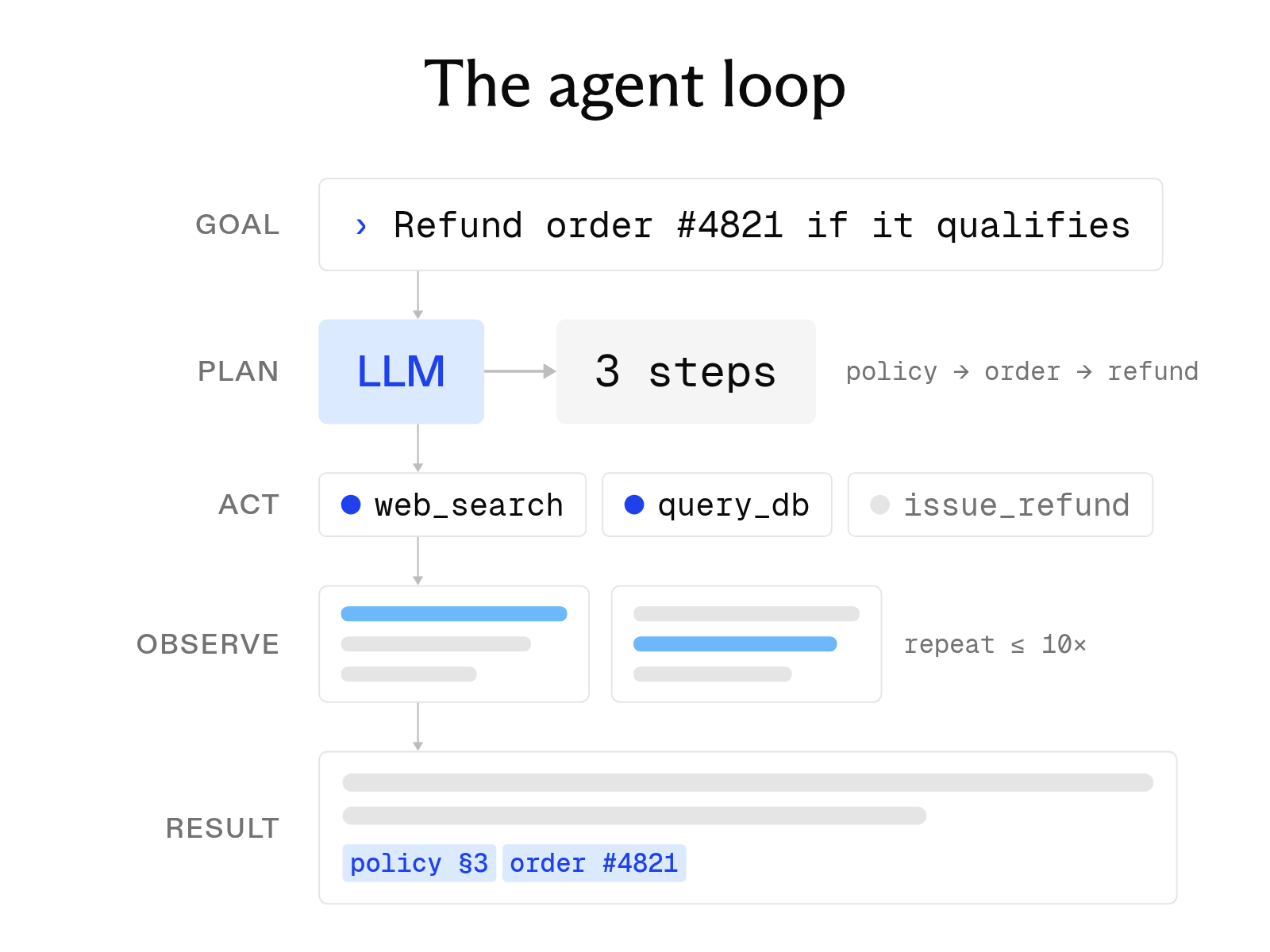
What is an AI agent? How it works, key components, and examples
October 1, 2026
How to build an AI agent with web search
October 6, 2026
The 8 best web search tools for AI agents in 2026
October 6, 2026
What is a search agent? How they work and how to build one
October 1, 2026
What is a deep research API, and how do you build with one?
October 20, 2026
The best web search MCP servers for Claude, Cursor, and Cline
October 19, 2026