The 12 best AI tools for academic research in 2026

Academic research is becoming much easier to work with programmatically. Papers that once lived mainly behind search boxes and journal interfaces can now be searched through APIs, pulled into AI workflows, analyzed by coding agents, and compared across thousands of results at once.
Here at Exa, we maintain a dedicated index of 350 million research papers that developers and AI agents can search directly through an API. If you prefer a more opinionated workflow, there are specific tools for literature discovery, document analysis, citation evaluation, and editing academic papers, too.
This guide organizes 12 tools by type, compares their free tiers, and explains how developers can add the same retrieval to their apps with Exa.
The 12 tools by research task
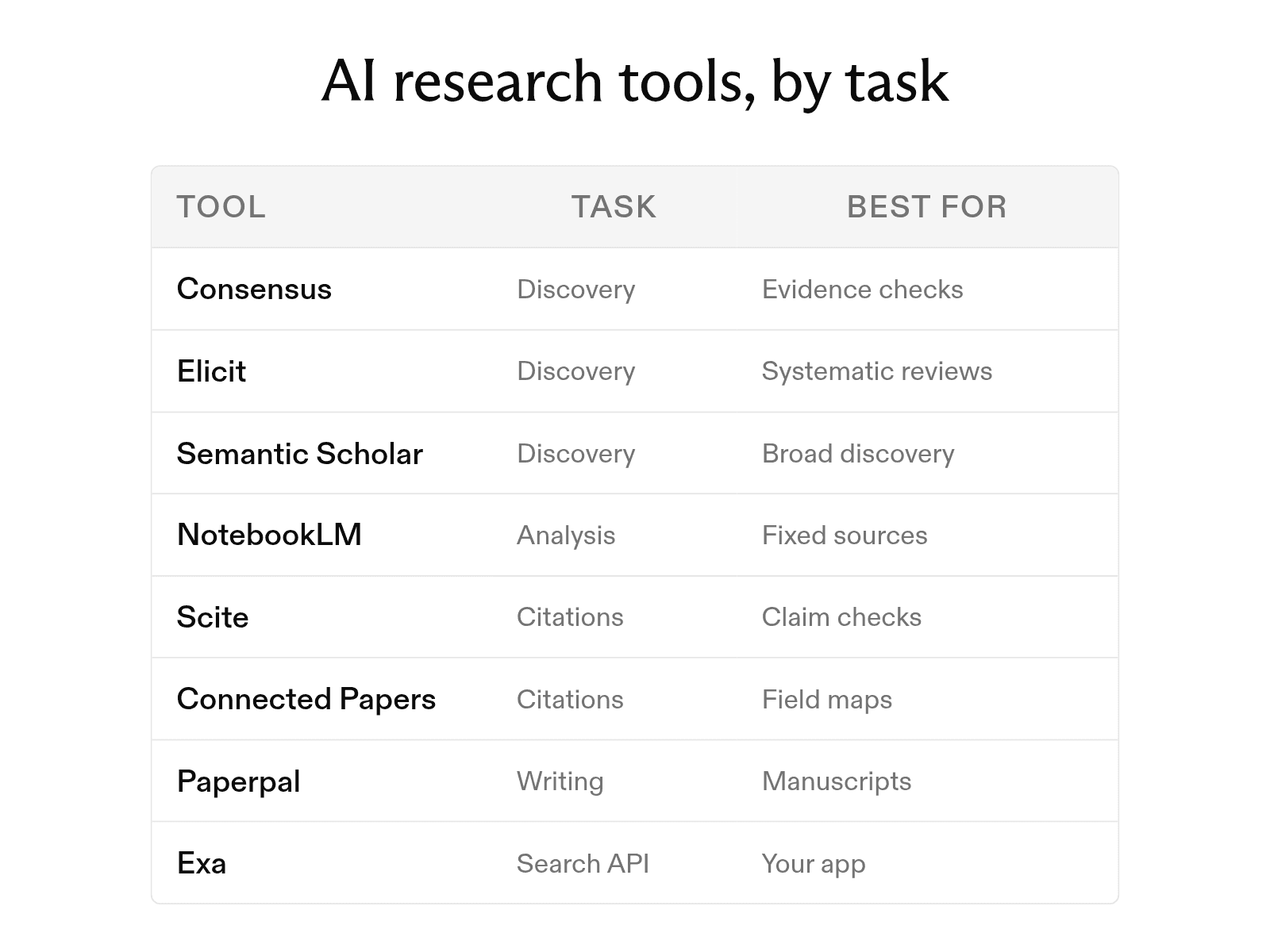
The list follows the stages of a research project, from finding literature to writing the results. You will not need all twelve tools. Choose one for each stage you need. If you are building research search into your own product, Exa's Search API covers the discovery stage with a publication category for papers, preprints, patents, and clinical trials, backed by a dedicated index of about 350 million publications.
1. Literature discovery
-
Consensus searches peer-reviewed literature and answers questions based on that research. Its homepage cites more than 250 million papers, and the Consensus Meter shows the level of agreement in the evidence for a yes-or-no question.
-
Elicit searches more than 138 million academic papers and 545,000 clinical trials. Every claim in an answer carries a sentence-level citation, and paid plans add a systematic review workflow.
-
Semantic Scholar is a free research tool from the nonprofit Ai2. Its TLDR feature gives a one-sentence summary of the objective and results for nearly 60 million papers in computer science, biology, and medicine.
2. Document analysis
-
SciSpace combines literature review tools, PDF chat, data extraction, and a citation generator in one workspace. You can ask questions about a paper and receive answers tied to its text.
-
NotebookLM answers questions using only the sources you add and provides inline citations. Google renamed it Gemini Notebook in July 2026. The free plan allows 50 sources per notebook and can create Audio Overviews.
-
ScholarAI offers paper search through its GPT in ChatGPT and its Copilot app. Since joining Jenni, ScholarAI has directed new users to the Jenni workspace, where they can search, write, and cite in one place.
3. Citation evaluation
-
Scite classifies how each citing paper uses a study. Its Smart Citations system labels each citation statement as supporting, contrasting, or mentioning.
-
ResearchRabbit builds a map of related work from seed papers you choose. The free plan includes unlimited searches across more than 310 million articles.
-
Connected Papers uses the Semantic Scholar database to draw a similarity graph around one paper. Its Prior Works and Derivative Works views identify the earlier papers that shaped a field and the later reviews that followed.
4. Writing and synthesis
-
Paperpal is an academic writing assistant. It checks language, answers research questions with cited findings from more than 300 million articles, and formats citations in more than 10,000 styles.
-
Perplexity answers questions with inline citations to web sources, making it useful for an initial overview before you search academic databases. Before relying on a citation, check whether the cited page links to the original study.
-
Litmaps turns a set of papers into a citation map and sends literature alerts about new papers. It helps you check that a literature review has not missed a key study.
Tool comparison
| Tool | Type | Core strength | Suited for | Free tier |
|---|---|---|---|---|
| Consensus | Answer engine | Consensus Meter on yes-or-no questions | Quick evidence checks | Yes, limited |
| Elicit | Research assistant | Data extraction across many papers | Systematic reviews | Yes |
| Semantic Scholar | Search engine | TLDR summaries, free API | Broad discovery | Free |
| SciSpace | Research workspace | Chat with a PDF | Reading hard papers | Not listed |
| NotebookLM | Notebook | Answers only from your sources | Analyzing a fixed source set | Yes |
| ScholarAI | Plugin and app | Paper search inside ChatGPT | ChatGPT users | 5 one-time credits |
| Scite | Citation checker | Smart Citations | Testing a claim | MCP credits only |
| ResearchRabbit | Discovery map | Seed-paper recommendations | Expanding a reading list | Yes |
| Connected Papers | Graph | Similarity graphs | Mapping a new field | 5 graphs a month |
| Paperpal | Writing assistant | Language and citation checks | Drafting a manuscript | Yes, limited |
| Perplexity | Answer engine | Cited web answers | First-pass questions | Yes |
| Litmaps | Citation map | New-paper alerts | Keeping a review current | Yes, limited |
Free and paid tiers
Most of these tools offer a free starting point, but free tiers often limit usage or exclude advanced analysis. The options fall into four groups: fully free, free with limits, mostly paid, and bundled with another subscription.
-
Fully free. Semantic Scholar is free, including its API. ResearchRabbit's free plan includes unlimited searches, while RR+ costs $10 per month when billed annually.
-
Free with limits. Elicit's free Basic plan includes unlimited searches and summaries, while Pro costs $49 per month when billed annually. Consensus includes 10 free Pro messages per month. Its Pro plan costs $20 per month or $12 per month when billed annually. Connected Papers allows five graphs per month. Litmaps Pro costs $50 per month for commercial use; the education rate is $12.50 per month, or $10 per month billed annually.
-
Mostly paid. Scite's free Connect plan gives you 25 MCP credits a month and no Assistant or Search access. Basic costs $20 per month, billed yearly. Paperpal's free plan includes 200 edits per month, while Prime costs $25 per month.
-
Bundled. NotebookLM is free, while Google AI Pro offers higher limits for $19.99 per month.
Choose tools by research stage
The best tool depends on the stage of your research. Use the following workflows to match each tool to your current task.
-
Starting a new topic. Begin with a plain-language question in Perplexity or Consensus to get oriented. Next, search Semantic Scholar or Elicit for academic sources. Add the two or three strongest papers to Connected Papers or ResearchRabbit to explore related work.
-
Reading a stack of papers. Upload the papers to NotebookLM or SciSpace, then ask specific questions about their methods and results. To compare many papers at once, use Elicit to extract the same data points into one table. In your own app, Exa highlights return only the passages of each paper that match your question, up to 17x more token-efficient than full-page text.
-
Writing and citing. Use Scite to check whether later research supports or challenges each key claim. While drafting, use Litmaps to find new papers. Finish by using Paperpal to check the language and format the reference list. To screen papers against inclusion criteria in code, the Exa Agent API takes the criteria and a JSON schema and returns one validated row per paper, with a citation for every value.
How citation checkers classify citations
A citation count shows how often a paper is cited, but not how later researchers use it. Scite addresses this gap with a deep-learning model that reads the sentence around each citation and assigns one of three categories.
-
Supporting. The citing paper provides evidence that agrees with the cited work.
-
Contrasting. The citing paper provides evidence that disagrees with the cited work.
-
Mentioning. The citing paper refers to the study without providing evidence that supports or challenges its validity.
Scite classifies citations "by rhetorical function." Each label describes what the evidence does. A sentence's tone does not change the label, so a supporting citation can still use critical language.
Research retrieval for developers
Developers building research assistants need a search layer that can turn plain-language descriptions into relevant papers and citable sources. Semantic Scholar, Consensus, Elicit, and Scite each offer an API, and the Semantic Scholar API is free.
Exa's Search API has a publication category for scholarly work. It covers papers, preprints, patents, grants, clinical trials, and regulatory approvals. Results carry metadata such as authors, venue, and citations. In July 2026, Exa launched a dedicated index of roughly 350 million publications. The search reads query meaning, so a description of a finding can locate the paper without its title.
from exa_py import Exa

exa = Exa()  # reads EXA_API_KEY

results = exa.search(
    "papers on evaluation benchmarks for retrieval-augmented generation",
    category="publication",
    num_results=10,
    contents={"highlights": True},
)

for paper in results.results:
    print(paper.title, paper.url)
    for passage in paper.highlights or []:
        print("   ", passage)
Each Exa Search API result includes the paper's title, URL, and passages that match the query. An app can use this information to display supporting evidence beside each citation.
For multi-step tasks such as screening papers against inclusion criteria, the Exa Agent API accepts a task and a JSON schema, then returns schema-validated JSON. The output.grounding field provides citations for each field, allowing every table value to trace back to a source. Fixed effort levels cost between $0.012 and $1.00 per request.
FAQ
What is the best free AI tool for research?
Semantic Scholar is free with no plan limits and includes a free API. ResearchRabbit and Elicit's Basic plan also provide unlimited searches at no cost.
Can AI tools replace a literature review?
No. They speed up the search, screening, and summary steps. You still need to read the key papers, judge their methods, and check that each citation says what the tool reports.
Which AI research tools give real citations?
Consensus, Elicit, Scite, SciSpace, and Paperpal answer questions from academic databases and link to the papers they use. NotebookLM cites only the sources you upload. Perplexity cites web pages, so verify that each cited page links to a primary source. Developers can return similarly detailed citations in their own products through Exa's publication search, which includes author, venue, and citation metadata with each result.
Is ChatGPT good for academic research?
ChatGPT can search the web and cite pages. For academic research, combine it with a tool that searches a paper database. You can use ScholarAI inside ChatGPT or use Elicit and Consensus alongside it. Verify every reference before including it in your work.
Cheers,
Keep learning
Browse all Learn articles →
The 12 best search engines for research papers in 2026, by field
September 30, 2026
Best AI source finders for academic use, compared
September 30, 2026
The 6 best people search APIs in 2026
October 6, 2026
The 8 best web search tools for AI agents in 2026
October 6, 2026
The 8 best AI search APIs in 2026
October 1, 2026
The 8 best free news APIs in 2026
October 1, 2026