Open-source deep research agents: how they work and how to use them
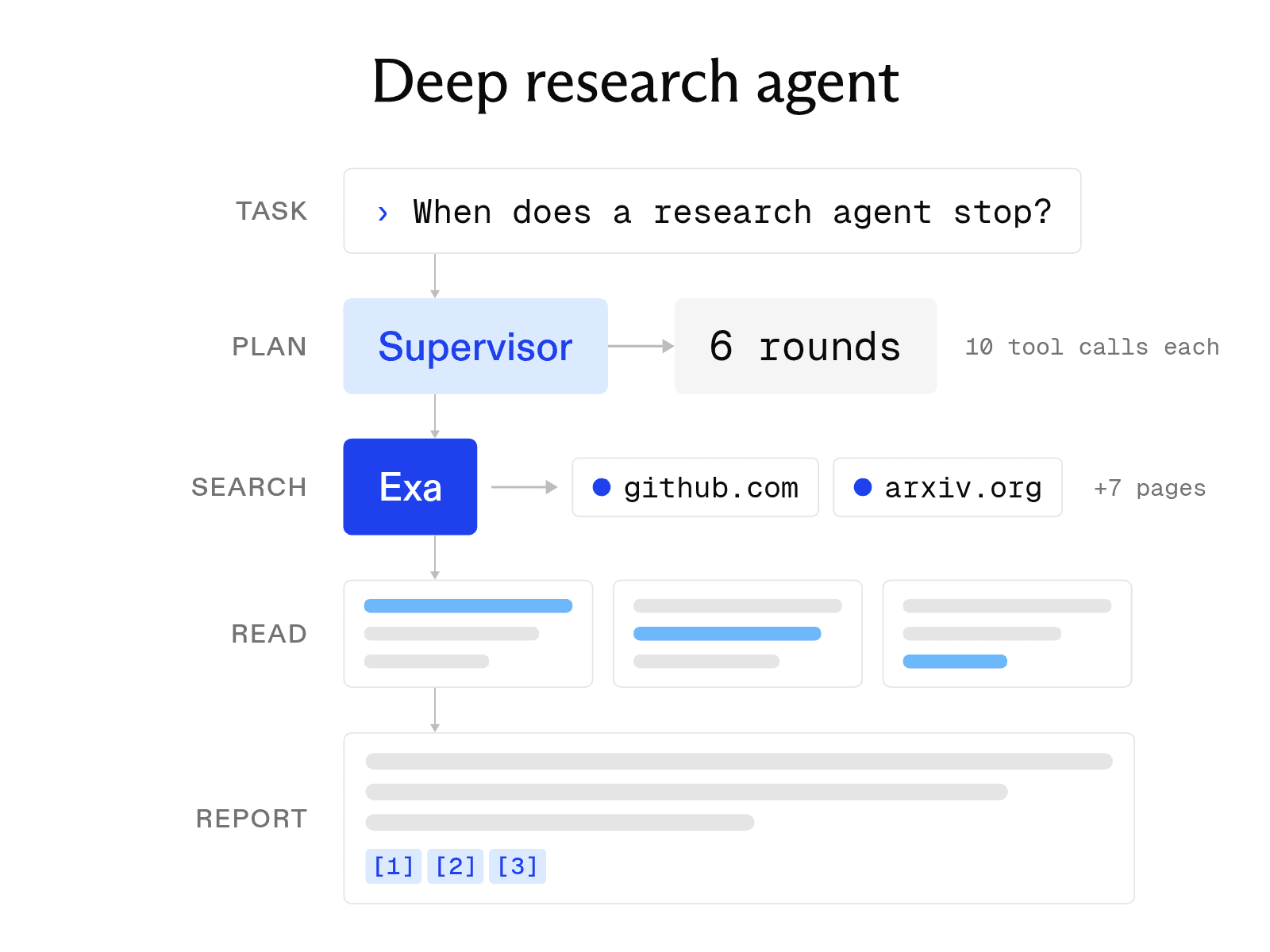

Deep research tools turn broad questions into structured, source-backed answers by searching, reading, and reasoning across multiple sources. Open-source agents expose that process, letting developers choose the models, search providers, and infrastructure behind it.
LangChain Open Deep Research is one example. Like commercial tools such as OpenAI Deep Research, it plans searches, reads sources, and produces a cited report, but gives you control over each component.
Search and retrieval are a major part of that stack. Exa provides web search and research APIs built for agents, including an Agent API that can handle the research process directly. This guide shows how to run an open-source deep research agent, how to use Exa with one, and when a managed research API is the simpler option.
Using an open-source deep research agent
Open Deep Research is a LangGraph agent that works with many model providers, search tools, and MCP servers. The setup takes three steps.
-
Clone the repository. Run
git clone https://github.com/langchain-ai/open_deep_research.git, create and activate a virtual environment withuv venv, then install the dependencies withuv sync. -
Configure your keys. Copy
.env.exampleto.envand add keys for the services you plan to use. The file includes fields for OpenAI, Anthropic, Google, Tavily, and LangSmith. The default setup uses OpenAI models and Tavily search. -
Launch with LangGraph. Start the local server with
uvx --refresh --from "langgraph-cli[inmem]" --with-editable . --python 3.11 langgraph dev --allow-blocking. LangGraph Studio will open in your browser. Enter a question in the message field.
All settings are in the "Manage Assistants" tab. You can swap the research model for any provider that LangChain's init_chat_model() supports, as long as the model handles structured outputs and tool calling. For search, the built-in options are Tavily, OpenAI native web search, and Anthropic native web search. Any other search provider connects through the agent's MCP configuration.
What an open-source research agent needs
Every open-source research agent has four main parts, regardless of its framework.
-
A model. One or more language models plan the research, choose what to search for next, and write the report. Open Deep Research uses separate model slots for summarization, research, compression, and final report writing. This setup lets you use a cheaper model for high-volume tasks.
-
A search tool. Exa can provide the search layer for an open-source deep research agent, returning web results and relevant page highlights through its hosted MCP server. Those highlights use up to 17x fewer tokens than full-page text, which matters when results repeatedly enter the model’s context during a multi-step research loop. Open Deep Research connects to Exa through MCP; GPT Researcher supports Exa directly with
RETRIEVER=exa. -
A page reader. Search results often include only a short excerpt. The agent needs a way to retrieve and clean the full page, unless its search tool returns the relevant passages directly.
-
A stop rule. Without a limit, an agent can keep searching. By default, Open Deep Research limits the supervisor to 6 research rounds and each researcher to 10 tool calls. Lower limits make reports faster and cheaper, but they may leave more gaps when the question is difficult.
Using commercial deep research
By contrast, commercial deep research requires no technical setup because the provider manages the model, search process, and stop rules. Getting started takes two steps.
-
Open the product. Sign in to ChatGPT, the Gemini app, or Claude with a plan that includes the feature.
-
Select deep research. In ChatGPT and Gemini, choose Deep Research before you send your prompt. In Claude, click the "+" button and choose Research. Then state your question, identify the sources you trust, and specify the output format you want.
After you submit the request, the tool may ask clarifying questions before returning a report with citations. OpenAI says ChatGPT deep research can take 5 to 30 minutes. Google says a Gemini report usually takes about 5 to 10 minutes. You cannot choose a different model or search provider. Usage limits depend on your plan.
Open-source deep research versus OpenAI deep research
The table below compares LangChain Open Deep Research with OpenAI Deep Research in ChatGPT.
| Open Deep Research | OpenAI Deep Research | |
|---|---|---|
| Cost | You pay for model and search API usage. One full benchmark run of 100 tasks cost $45.98 with default models | Included in ChatGPT plans, with usage that varies by plan |
| Providers supported | Any model with tool calling through LangChain, plus Tavily, native OpenAI or Anthropic search, and MCP servers | OpenAI models and search |
| Self-hosting | Yes, locally or on LangGraph Platform | No |
| Output | A research report in LangGraph Studio or through the API | A cited report in ChatGPT |
| Benchmark (RACE) | 0.4943 with GPT-5 as the research model, 0.4309 with defaults | 0.4645 on the DeepResearch Bench leaderboard with its original Gemini judge |
The RACE score grades report quality against expert reports on 100 PhD-level research tasks. On this scale, Open Deep Research scores about three points higher than OpenAI's product when GPT-5 is the research model. LangChain reports its own scores. The leaderboard switched to a GPT-5.5 judge in May 2026, so its newer results are not directly comparable.
Using Claude Research
Claude has its own research mode. Research is available on paid Claude plans (Pro, Max, Team, and Enterprise) on the web, in the desktop app, and on mobile devices. To use it, turn on web search, click the "+" button in the lower-left corner of the chat, and choose Research. A blue indicator confirms that Research is active.
Anthropic says Claude can research for up to 45 minutes, although most reports finish in 5 to 15 minutes. Each report includes citations.
Claude Code includes a /deep-research workflow. Type /deep-research followed by your question. The workflow runs several web searches, cross-checks the sources, and returns a cited report. Workflows are available on all paid plans. On Pro, turn them on in /config.
MCP servers also extend Claude and Claude Code. Exa MCP adds Exa web search and page fetching, and with an API key or sign-in it adds agent_run for multi-step research. In Claude Code, install it with claude plugin install exa@claude-plugins-official. In Claude on the web or desktop, add Exa from the connector directory.
Regardless of which option you use, three practices improve the output. First, include the scope, time frame, and output format in your initial prompt because research runs are expensive to repeat. Second, name the types of sources you trust, such as regulatory filings or peer-reviewed papers. Finally, open the citations for any claims you plan to repeat and confirm that each source supports the claim.
Running deep research locally
A fully local setup keeps your questions off third-party model APIs. Local Deep Researcher from LangChain is the simplest version. It runs any model hosted by Ollama or LMStudio, defaults to llama3.2, and uses DuckDuckGo for search, which needs no API key. Set FETCH_FULL_PAGE=true to scrape the full page behind each DuckDuckGo result. The agent writes a query, summarizes the results, identifies gaps, and repeats the process. By default, it completes three loops before producing a Markdown summary with sources.
However, search queries still leave your machine because DuckDuckGo is a web service. For greater privacy, Local Deep Research can pair Ollama with a self-hosted SearXNG instance. This setup runs both the model and the search engine on hardware you control.
If you searched for DuckDB or diving ducks, neither is related: DuckDB is an in-process analytics database, and diving ducks are birds.
Using a managed research API
Running an open-source harness means managing model keys, the search provider, stop rules, and failures. A managed research API handles this work for you. The Exa Agent API is a single endpoint that handles an open-source agent's multi-step searching, reading, and verification using Exa's own search index. You send a research task and an optional output schema, and you get back JSON with citations for each field.
The effort parameter sets the cost per request. Fixed modes range from minimal at $0.012 to xhigh at $1.00. Auto adjusts the effort to fit the task and sets a default cap of $5 per run. This pricing structure makes costs predictable before a task begins. By contrast, a self-hosted agent may decide to run an unknown number of searches. The same research runs from Claude or any other MCP client through the agent_run tool in Exa MCP.
FAQ
Is Open Deep Research free?
The code is free and open source under the MIT license. However, you still pay for the model and search APIs that it uses. LangChain's README warns that the full 100-task benchmark costs about $20 to $100, depending on the models you choose.
Can I use Exa with Open Deep Research?
Yes. Open Deep Research connects to MCP servers, and Exa hosts one at https://mcp.exa.ai/mcp with tools for web search and page fetching. Add the server in the agent's MCP configuration. If you want Exa to run the whole research loop instead, call the Exa Agent API directly.
Cheers,
Keep learning
Browse all Learn articles →
What is deep search, and how does it differ from deep research?
October 6, 2026
How to build an AI agent with web search
October 6, 2026
What is LLM grounding, and how does it work with a search API?
October 6, 2026
What is a RAG API? RAG as a service explained
October 1, 2026
What is an AI agent? How it works, key components, and examples
October 1, 2026
What is semantic search? Examples and APIs
October 1, 2026