What is a deep research API, and how do you build with one?

A deep research API runs a multi-step web investigation and returns a report with a citation behind each claim. Unlike a chatbot answering in a single turn, it plans searches, reads the results, and synthesizes what it found.
At Exa, we build two: deep search, a single high-depth retrieval call against our own index, and the Exa Agent, which runs the whole research loop and returns cited JSON.
This article explains how a deep research agent works, compares consumer tools, APIs, and open-source systems on output format, cost, latency, and benchmark quality. Finally, we walk through your first deep search call and Agent call on Exa.
How a deep research agent works
Whether you reach it through a chat window or an API endpoint, a deep research system typically runs in three stages.
-
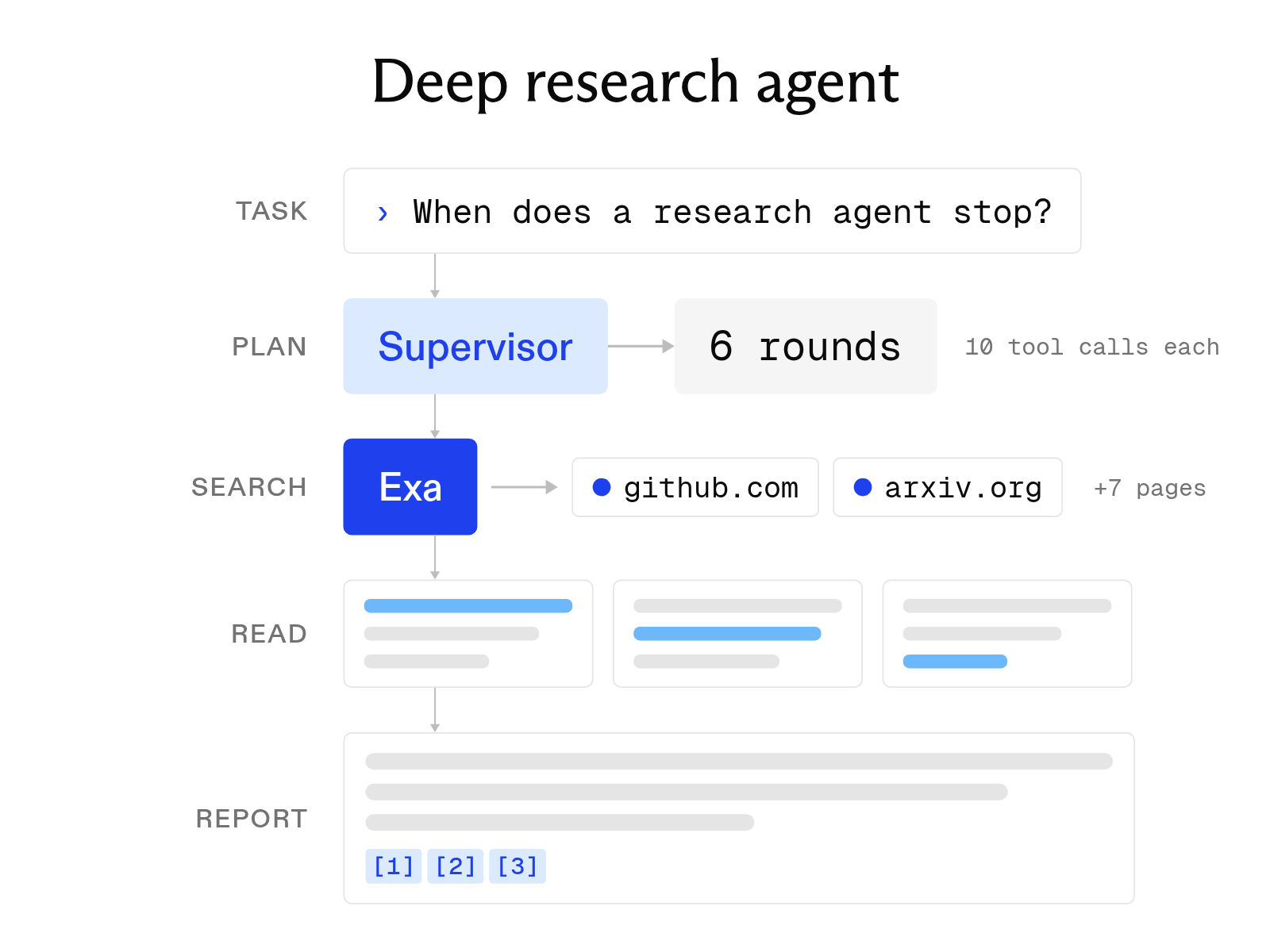
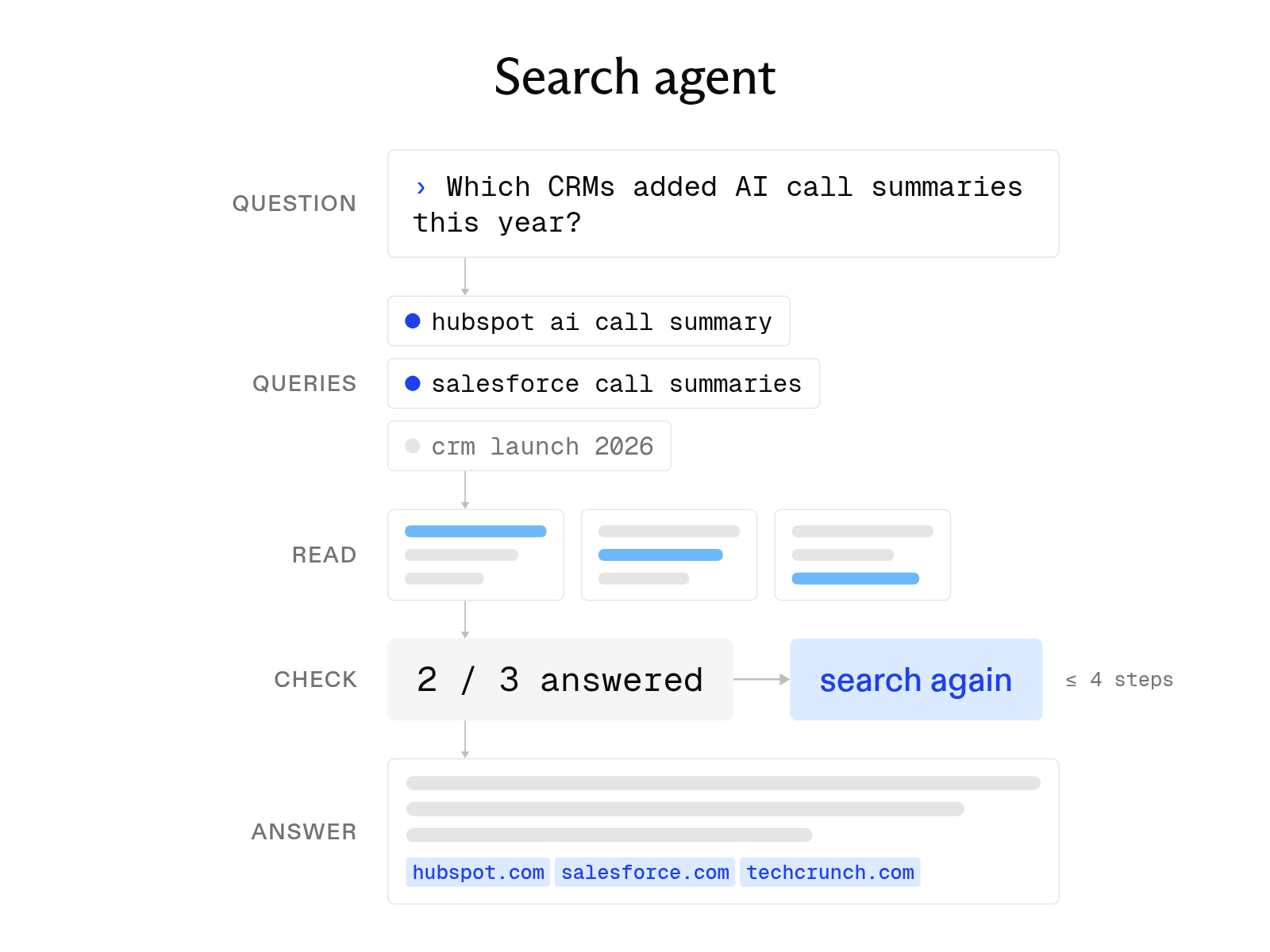
Query planning. The agent splits the task into subquestions and searches each. A vendor-pricing question, for example, becomes separate searches for each vendor, pricing page, and recent announcement.
-
Search and reading. The agent reads the results and checks the evidence against the task's requirements. If evidence is missing or contradictory, it narrows the search instead of accepting the first plausible page.
-
Synthesis and reporting. The agent writes the answer and links each claim to a source URL, either as prose with inline citations or as a schema with each field cited.
It works best for tasks that draw on many sources and would otherwise take hours of manual browsing:
- Competitive analysis of rivals' pricing tiers, launches, and public customers.
- Investment due diligence on a company's funding, leadership changes, lawsuits, and press coverage.
- Literature reviews that collect papers on a narrow method with their URLs and publication years.
- Technical comparisons of databases, APIs, or SDKs against fixed criteria.
How to access deep research
Deep research comes in three forms, depending on whether you run research occasionally, automate it, or operate the whole stack yourself.
Consumer features. ChatGPT and Gemini offer deep research modes in their chat apps, for analysts who need occasional reports. Applications that repeat the same research at scale need an API.
APIs. Our Exa Agent API takes a research task and an optional output schema and returns validated JSON with citations. OpenAI offers o3-deep-research and o4-mini-deep-research through the Responses API, which returns reports with inline citations. Both are asynchronous: your code starts a run and retrieves the result later.
Open-source systems. These give the most control, but you operate the stack yourself, including the search and page-reading services. Alibaba's Tongyi Lab publishes Tongyi DeepResearch, an agentic model with 30.5 billion total parameters and 3.3 billion activated per token, plus inference code. The smaller TypeScript project dzhng/deep-research loops a language model through Firecrawl searches and scraping, with breadth and depth controls.
Benchmarks and cost
On the independent DeepResearch Bench I leaderboard of consumer research agents, last updated September 11, 2026, Gemini 2.5 Pro Deep Research (49.98), OpenAI Deep Research (47.84), and Perplexity Research (43.05) rank 11th through 13th, behind ATH-Voicepica-DeepResearch at 55.99. Exa Agent isn't on this leaderboard.
We published our own Agent benchmarks on four tasks. Each cell shows score / cost per query, with Exa Agent at high effort.
| Benchmark | Exa Agent (high) | Opus 4.8 | GPT 5.5 |
|---|---|---|---|
| BrowseComp | 74 / $0.50 | 84 / $1.97 | 72 / $0.96 |
| WideSearch | 52 / $0.50 | 52.4 / $2.16 | 51.8 / $1.90 |
| FinanceAgent-V2 | 64.2 / $0.50 | 61.2 / $1.23 | 59.2 / $1.30 |
| People-FindAll | 16.4 / $0.50 | 14.1 / $1.97 | 13.2 / $1.92 |
On BrowseComp, Opus scores ten points higher than Exa Agent at roughly four times the cost. On WideSearch, all three score about the same, and Exa Agent costs about a quarter as much.
Providers price in different units, so list prices don't line up one-to-one:
| Option | Pricing unit | Price |
|---|---|---|
Exa deep search, deep | Per 1,000 requests (up to 10 results) | $12 |
Exa deep search, deep-reasoning (legacy) | Per 1,000 requests (up to 10 results) | $15 |
| Exa deep search, each result beyond the tenth | Per 1,000 requests | $1 |
Exa Agent, minimal (fixed) | Per request | $0.012 |
Exa Agent, low (fixed) | Per request | $0.025 |
Exa Agent, medium (fixed) | Per request | $0.10 |
Exa Agent, high (fixed) | Per request | $0.50 |
Exa Agent, xhigh (fixed) | Per request | $1.00 |
Exa Agent, auto (default, metered) | Per run, capped | Up to $5 |
Exa Agent, ultra (metered) | Per run, capped | Up to $20 |
| Gemini Deep Research | Per task (Google estimate) | $1 to $3 |
| Gemini Deep Research Max | Per task (Google estimate) | $3 to $7 |
OpenAI o3-deep-research, input | Per million input tokens | $10 |
OpenAI o3-deep-research, output | Per million output tokens | $40 |
OpenAI o3-deep-research, web search | Per 1,000 web search calls | $10 |
For either metered Agent mode, budget.maxCostDollars sets the cap anywhere from $1 to $100. OpenAI also bills returned search content at model token rates.
How to choose a provider
Six attributes separate the options: the first two shape what your code receives, and the rest decide what each run costs, how long it takes, and where it searches.
-
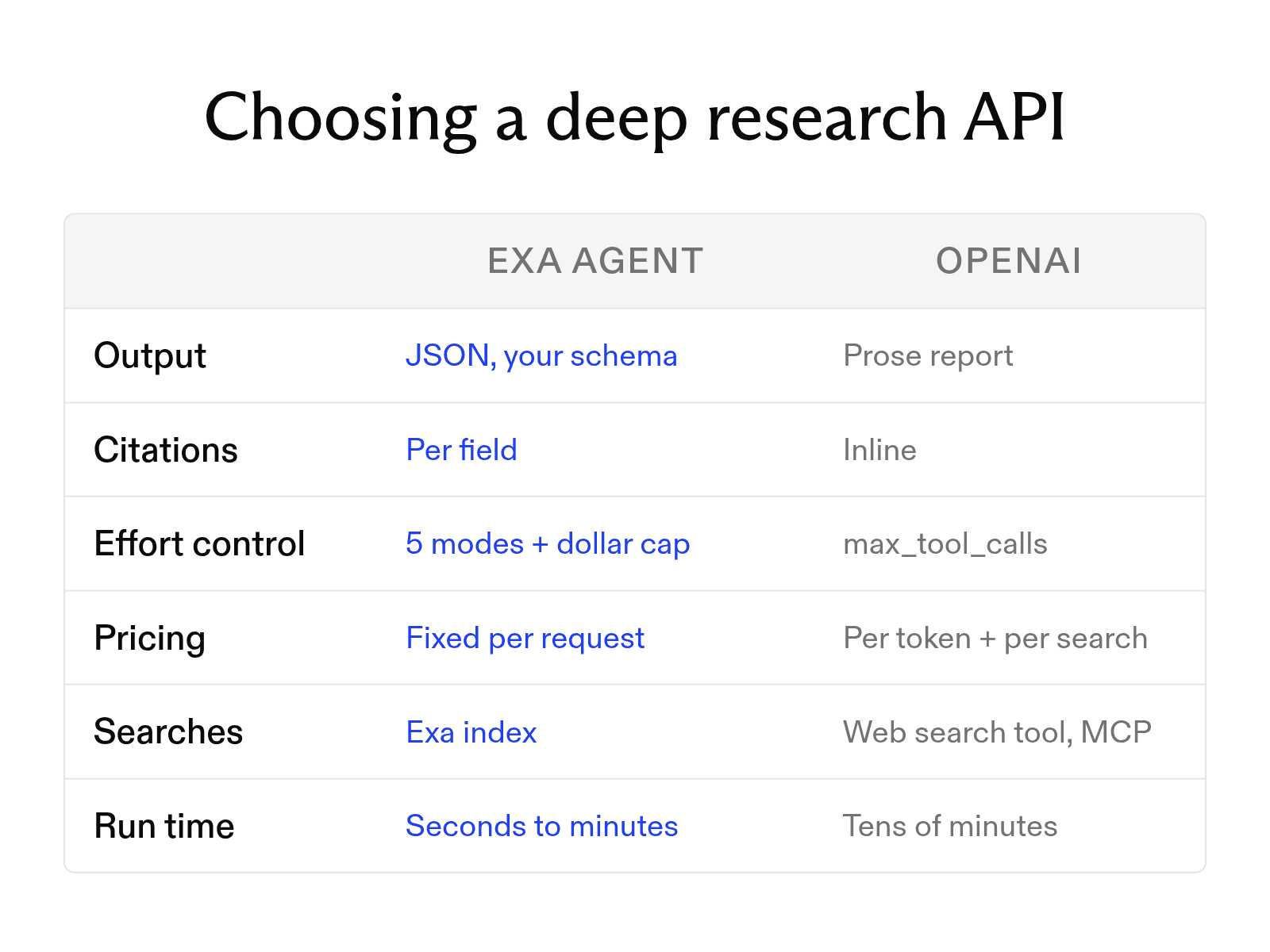
Output format. Does your code need prose or JSON? Gemini's Deep Research agent doesn't support structured output. The Exa Agent returns JSON that matches your schema.
-
Citations. Do citations attach to the whole report, specific text, or individual fields? Field-level citations let you verify one value without rereading the report. OpenAI returns inline citations, and our deep search and Agent cite each field.
-
Effort control. How do you cap spending per run? OpenAI gives you
max_tool_calls, which its docs call the primary way to constrain cost and latency. Our Agent has five fixed-price effort modes and a dollar cap on the two metered modes. -
Depth control. Can one call trade depth for latency? Our search API takes a
typevalue fromlitethroughdeep, so you set speed and depth per call. -
Cost per request. Is pricing fixed or token-billed? Token costs are harder to predict because the agent controls how much it reads. Our Agent's fixed modes charge per request, while OpenAI bills per token and per web search call.
-
Data sources. Which index does the agent search? Gemini uses Google Search by default. OpenAI uses its web search tool, remote MCP servers, or your vector stores. We search our own index.
When to use deep search or the Agent
Our two research products differ mainly in who controls the research loop.
-
Deep search makes one call to the
/searchendpoint. Set the depth withtype:deep-litedoes lightweight expansion and synthesis when latency matters more than coverage, anddeepdoes comprehensive multi-step research. Add up to tenadditionalQueriesto broaden coverage. SetmaxAgeHoursinsidecontents, up to 720 hours, to control freshness.Passing an
outputSchemato any search type adds a synthesized answer with field-level citations and about 2 seconds of latency. -
The Exa Agent replaces the workflow code you'd otherwise write. Give it a task and an output schema, and it searches, reads, checks pages, and fills the fields you specified.
Three factors decide between them:
-
Who writes the loop. The Agent runs the loop; your application submits a task and waits for the run to finish. With deep search, your code runs the loop and calls the endpoint at each step.
-
How quickly you need the result. Deep search responds within a single request. An Agent run takes longer, so the API returns a run object that you poll or stream until it reaches a terminal status.
-
How hard the criteria are to verify. The Agent's
ultraeffort tier is built for large lists, research across several sources, and criteria that are hard to verify.
Output shape doesn't decide it, because both support structured output. Deep search's outputSchema takes a root type of text or object, so it can return a list of entities with several fields. The Agent takes a full JSON Schema, validates output.structured against it, and returns null for any field the evidence doesn't support.
Building with Exa deep search and the Exa Agent API
Both examples below ask the same question, use the exa-py SDK, and read EXA_API_KEY from the environment. Sample responses show placeholder values.
Example 1: deep search with an explicit depth setting.
from exa_py import Exa

exa = Exa()
result = exa.search(
    "Which managed vector databases offer hybrid keyword and vector search, and at what price?",
    type="deep",
    additional_queries=["hybrid search pricing managed vector database"],
    contents={"highlights": True, "max_age_hours": 168},
    output_schema={"type": "text", "description": "A short cited comparison"},
)
Illustrative response:
{
  "results": [{"title": "Vendor A pricing", "url": "https://vendor-a.example/pricing", "highlights": ["..."]}],
  "output": {
    "content": "Vendor A includes hybrid search on its standard tier...",
    "grounding": [{"field": "content", "citations": [{"url": "https://vendor-a.example/pricing", "title": "Vendor A pricing"}], "confidence": "high"}]
  },
  "costDollars": {"total": 0.012}
}
Deep search returns highlights from each page, so your model reads cited evidence in fewer tokens.
Example 2: the same question as an Agent run with an output schema.
run = exa.agent.runs.create(
    query="Which managed vector databases offer hybrid keyword and vector search, and at what price?",
    effort="medium",
    output_schema={
        "type": "object",
        "required": ["vendors"],
        "properties": {"vendors": {"type": "array", "maxItems": 10, "items": {
            "type": "object",
            "required": ["name", "hybrid_search", "starting_price"],
            "properties": {"name": {"type": "string"}, "hybrid_search": {"type": "boolean"},
                           "starting_price": {"type": ["string", "null"]}}}}},
    },
)
run = exa.agent.runs.poll_until_finished(run.id)
Illustrative response:
{
  "status": "completed",
  "output": {
    "structured": {"vendors": [{"name": "Vendor A", "hybrid_search": true, "starting_price": "..."}]},
    "grounding": [{"field": "structured.vendors[0].starting_price", "citations": [{"url": "https://vendor-a.example/pricing"}], "confidence": "high"}]
  },
  "costDollars": {"total": 0.10}
}
Each output.grounding entry lists the sources behind one field in output.structured.
The effort parameter sets cost and depth. Prices for each mode are on our pricing page.
FAQ
How long does a deep research call take?
From a few seconds to an hour, depending on provider and mode. Our deep-lite search holds a consistent 4-second latency, while deep takes 4 to 15 seconds (see the deep search reference for current figures). Exa Agent runs take seconds to minutes. OpenAI says its deep research models can take tens of minutes. Google caps Gemini Deep Research at 60 minutes and says most tasks finish within 20.
Cheers,
Keep learning
Browse all Learn articles →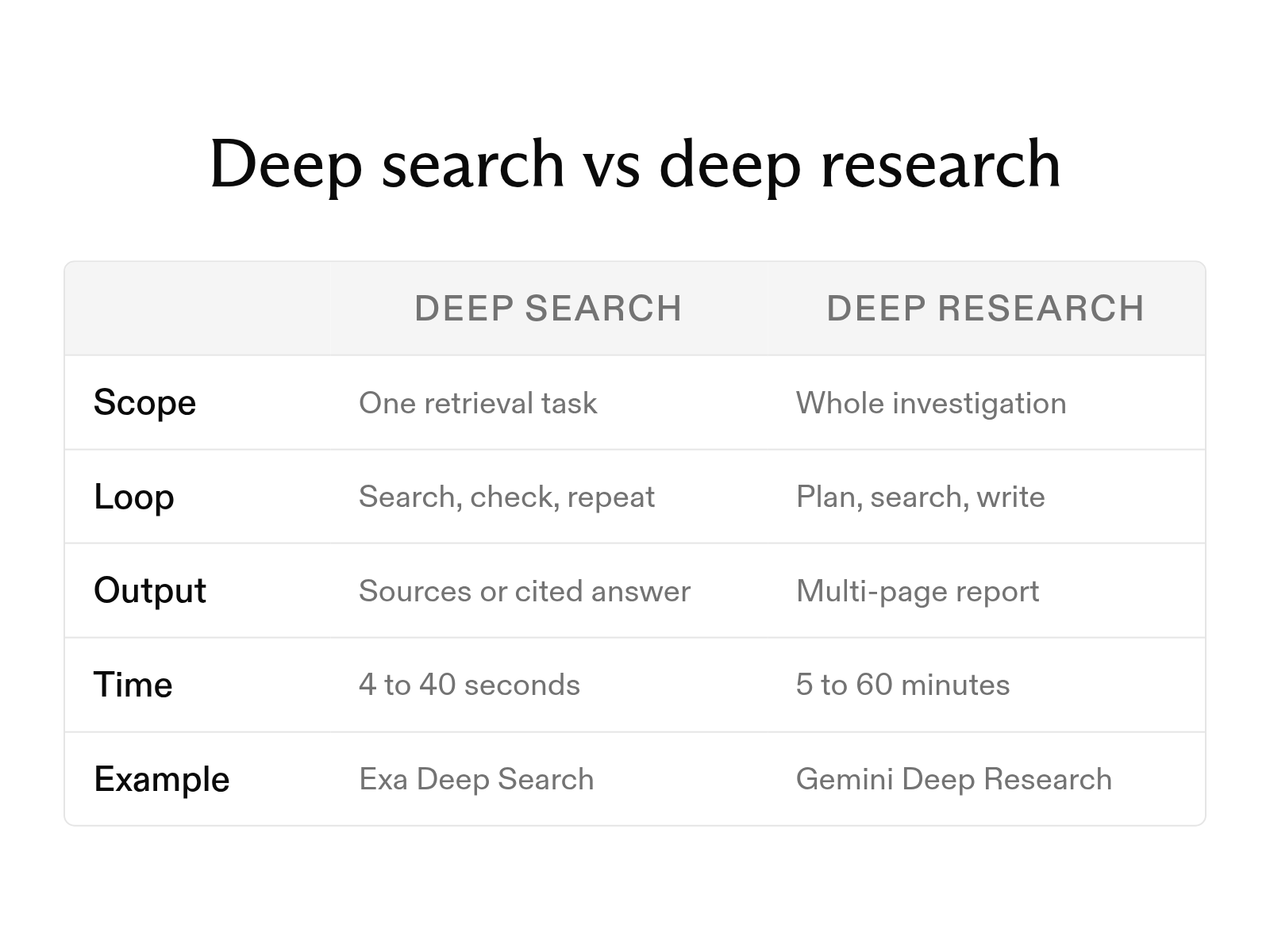
What is deep search, and how does it differ from deep research?
October 6, 2026
Open-source deep research agents: how they work and how to use them
October 1, 2026
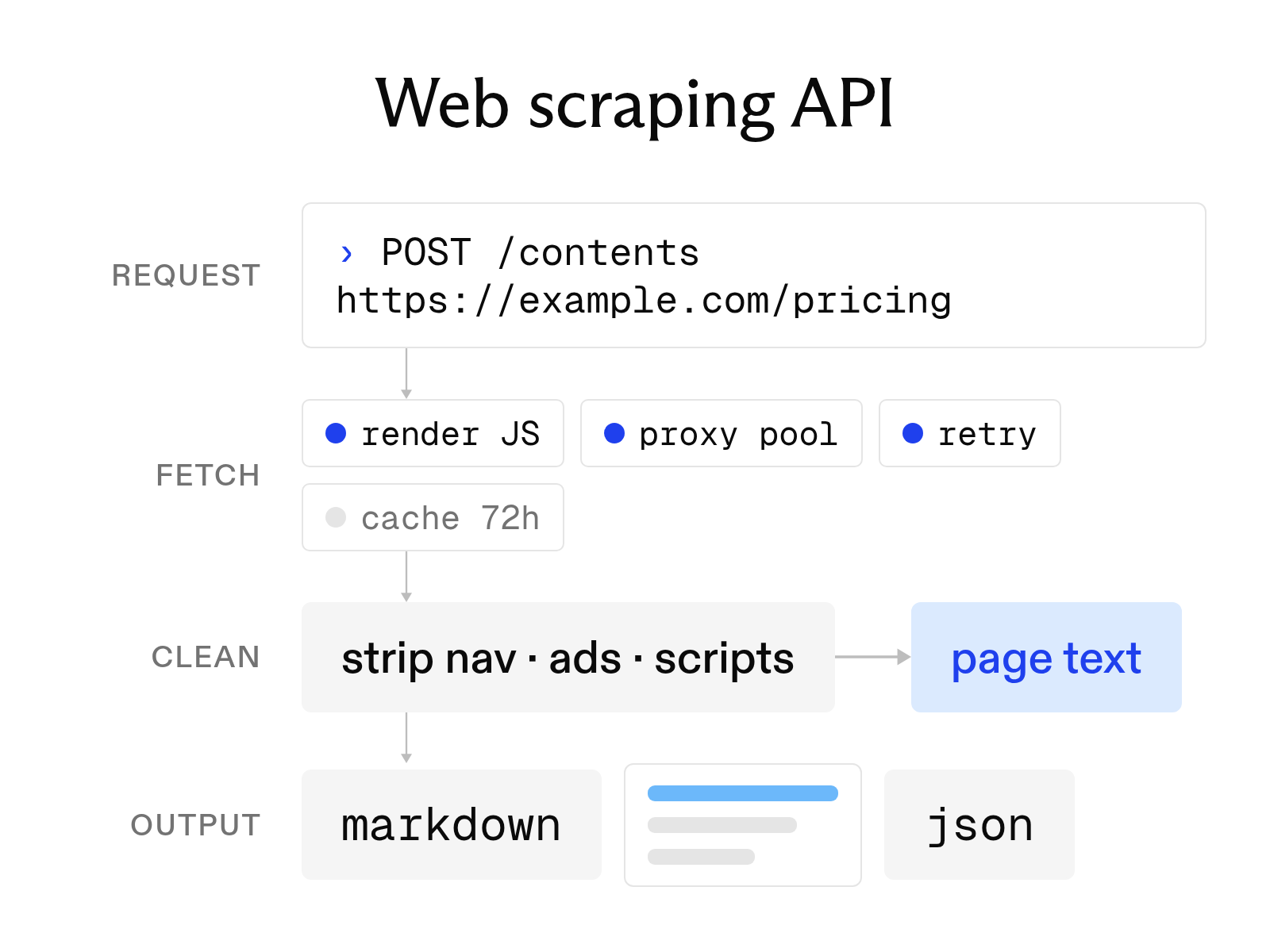
What a web scraping API is and how to choose one
October 6, 2026
What is a search agent? How they work and how to build one
October 1, 2026
What is an AI agent? How it works, key components, and examples
October 1, 2026
The 10 best AI agent tools for 2026 (and how tool calling works)
October 19, 2026