How to build a data pipeline for live web data
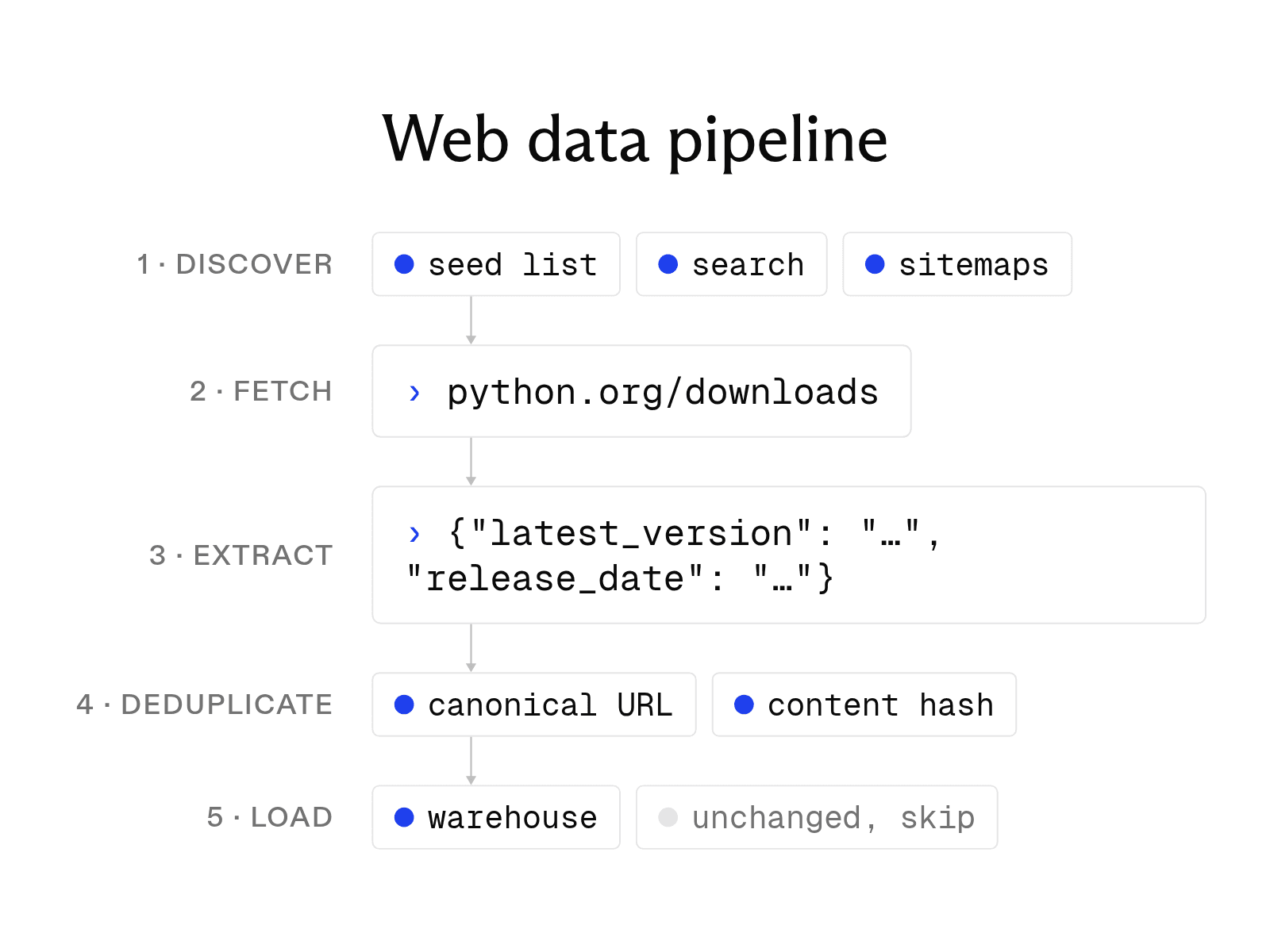

A live web data pipeline finds the pages that belong in your dataset, fetches them, extracts the fields you need, normalizes and deduplicates the results, and loads them on a schedule that keeps them current. Agents use data like this to write code, research companies, and find scientific papers.
At Exa, we work on this from both sides: we maintain our own web index, and more than 400,000 developers build on it. HubSpot uses Exa to monitor company changes and trigger workflows for its agents.
We walk through all six stages, from finding pages to loading records. You’ll learn how to choose tools for fetching and orchestration, set a refresh schedule, and remove duplicates. We include a short Python example and explain what to monitor once the pipeline is running.
The six stages of a web data pipeline
First define one useful record: the fields you need, its source, and what makes it unique. Then build these stages:
-
Discovery. Find pages for your dataset: a seed list for known sources, and search queries, RSS feeds, or sitemaps for new ones. A research dataset needs newly published papers, which refetching the original list won't find.
-
Fetch. Retrieve the page and keep its URL and retrieval time. Check whether the content is in the HTML, needs JavaScript, or lives in a PDF; that decides which tools you need and which failures to expect.
-
Extract. Turn the page into your record. CSS selectors work on consistent layouts; model-based extraction handles more variation and can return fields in a JSON schema. Either way, check the values: a response can match your schema and still have the wrong release date.
-
Normalize. Put dates, currencies, units, and names into consistent formats before combining sources, and keep the original values to check conversions later. A price needs a currency code; a date needs enough context to fix the year.
-
Deduplicate. Decide what counts as a repeat: the same URL, the same content, or the same event from different sources.
-
Load. Write validated records to your database or warehouse. Update existing records by a stable key, or store versions if you need history. Retrying a failed job shouldn't create duplicate rows.
Keep the source content with the extracted record so you can reprocess it after fixing an extraction bug. In our own data framework, tracking which outputs are missing or invalid lets us recompute only the affected data.
Choose your fetching tools
Test retrieval on your actual sources before choosing the rest of the stack, including a PDF, a JavaScript page, and any source that's given you trouble. That tells you more than a feature comparison.
-
Managed recurring search. Exa Monitors run recurring searches and send each run's new output to an HTTPS webhook. With
outputSchema, structured fields arrive inoutput.contentand source references inoutput.grounding. Verify theExa-Signatureheader before processing a delivery. -
Managed retrieval for known URLs. Use Exa Contents when you already have URLs. We retrieve text from webpages and PDFs, including JavaScript-rendered content, and support structured extraction through
summary.schema. Our search can also return content with results. You handle validation, normalization, and storage. Pricing depends on the pages and content types you request, monitor output, and generated summaries. -
Your own fetch layer. An HTTP client and a parser can be enough for a few stable sites; add a browser such as Playwright for JavaScript rendering. The ongoing work: maintaining parsers, managing request rates, and recovering from timeouts and blocked requests. To decide build or buy, try both on a representative set of URLs and compare extraction quality, request cost, and time spent handling failures.
Choose a refresh schedule and orchestrator
Set a freshness target, like a new release in the dataset within a day of publication. Fetch frequency, source update frequency, and end-to-end freshness differ; monitor the last against your target. Then choose how updates reach the pipeline:
-
Fixed schedule. The simplest start: fetch at regular intervals with cron or a workflow scheduler. Group sources by how often they change so a daily news feed and an old reference page don't get the same number of requests.
-
Change-triggered. Fetch when a feed entry or sitemap
lastmodvalue signals an update, once you've checked the source keeps those signals reliable. Conditional HTTP requests save bandwidth: a 304 Not Modified response means reuse the stored page. -
On-demand. Fetch when an agent or user needs the information. You skip pages nobody uses, but the application waits on retrieval and must handle failures. Store responses if you need an audit trail or reuse.
A simple scheduler handles one task; an orchestrator helps when fetching, extraction, and loading need separate retries or dependencies:
-
Apache Airflow defines work as Python DAGs (directed acyclic graphs). Task dependencies control when extraction and loading run, and a failed task retries without restarting unrelated work.
-
Dagster organizes work around data assets, so you can see how a dataset was produced, what depends on it, and whether it meets a freshness policy.
-
Prefect adds workflow tracking to Python functions with
@flow. You configure retries and logging, and fetching and extraction stay ordinary Python.
Exa Monitors run at intervals of an hour or longer and can be delayed up to 30 minutes, so allow for that in your freshness target. For known URLs, Exa Contents controls cache age with maxAgeHours. Use 0 to request live content. Repeated requests can reuse a fetch from the previous 60 seconds. A positive value sets the age at which Exa tries to refresh a cached copy. If the fetch fails, Exa can return the cached copy. A value of -1 only uses cached content.
Deduplicate URLs, records, and events
Start with exact matches; add costlier similarity checks only if duplicates still get through.
-
Canonical URLs. Remove known tracking parameters such as
utm_sourceand lowercase the hostname. A page's canonical URL is a useful signal. Keep parameters and path details that identify different content; lowercasing every path or stripping every query string can merge distinct pages. -
Content hashes. Hash the normalized fields you care about with SHA-256; hashing raw HTML also flags changed ads and page furniture. For a dataset of current values, compare each record with its last successfully loaded version. Values can change and later revert, so checking against all historical hashes can hide a real update.
-
Near-duplicate detection. MinHash and SimHash find text overlap; embeddings can help find differently worded accounts of the same event. Review candidate matches before setting a threshold. Two similar-looking papers on one technique may be separate contributions, and a second URL for a paper isn't a new version of it. Preserve whichever distinction your application cares about.
Monitors filter out findings the same monitor already returned; you still handle overlap between monitors and other sources.
When merging records, keep their source references: several articles can support one event, and disagreeing sources are worth investigating.
Example: tracking the latest Python release
This Exa Contents example makes one pass through fetch, extract, validate, and deduplicate to get the latest stable Python release from its download page, printing the record where a real pipeline would load it. Install exa-py and set EXA_API_KEY. The request uses the last cached copy if it’s less than 24 hours old and otherwise tries to refresh it.
import json
from exa_py import Exa

exa = Exa()  # reads EXA_API_KEY from the environment

schema = {
    "type": "object",
    "properties": {
        "latest_version": {"type": "string", "description": "Newest stable Python 3 release, excluding prereleases"},
        "release_date": {"type": "string", "description": "Date of that release"},
    },
    "required": ["latest_version"],
}

result = exa.get_contents(
    ["https://www.python.org/downloads/"],
    max_age_hours=24,
    summary={"schema": schema},
)
if not result.results:
    raise RuntimeError("No page returned; inspect result.statuses")
page = result.results[0]

record = json.loads(page.summary)
if not isinstance(record.get("latest_version"), str) or not record["latest_version"].strip():
    raise ValueError("Missing or invalid latest_version")

print(record)
The next snippet hashes the extracted fields to spot an exact repeat. It only illustrates the comparison: the in-memory set starts empty each run.
import hashlib

seen = set()  # in production, load existing hashes from your warehouse
key = hashlib.sha256(json.dumps(record, sort_keys=True).encode()).hexdigest()
if key in seen:
    print("unchanged, skip load")
else:
    seen.add(key)
    print("new record, load:", page.url, key[:12])
To make it recurring, persist the validated record and its deduplication key together, then schedule the job with one of the refresh options above.
What to monitor once the pipeline is live
A job can succeed and still write unusable data, so check the records, not just the run status:
-
Source availability. Record which URLs succeeded, failed, or timed out; Exa Contents returns per-URL outcomes in
statuses. Keep failed URLs for retry so a partial response doesn't silently shrink your dataset. -
Extraction success. Track the share of pages yielding valid records per source; a drop can mean a changed layout or a block page. Check required fields and plausible values, and sample records against the original pages.
-
Freshness. Store retrieval time separately from any publication or update date on the page, and alert when the last successful retrieval is older than your target. A recent job timestamp says when the code ran, not whether it got current content.
-
Schema drift. Watch for changed types, missing fields, and unexpected units, and hold invalid records out of the main dataset until you inspect them. A price switching from dollars to cents can pass a numeric type check and still break downstream calculations.
Unchanged data isn't necessarily a failure: the latest Python release may not change for weeks, so check the source before blaming a stuck extractor. For Exa Monitors, send failed runs and their failReason to your alerting system to tell an empty result from a failed search.
FAQ
What do I do about sources that block me?
Look for an official API or feed first. Respect the site's access rules, slow your request rate, and use conditional requests where supported. A cached copy may meet your freshness requirement (maxAgeHours=-1 in Exa Contents), but we can't guarantee every page is cached.
Cheers,
Keep learning
Browse all Learn articles →
Data extraction APIs compared: documents and the live web
November 24, 2026
How to monitor a website for changes: steps, tools, and APIs
October 19, 2026
URL to text: 3 ways to turn a webpage into clean text or Markdown
October 20, 2026
How to scrape a website: 9 tools and methods compared
October 20, 2026
The 14 best web scraping tools in 2026
October 20, 2026
The 9 best AI web scraping tools in 2026 (and how AI scraping works)
October 6, 2026