Data extraction APIs compared: documents and the live web
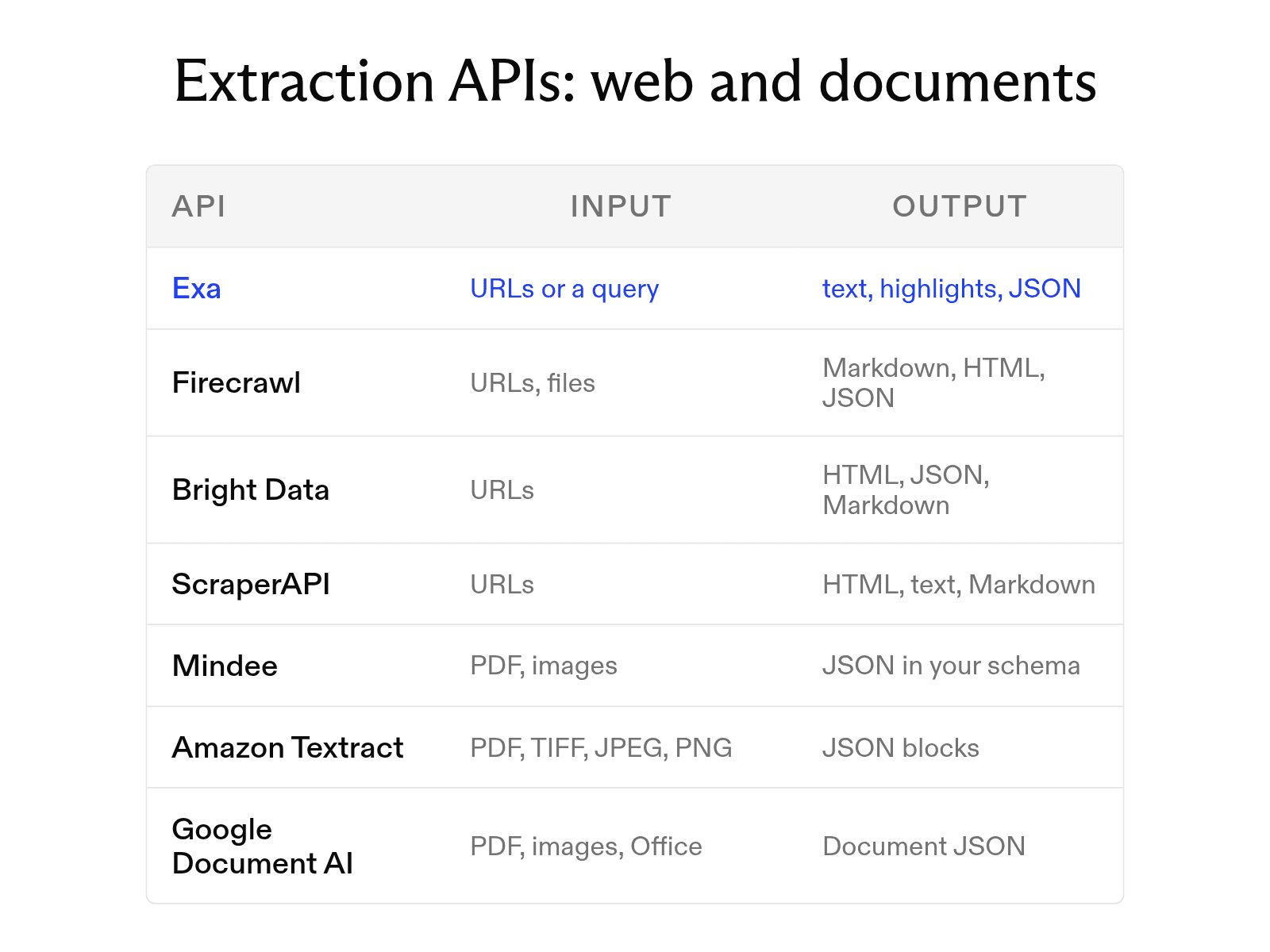

A data extraction API reads a source and returns the parts you need as data. Use a document extraction API to pull fields from a file, such as the total on a scanned invoice. Use a web extraction API to pull the main content from a URL, such as the body of a news article.
At Exa, we build a web search API for AI applications. Our Contents API turns URLs into clean page text and can return just the passages relevant to a query.
We compare Exa with eight other document and web extraction APIs on input, OCR, JavaScript rendering, output, and price. We also show how to choose an API and make your first request with Exa Contents.
Data extraction API comparison
The first four tools take URLs; the last five take files.
| Tool | Input | OCR | JavaScript rendering | Output | Pricing unit |
|---|---|---|---|---|---|
| Exa | URLs or a search query | No | Yes | Full text, highlights, summary, schema JSON | Per 1,000 pages |
| Firecrawl | URLs and uploaded files | Yes | Yes | Markdown, HTML, JSON | Credits, 1 per page |
| Bright Data | URLs | No | Yes | HTML, JSON, Markdown, screenshot | Per 1,000 successful requests |
| ScraperAPI | URLs | No | Yes | HTML, text, Markdown | Credits, 1 to 75 per request |
| Docsumo | PDF and image files | Yes | n/a | JSON with field confidence scores | Per page, quoted by volume |
| Mindee | PDF and image files, or a file URL | Yes | n/a | JSON in your schema | Credits, 1 per page |
| Nutrient | PDF, image, and Office files | Yes | n/a | Spatial JSON, Markdown, schema JSON | Credits, 1 to 24 per page |
| Amazon Textract | PDF and image files | Yes | n/a | JSON blocks | Per 1,000 pages |
| Google Document AI | PDF, image, HTML, and Office files | Yes | n/a | JSON Document object | Per 1,000 pages |
Web content extraction APIs
A page's HTML wraps the useful text in navigation, scripts, ads, and markup, all of which costs tokens in a model's context. A web extraction API strips it and returns the main content, such as an article's headline and body.
Exa
Exa Contents takes URLs and returns full text, highlights, or a summary. Highlights return only the passages matching your query; in our benchmark they matched full-page accuracy with 16 times fewer tokens. A summary can also fill a JSON schema you provide.
We allow 100 requests per second on /contents. Each content type costs $1 per 1,000 pages, and the free tier includes $10 in monthly credits. A statuses array reports whether each URL succeeded or failed.
Firecrawl
Firecrawl is a web scraping API that turns a URL into Markdown, HTML, or schema-based JSON. Its /parse endpoint takes uploaded files and OCRs image-only pages. A basic scrape costs 1 credit; JSON extraction adds 4. The free plan gives 1,000 credits a month at 10 scrapes per minute. If a basic proxy fails, Firecrawl retries with enhanced proxies at the same 1-credit price.
Bright Data
Bright Data's Web Unlocker API rotates proxies and solves CAPTCHAs. Pay-as-you-go costs $1.50 per 1,000 successful requests, with unlimited concurrency. The free tier gives 5,000 credits a month, one per request, shared with Bright Data's other APIs.
ScraperAPI
ScraperAPI sets HTML, text, or Markdown output with its output_format parameter. A standard request costs 1 credit; JavaScript rendering or a Cloudflare or DataDome bypass costs 10. The Hobby plan is $49 a month for 100,000 credits and 20 concurrent threads.
Document extraction APIs
Document extraction runs in four stages, each with its own failures.
-
Ingest. The API checks file type, size, and page count. Mindee and Textract reject password-protected PDFs; synchronous Textract calls take only single-page PDFs.
-
OCR. A model turns page images into text and records each element's position. Handwriting lowers accuracy: Textract reads it only in English, and Mindee reports lower accuracy than for print. Textract reads text at any rotation within the page but not vertical text; Google's Enterprise Document OCR can straighten a rotated scan first.
-
Field mapping. The API matches text to requested fields, such as an invoice number or a line-item table. Tables that span pages cause errors because a header on one page must be linked to rows on the next.
-
Validation. Confidence scores decide which fields pass automatically and which go to human review.
Docsumo
Docsumo is a document processing platform for lending, insurance, and accounts payable teams. It takes PDF, JPG, PNG, and TIFF files by upload, email, or REST API. A webhook returns fields as JSON with a confidence score for each, and results also download as Excel or CSV. A 14-day free trial covers up to 1,000 pages; Business and Enterprise pricing depends on page volume.
Mindee
Mindee builds an extraction model from a template or sample document and returns matching fields as JSON. It takes PDF, JPEG, PNG, WebP, TIFF, and HEIC files by upload or HTTPS URL. Its OCR reads printed text in any writing system and most handwriting. A page costs 1 credit, or 1.5 with confidence scores. Starter is €44 a month, billed annually, for 6,000 credits.
Nutrient
Nutrient sells a document SDK and cloud API. Its Data Extraction API turns PDFs, scans, images, and Office files into spatial JSON or Markdown, and can extract fields in your schema with confidence scores and source coordinates. Parsing costs 1 to 18 credits per page and field extraction 7 to 24, depending on mode. The free plan gives 5,000 credits a month; Starter is $59 a month for 50,000.
Amazon Textract
Amazon Textract is AWS's OCR and document analysis service. It reads JPEG, PNG, PDF, and TIFF files and returns JSON Block objects for pages, lines, words, tables, and key-value pairs. In US West (Oregon), per 1,000 pages for the first million each month, text detection costs $1.50, table extraction $15, and form extraction $50; above a million, text detection drops to $0.60. New AWS customers get a three-month free tier of 1,000 text-detection pages per month.
Google Document AI
Google Document AI, Google Cloud's document processing service, takes PDF, TIFF, GIF, JPEG, PNG, BMP, and WebP files; its Layout Parser also takes HTML, DOCX, PPTX, and XLSX. Enterprise Document OCR costs $1.50 per 1,000 pages, and Form Parser $30 per 1,000 for up to one million pages a month.
Choosing an API by the input you hold
You hold a file. Send a PDF, scan, or phone photo to a document API. Use Textract or Document AI if you already run on AWS or Google Cloud and want per-page billing; Docsumo or Mindee for a trained model of one document type, such as a bank statement, with per-field confidence scores; Nutrient for Office files or spatial JSON with source coordinates. Of the web APIs here, only Firecrawl reads uploaded files.
You hold a URL. If the site blocks bots, Bright Data and ScraperAPI handle proxies and CAPTCHAs and charge per request. If not, Exa Contents can return query-specific highlights to shorten the model's prompt. Use Firecrawl when you need Markdown or HTML and the same pipeline must parse uploaded files.
You hold a question. If you haven't found the page with the answer yet, it's a retrieval task. Exa Search finds relevant pages and returns highlights in one call, at $7 per 1,000 requests including content for up to 10 results. Set category to news for recent articles, which are searchable within minutes of publication.
Extracting a web page with Exa Contents
This Python request fetches a news article's body, then only the passages that answer one question about it.
from exa_py import Exa

exa = Exa()  # reads EXA_API_KEY
url = "https://www.cnbc.com/2026/09/16/fed-rate-decision-september-2026.html"

# The article body, capped at 5,000 characters
page = exa.get_contents([url], text={"max_characters": 5000})
print(page.results[0].title)
print(page.results[0].text[:400])

# Only the passages that answer one question
page = exa.get_contents([url], text=False, highlights={"query": "what the Fed decided on rates"})
print(page.results[0].highlights)
The Exa Contents quickstart has samples in Python, JavaScript, and cURL.
Cheers,
Keep learning
Browse all Learn articles →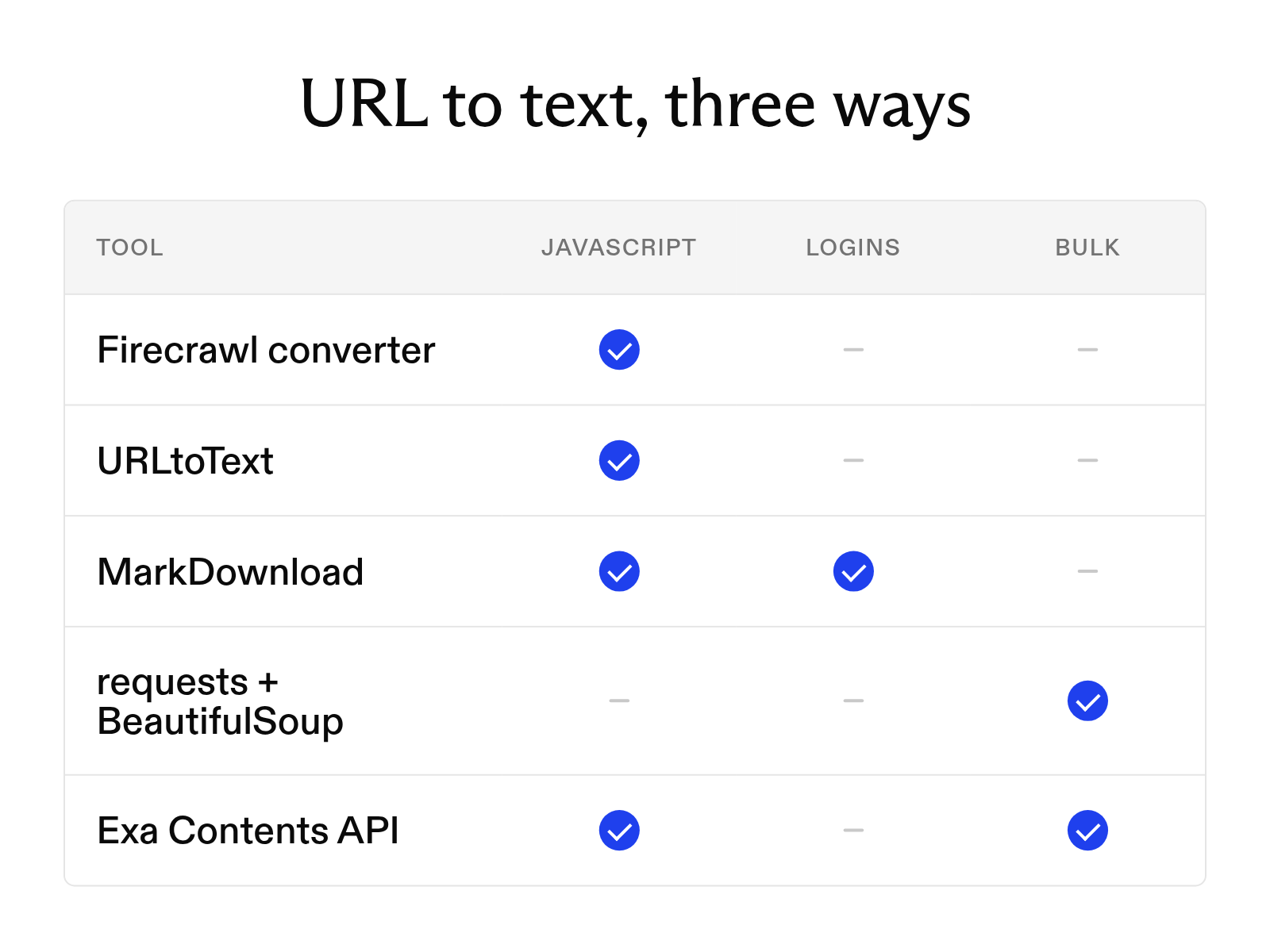
URL to text: 3 ways to turn a webpage into clean text or Markdown
October 20, 2026
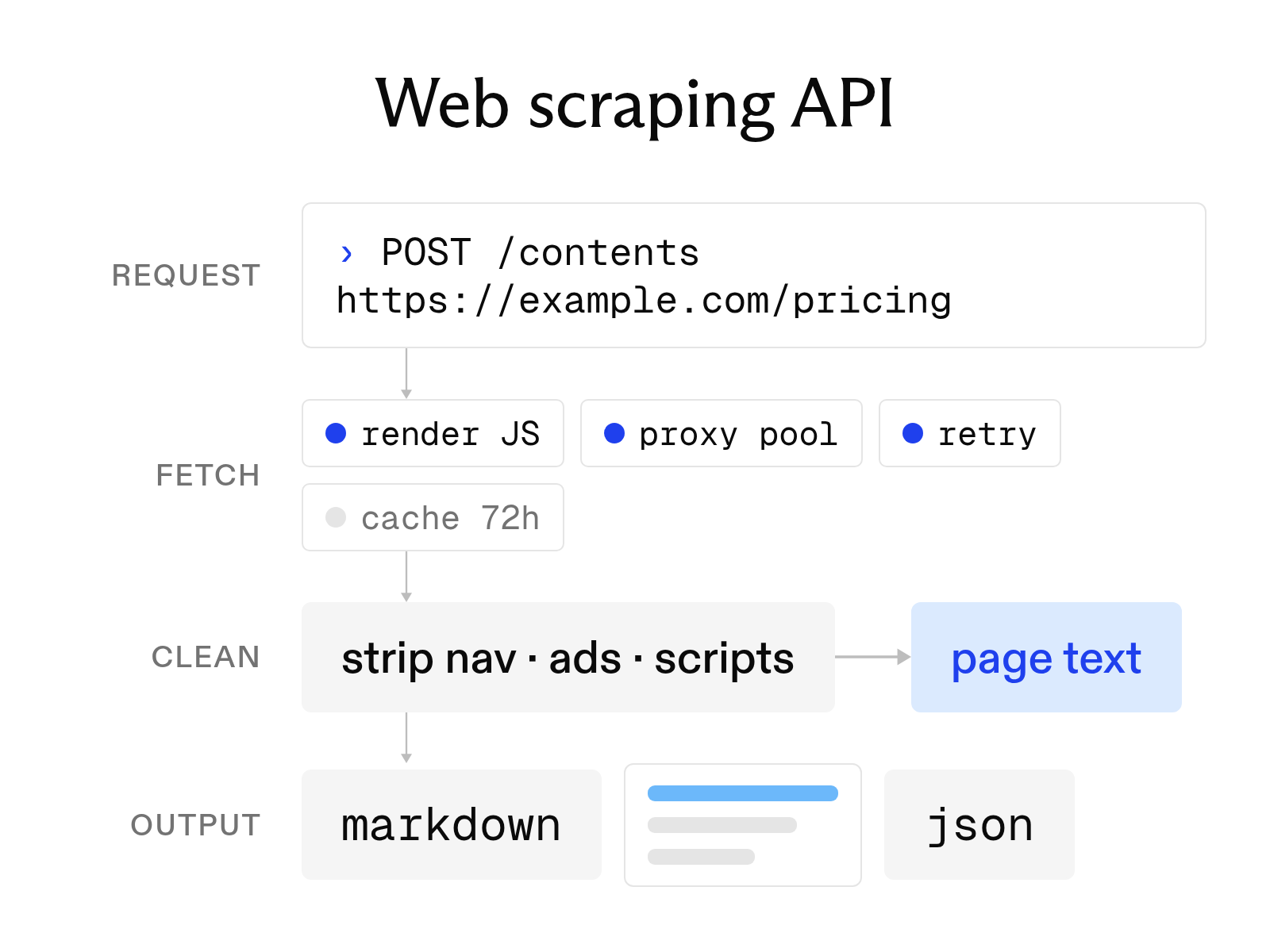
What a web scraping API is and how to choose one
October 6, 2026
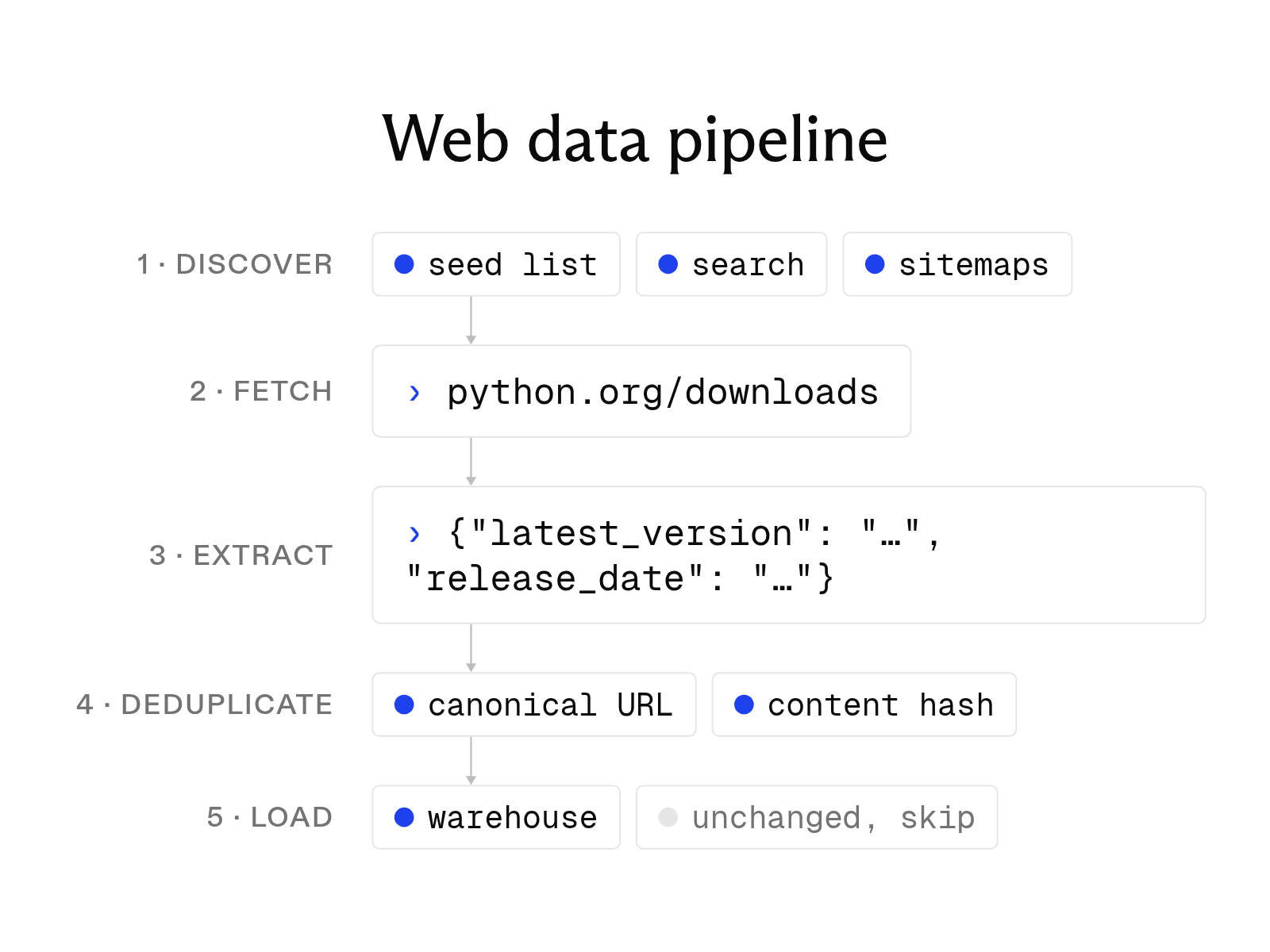
How to build a data pipeline for live web data
November 24, 2026
The 14 best web scraping tools in 2026
October 20, 2026
How to scrape a website: 9 tools and methods compared
October 20, 2026
The 9 best AI web scraping tools in 2026 (and how AI scraping works)
October 6, 2026