The 14 best web scraping tools in 2026
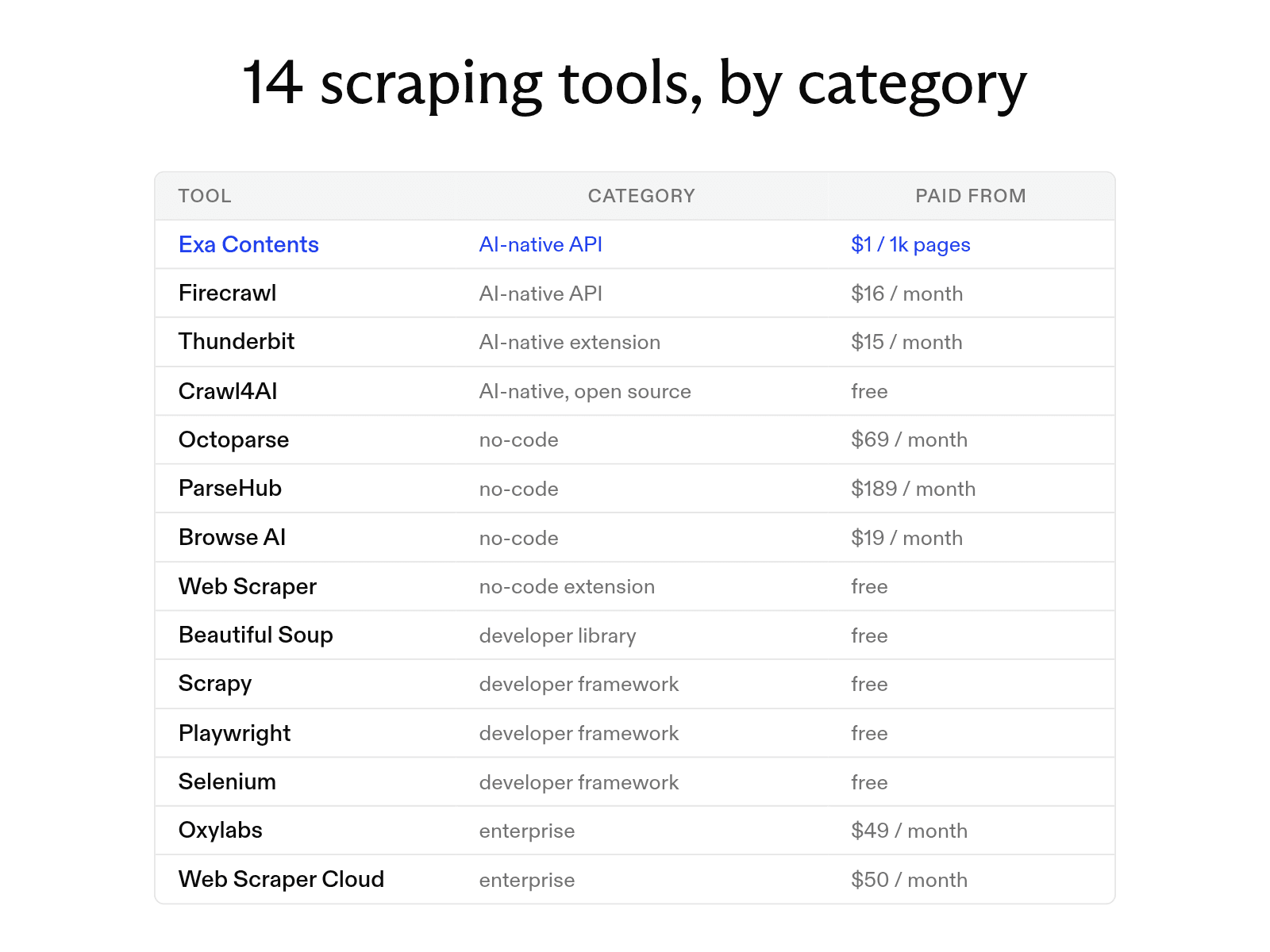

The best web scraping tool depends on how much code you can write, what you can spend, and how many pages you need. The options fall into four categories:
- AI-native tools that use language models to parse unstructured pages
- point-and-click no-code platforms
- developer frameworks that offer fine-grained control
- enterprise platforms with proxy networks, CAPTCHA solving, and managed infrastructure for large jobs
At Exa, we build a search API for AI applications rather than human browsing. Our Contents API turns URLs into clean text, which puts us among the AI-native tools on this list.
We compare Exa and 13 other tools on price, free tier, JavaScript handling, anti-bot support, and export format, match them to coding ability, budget, and page volume, and cover what to check before you scrape.
How the 14 tools compare
Below we compare 14 web scraping tools by price, free usage, and features.
| Tool | Paid from | Free option | Code needed | JavaScript | Anti-bot | Export |
|---|---|---|---|---|---|---|
| Exa | $1/1k pages | $10 credits/mo | Yes (API) | Yes | None | Markdown, JSON |
| Firecrawl | $16/mo | 1,000 credits/mo | Yes (API) | Yes | Proxies | Markdown, JSON |
| Thunderbit | $15/mo | 6 pages/mo | No | Yes | Not stated | Excel, Sheets |
| Crawl4AI | Free | Open source | Yes | Yes | Stealth, proxies | Markdown, JSON |
| Octoparse | $69/mo (annual) | 10 tasks | No | Yes | CAPTCHA, IP rotation | Excel, CSV, JSON |
| ParseHub | $189/mo | 200 pages/run | No | Yes | IP rotation | JSON, Excel |
| Browse AI | $19/mo (annual) | 50 credits/mo | No | Yes | Bot evasion | CSV, JSON |
| Web Scraper | Free | Unlimited local runs | No | Yes | Not stated | CSV, XLSX |
| Beautiful Soup | Free | Open source | Yes | No | None | Your code |
| Scrapy | Free | Open source | Yes | Add-on | Add-ons | JSON, CSV |
| Playwright | Free | Open source | Yes | Yes | None | Your code |
| Selenium | Free | Open source | Yes | Yes | None | Your code |
| Oxylabs | $49/mo | 2,000-result trial | Yes (API) | Yes | CAPTCHA, proxies | HTML, JSON |
| Web Scraper Cloud | $50/mo (annual) | 7-day trial | No | Yes | CAPTCHA, IP rotation | CSV, JSON, Sheets, S3 |
AI-native scraping tools
AI-native scrapers use language models to read pages and return the content or fields you ask for.
-
Exa: give our Contents API a URL and it returns the page as plain, markdown-style text, up to 10,000 characters per page. Set
excludeSectionsto["navigation", "footer", "sidebar"]and the boilerplate never reaches your prompt; ask for highlights and you get only the passages that match your query. We serve most requests from our own index, so the target site gets no new request from your scraper. We don't bypass bot protection, though, so for bot-protected or login-only pages, Oxylabs or a browser extension fits better. -
Firecrawl converts pages to Markdown or structured JSON, strips navigation and footers, and handles proxies, caching, and JavaScript rendering. Give it a prompt or schema and it returns those fields. A basic scrape or crawl costs one credit per page.
-
Thunderbit is a Chrome extension that extracts the fields you describe, without a CSS selector, and exports them to Excel, Google Sheets, Airtable, or Notion. Each page uses up to 30 credits.
-
Crawl4AI is an open-source Python framework that outputs Markdown, supports language-model extraction alongside CSS and XPath rules, and can populate target schemas automatically.
No-code and visual scraping platforms
Visual scrapers build workflows from what you click in a browser. Select fields, the tool finds the pattern across pages, and you set up pagination, scrolling, and scheduled runs without code.
-
Octoparse ships 500+ preset templates plus a visual builder for your own workflows, and handles logins, pagination, and infinite scrolling. The free plan allows 10 tasks on one device with local extraction and 50,000 exported rows a month. Cloud extraction, IP rotation, and automatic CAPTCHA solving need a paid plan.
-
ParseHub is a desktop app whose visual picker handles AJAX calls, form submissions, and dropdowns. The free plan's five projects are all public, and it keeps your data for 14 days. Private projects need a paid plan.
-
Browse AI records your actions in its Robot Studio to build bots that run on schedules and alert you when content changes. The free plan covers two domains. Monthly billing costs $48 a month.
-
Web Scraper is a browser extension for building extraction sitemaps by clicking, with AI-assisted selector suggestions. It handles pagination and dynamic scrolling.
Developer libraries and frameworks
These put extraction logic in your own code: more control, no third-party usage fees.
-
Beautiful Soup is a Python library that parses HTML and XML into searchable trees. It can't fetch pages or run JavaScript, so for static pages you pair it with an HTTP library like
requests. -
Scrapy is an asynchronous Python framework for large-scale crawling. It runs requests concurrently, follows links, and routes data through customizable pipelines.
-
Playwright drives Chromium, Firefox, and WebKit from several languages and waits for elements automatically, so it handles JavaScript-heavy sites where data appears only after users click, scroll, or log in.
-
Selenium drives real browsers and runs them across a Grid when one machine isn't enough. Like Playwright, it handles JavaScript-heavy sites.
Enterprise scraping platforms
Enterprise platforms manage the proxies, retries, and other infrastructure needed to scrape bot-protected sites at scale.
-
Oxylabs offers a Web Scraper API that returns raw HTML or structured JSON and automates IP rotation and JavaScript rendering. The trial needs no credit card, and the $49 plan covers up to 98,000 results. Pricing per 1,000 results varies by target: $0.50 on Amazon, $1.00 on Google, $1.15 elsewhere, and $1.35 with JavaScript rendering. For harder targets, Oxylabs documents Web Unblocker for CAPTCHAs and rotating browser fingerprints.
-
Web Scraper Cloud runs extension-built sitemaps on managed servers, adding automatic retries, CAPTCHA solving, and IP rotation. It names Cloudflare, Datadome, PerimeterX, Imperva, Akamai Bot Manager, hCaptcha, and reCAPTCHA among the systems it handles. The entry plan includes 5,000 URL credits and 2 concurrent scrapers.
How to choose a web scraping tool
Coding ability, budget, and page volume narrow the list quickly; login walls and bot protection narrow it further.
-
No coding. Octoparse, ParseHub, Browse AI, and Web Scraper build workflows from your clicks, and Thunderbit extracts the fields you describe.
-
Writing code. Beautiful Soup, Scrapy, Playwright, and Selenium give full control, but you manage servers, proxy rotation, and selector updates. Firecrawl and Oxylabs are APIs that handle proxies and JavaScript rendering for you. Our Contents API returns clean page text.
-
No budget. Beautiful Soup, Scrapy, Playwright, Selenium, and Crawl4AI are free and open source, and the Web Scraper extension runs locally for free with no page cap.
-
Small or recurring jobs. Thunderbit and Web Scraper run in Chrome without a dedicated server, which suits small, quick, or recurring tasks.
-
Large volumes. Scrapy is built for large-scale crawling, and Selenium scales across a Grid. Octoparse, ParseHub, and Browse AI handle IP rotation and scheduled runs for ongoing monitoring of large datasets.
-
Login-protected pages. Extensions use your active browser session to reach content behind a login without a separate server. Octoparse handles logins, and Playwright and Selenium handle pages where data appears only after you log in.
-
Bot-protected sites. Use an enterprise platform: Oxylabs with Web Unblocker, or Web Scraper Cloud.
What to check before you scrape
Robots.txt, terms of service, your request rate, and privacy law all limit what you should collect and how.
-
Read robots.txt. The file at a site's root lists crawler access rules in the format standardized by RFC 9309 in 2022. Follow its blocked paths and crawl-delay.
-
Respect rate limits. Limit request rates, cap concurrent connections, and use exponential backoff when servers return errors.
-
Follow the terms of service. Many sites prohibit automated scraping, and commercial use may require written permission or a data-licensing agreement. Login-protected and copyrighted content carry more risk than public product pages, so ask legal counsel before a commercial project.
-
Handle personal data with care. Privacy laws such as the GDPR protect personally identifiable information and require data minimization, secure storage, and strict retention schedules.
FAQ
Why would a website block my scraper's IP address?
A burst of requests from one IP address is a clear bot signal. Slow your request rate, send realistic browser headers, and rotate proxies, or use a hosted API that serves pages from its own index, as we do for most requests.
Cheers,
Keep learning
Browse all Learn articles →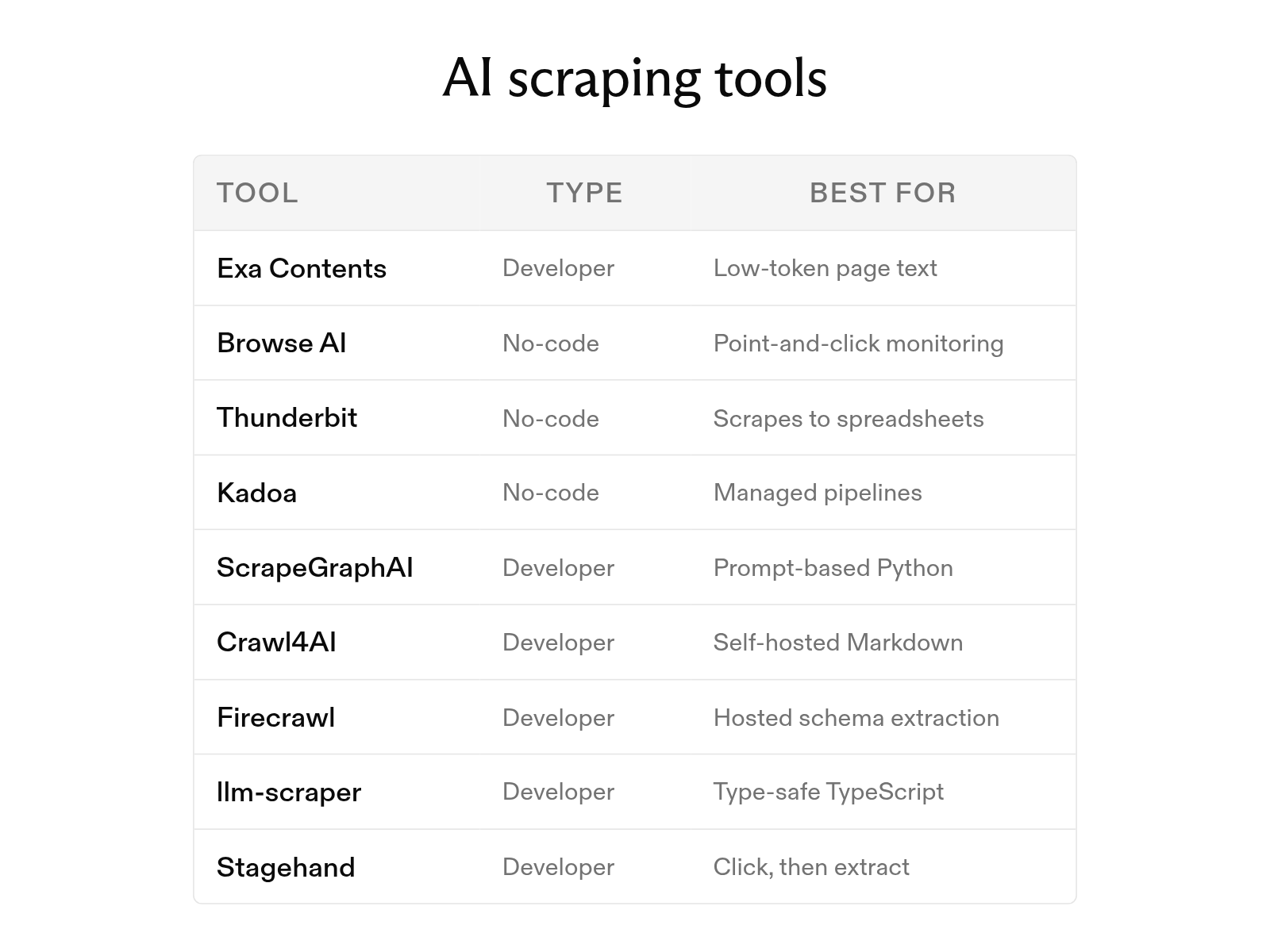
The 9 best AI web scraping tools in 2026 (and how AI scraping works)
October 6, 2026
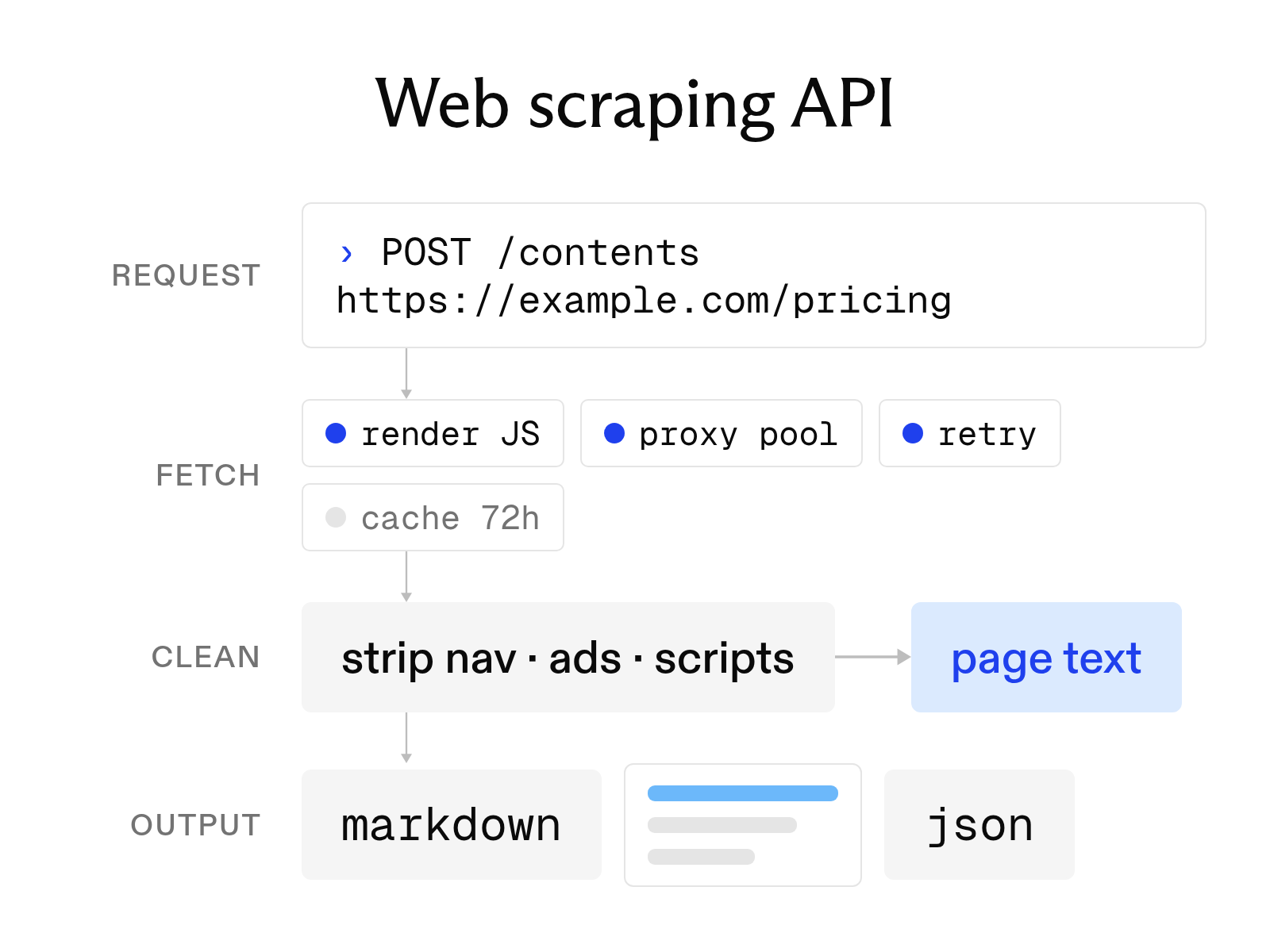
What a web scraping API is and how to choose one
October 6, 2026
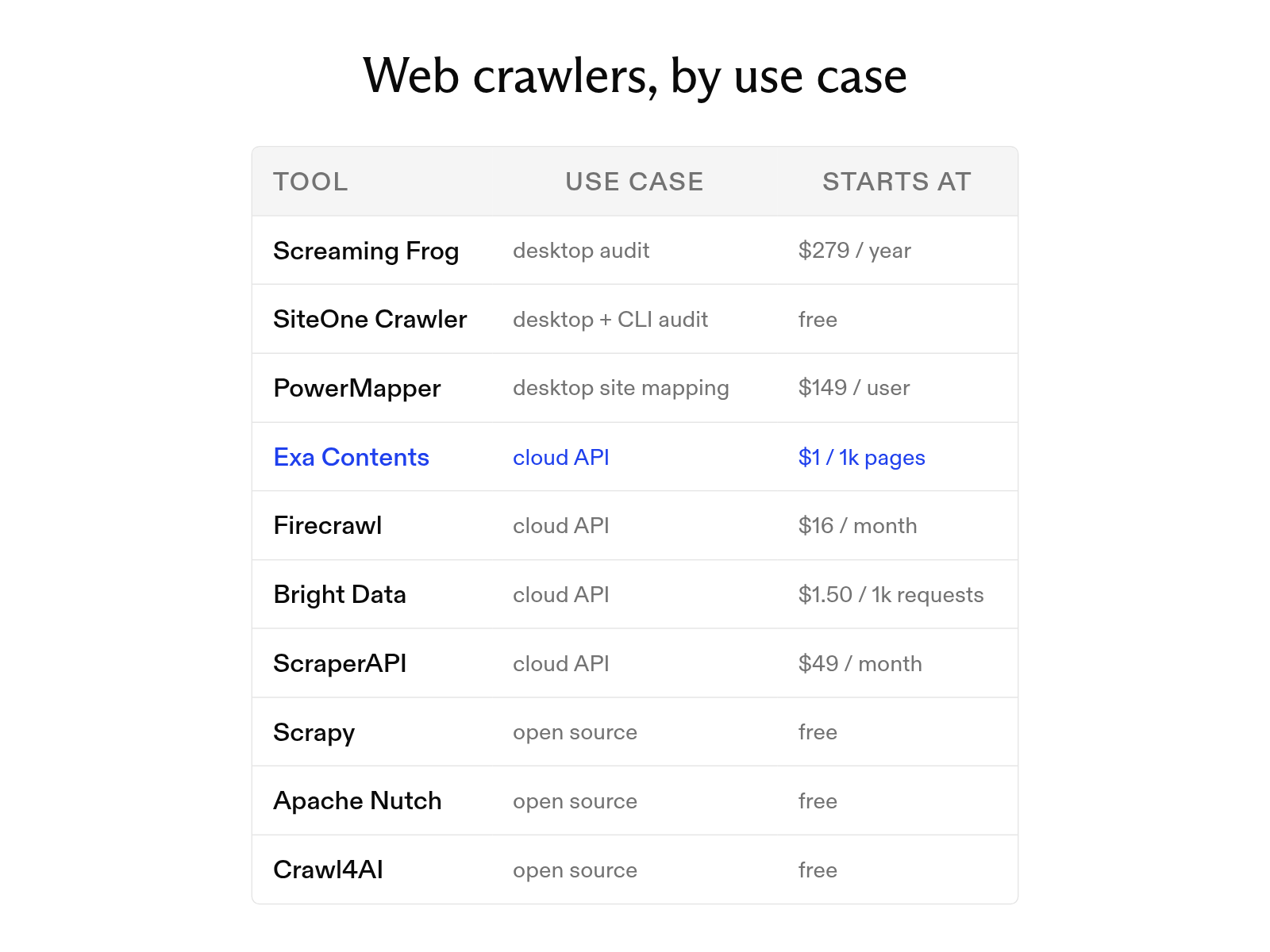
The 10 best web crawler tools in 2026 organized by use case
October 19, 2026
How to scrape a website: 9 tools and methods compared
October 20, 2026
URL to text: 3 ways to turn a webpage into clean text or Markdown
October 20, 2026
Web crawlers explained: how they work and 10 common crawlers
October 19, 2026