URL to text: 3 ways to turn a webpage into clean text or Markdown
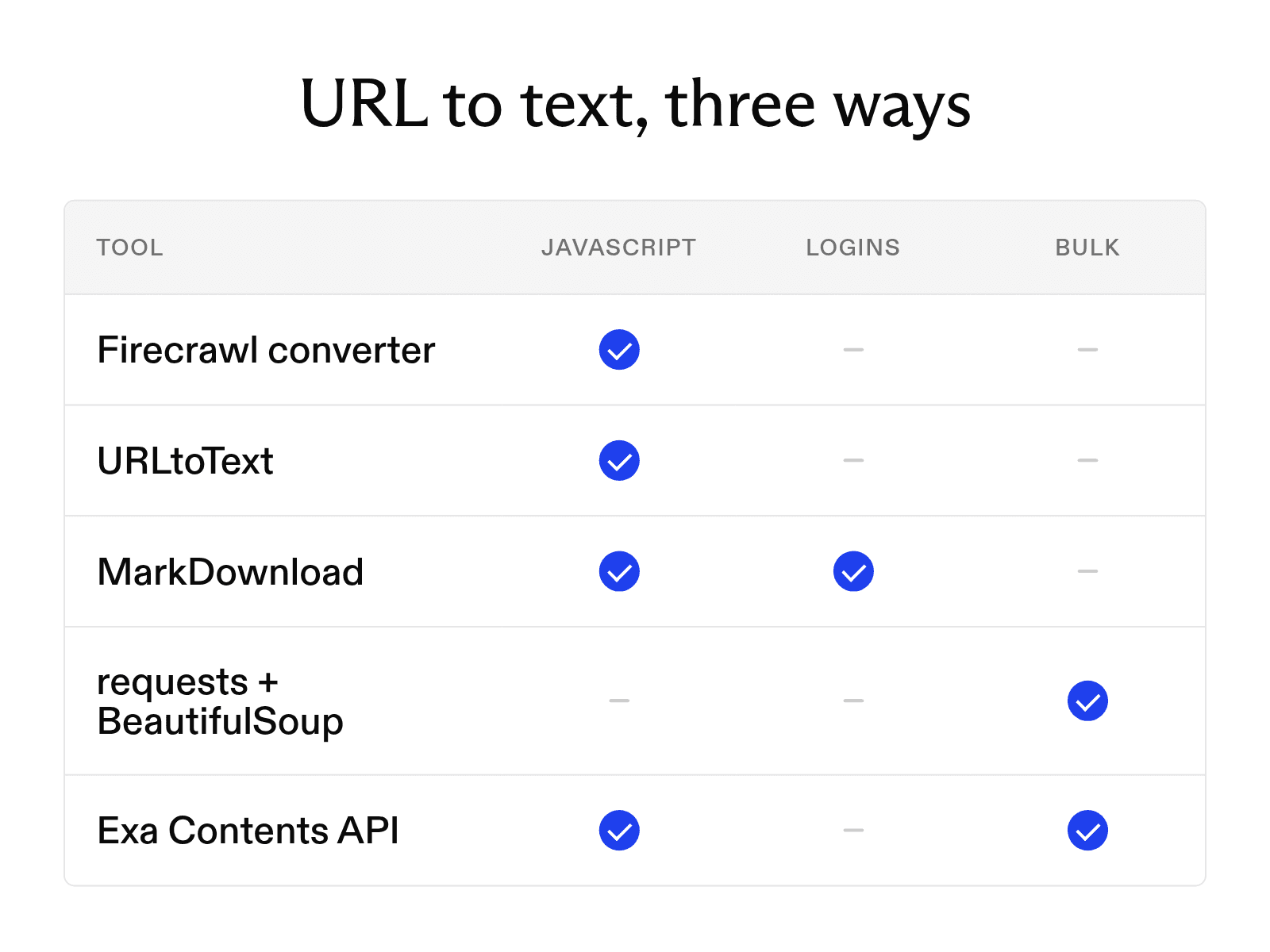

Converting a URL to text means stripping ads, menus, and navigation from a webpage to get clean text or Markdown you can save, analyze, and reuse in notes, documents, and AI tools.
At Exa, we run the Exa Contents API, an endpoint that turns URLs into plain text or Markdown for language-model applications.
Below we compare online converter, browser extensions, and API-based providers on JavaScript-rendered pages, pages behind a login, and bulk conversion. Then, we show how to use each and when to pick plain text over Markdown.
Different options for converting a URL to text, and when to use them
Below, we compare some popular approaches to getting text or Markdown from a URL, and when to use them.
| Tool | Method | JavaScript-rendered pages | Pages behind a login | Bulk or scheduled conversion |
|---|---|---|---|---|
| Firecrawl's Website to Markdown | Online converter | Yes | No | No |
| URLtoText | Online converter | Yes, with a free account | No | No |
| MarkDownload | Browser extension | Yes, from the rendered page | Yes | No |
requests + BeautifulSoup | Code | No | No | Yes, in a loop |
| Exa Contents API | API | Yes | No | Yes, many URLs per request |
- Online converter: use it for a single page. See Online converters below.
- Browser extension: use it for pages behind your login or for part of a page. See Browser extensions below.
- Code or API: use it for hundreds of URLs on a schedule. See Code and APIs below.
Choosing between plain text and Markdown
Plain text keeps the words and drops the structure: headings, list items, and table cells become undifferentiated lines.
Markdown keeps structure with a few characters: # for headings, - for list items, pipes for tables, brackets for links. These help a language model tell headings from body text, count numbered steps, and cite links with their URLs. The overhead is small, and most language models already write Markdown.
Use plain text for a word count or a screen reader, Markdown for anything a language model will read.
Online converters
URLtoText converts a webpage to plain text, Markdown, or HTML. Basic conversion needs no account; JavaScript rendering, CSS selectors, and proxy options need a free one. Enter a URL, pick a format, click Convert, and copy the result.
Firecrawl's Website to Markdown loads the full page, including JavaScript, and returns the main content as Markdown without ads or navigation. Firecrawl says it's free, with no sign-up or usage limits. Paste the URL, click Convert to Markdown, then copy the result or download the .md file.
Either way, check that the output starts and ends with the article before you copy or download it.
Browser extensions
A browser extension converts the page open in your browser, so unlike the other methods it can reach content behind your login.
MarkDownload is free and open source and works in Chrome, Firefox, Edge, and Safari. It simplifies the page with Mozilla's Readability.js and converts the remaining HTML with Turndown.
Click the icon, edit the Markdown preview if needed, and download the .md file. To convert part of a page, select it first.
To send pages to Obsidian, install the Advanced Obsidian URI community plugin and enter your vault and folder names in MarkDownload's settings, then right-click the icon and choose the Obsidian option.
Code and APIs
Use requests and BeautifulSoup for static pages, and the Exa Contents API for JavaScript-rendered pages, PDFs, highlights, and live fetches.
requests and BeautifulSoup (static pages)
Two Python libraries handle most static pages: requests downloads the HTML, and BeautifulSoup parses it so you can strip scripts, styles, and navigation before extracting the text. Install both with pip install requests beautifulsoup4.
import requests
from bs4 import BeautifulSoup

url = "https://example.com/article"
response = requests.get(url, timeout=10)
response.raise_for_status()

soup = BeautifulSoup(response.text, "html.parser")
for tag in soup(["script", "style", "nav", "header", "footer", "aside"]):
    tag.decompose()

text = soup.get_text(separator="\n", strip=True)
print(text)
get_text joins what's left with line breaks and strips extra whitespace. Adjust the tag list for each site. For Markdown, pass the cleaned HTML to a converter library instead of calling get_text.
requests doesn't run JavaScript, so pages that render in the browser may come back nearly empty. Load those in a headless browser before extracting the text.
Exa Contents API (JavaScript-rendered pages, PDFs, highlights, live fetches)
Send us URLs and we return each page as plain text or Markdown, JavaScript-rendered pages and PDFs included.
Request either text or highlights; highlights returns only the passages that match your query. In our SimpleQA evaluation, 500 characters of highlights matched the accuracy of the first 8,000 characters of full-page text with one-seventeenth the tokens.
For prices and other frequently updated pages, set maxAgeHours to 0 to fetch a live copy instead of a cached one.
If you're weighing us against Firecrawl, see our comparison of Exa and Firecrawl.
FAQ
Why is my output empty or missing content?
The page probably loads its content with JavaScript. Use a converter that renders JavaScript, such as Firecrawl, or load the page in a headless browser first.
Does converting a URL to text keep images?
Usually not. Plain text drops them. Markdown converters often keep each image link as  so you can fetch the file later, but the image itself isn't in the output.
Cheers,
Keep learning
Browse all Learn articles →
What a web scraping API is and how to choose one
October 6, 2026
The 9 best AI web scraping tools in 2026 (and how AI scraping works)
October 6, 2026
How to scrape a website: 9 tools and methods compared
October 20, 2026
The 14 best web scraping tools in 2026
October 20, 2026
The 10 best web crawler tools in 2026 organized by use case
October 19, 2026
How to monitor a website for changes: steps, tools, and APIs
October 19, 2026