How to monitor a competitor's website traffic

Nobody outside a company can see its analytics, so every competitor traffic number is an estimate. The method behind it matters more than the tool reporting it.
At Exa, we build a web search API for AI applications. Our Agent API can pull Similarweb traffic data through Exa Connect, and Exa Monitors tells you when a competitor publishes something new.
This guide explains how estimates are made, compares Similarweb, Semrush, Ahrefs, SpyFu, SE Ranking, and Exa, and covers how far to trust them. Traffic shows growth but not its cause, so we also show how to track what competitors change and get a Slack message or email when they do.
How traffic estimates work
Each estimate comes from one of three methods.
-
Clickstream panels. Vendors scale anonymized browsing data from a panel of devices up to the whole web. Semrush gets clickstream data from third-party providers every one or two days; Similarweb combines data from its installed products, connected site analytics, public sources, and partners such as ISPs. Panels cover direct, referral, social, and search traffic but are unreliable for small sites, where they see too few visitors.
-
Search visibility models. These tools multiply the search volume of each keyword a site ranks for by the estimated click-through rate for its position, then sum. They cover only search traffic and miss keywords the tool doesn't track.
-
Public disclosures. Earnings calls, funding announcements, and press releases sometimes state visits or users. The numbers are real, but the company picks when to release them.
Two tools can disagree because they measure different things. Semrush says its clickstream and rankings tools "will almost always report different estimations of traffic."
How the traffic tools compare
Similarweb alone publishes a minimum site size, and the search-model tools cover search traffic only.
| Tool | Method | Channels covered | Free option | Paid starting price | Minimum site size |
|---|---|---|---|---|---|
| Similarweb | Panel (plus connected-analytics data) | All channels | Free website checker (high-level sample) | Not published (free trial or a call with sales) | 5,000 visits in the latest month |
| Exa | Panel (Similarweb's estimates via Exa Connect) | All channels | None (calls that return no data are free) | $0.30 per credit plus Agent pricing (up to 7 credits per month of traffic-and-rank data) | 5,000 visits in the latest month (Similarweb's threshold) |
| Semrush Traffic Analytics | Panel (clickstream) | All channels | 7-day free trial | $289/month (Pro, Traffic & Market toolkit, billed annually) | None published |
| Semrush Domain Analytics | Search model (rankings) | Search | Free account (10 reports per day) | $139/month (SEO plans) | None published |
| Ahrefs | Search model (rankings, search volume, own click-through curve) | Google search | Free Website Traffic Checker | $29/month (Starter); $129/month (Lite) | None published |
| SpyFu | Search model | Organic and paid search; Google Ads history | None (30-day money-back guarantee) | $39/month (Basic); $29/month billed annually | None published |
| SE Ranking | Search model (rankings, search volume, click-through rates adjusted for search features) | Organic search | Free traffic checker; 14-day free trial | $129/month (Core) | None published |
Exa Connect attaches data partners to an Agent run: add similarweb to the run's data sources and request monthly visits in the output schema. The agent returns Similarweb's estimate as JSON alongside its web research and sources, so Similarweb's limits apply.
For tools with no published minimum, treat small-site estimates as unreliable. When traffic data is weak or missing, track direct website changes instead.
How to check a competitor’s traffic estimate
Where did the number come from, and does another tool show the same trend?
-
Compare trends. Similarweb says it expects trend alignment with a site's own analytics; Ahrefs says its estimates work best for comparison. Check whether two tools show similar growth over six months, even if monthly totals differ.
-
Label every estimate. Note the tool, model, and month next to every number you give a client or board. An estimate presented as fact can become a performance target.
-
Confirm a surprise twice. Check a sudden jump in a tool using the other method (a panel against a search model), then in your change log. A jump in a launch month is more credible than one with no cause.
-
Calibrate on your own site. Check your own site in two tools against your analytics before you trust either on a competitor.
Tracking what competitors change
What a competitor publishes shows their priorities. Six signals are directly observable:
-
New pages: a comparison page, a use-case page, or a new product line in the navigation.
-
Pricing page changes: a new tier, a removed free plan, or a price move.
-
Job postings: ten new sales roles in one region point to a market entry.
-
Release notes: what shipped, and in what order.
-
Review volume: a jump in new reviews, which follows a launch or sales push.
-
News mentions: funding, partnerships, and executive hires.
Log each change with the date, competitor, what changed, and link. After three months, the log shows which launches preceded a traffic change.
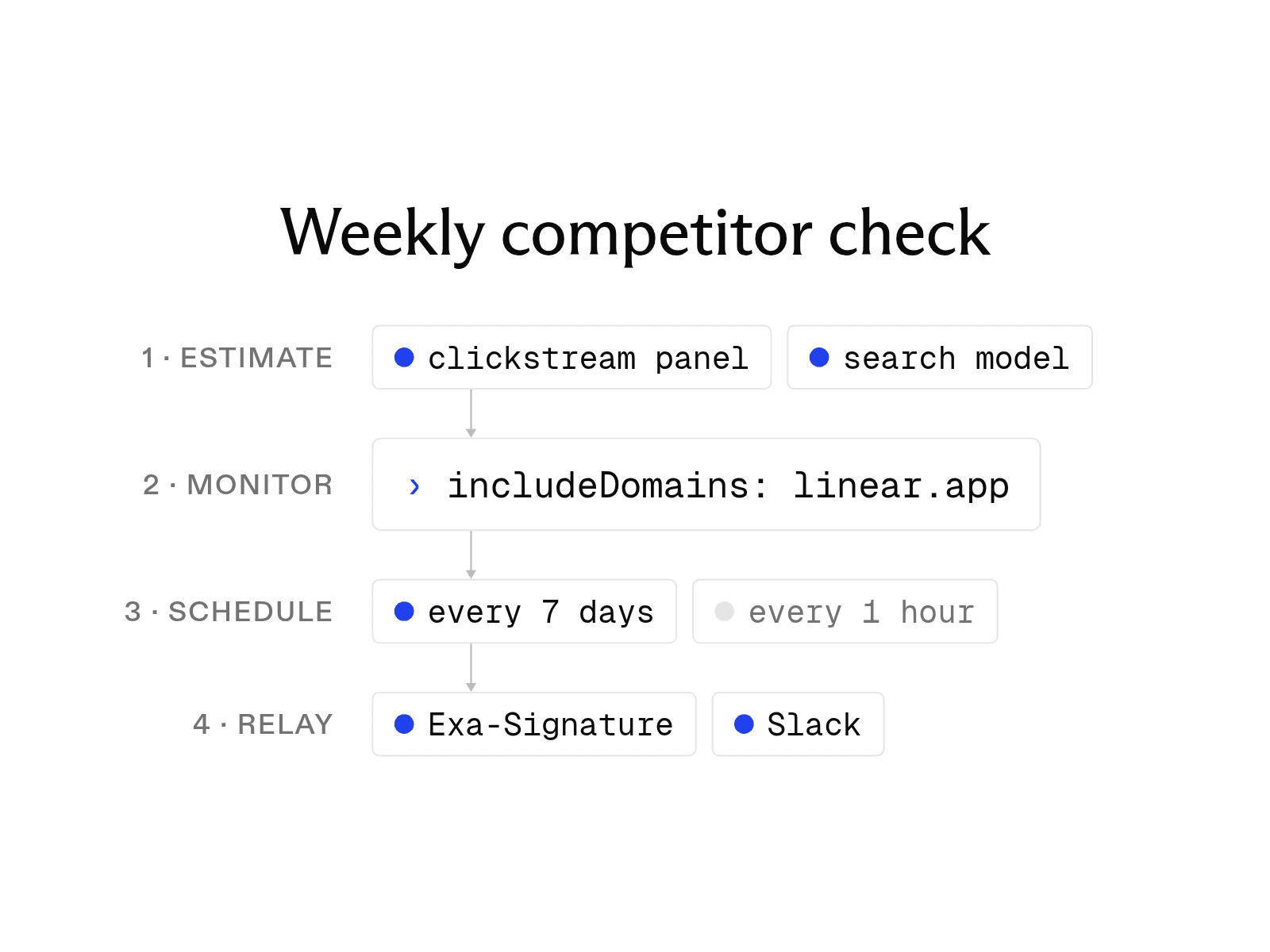
Our search index doesn't estimate traffic or track rankings; it finds the pages. Exa Monitors runs a search on a schedule and sends only new results to a webhook. With an output schema, each run returns fields such as competitor, change, and link, with sources in a separate grounding field. The base price is $2 per 1,000 requests, or about $0.10 a year for one weekly run. Results above 10 per run and AI page summaries cost extra.
Setting up a weekly check in Slack or email
Use one Monitor per competitor and a webhook that forwards new results to Slack or email.
-
Pick five competitors. That keeps the weekly message readable.
-
Pick the pages that matter: the domain, its pricing page, and its changelog. A Monitor catches new matching pages on the domain, not edits to existing ones, so fetch the pricing page and changelog weekly with the Contents API and compare the text with last week's copy. Contents costs $1 per 1,000 pages.
-
Set a schedule. Run each Monitor every seven days; the code below limits the search to one domain and returns highlights. The shortest interval is one hour, and a run may start up to 30 minutes late.
exa.monitors.trigger(monitor.id)runs it once without waiting.
from exa_py import Exa

exa = Exa()  # reads EXA_API_KEY
RELAY_URL = "https://httpbin.org/post"  # your public HTTPS endpoint

monitor = exa.monitors.create({
    "name": "Linear: product and pricing changes",
    "search": {
        "query": "Linear announces a new feature, pricing change, or product update",
        "includeDomains": ["linear.app"],
        "contents": {"highlights": True},
    },
    "trigger": {"type": "interval", "period": "7d"},
    "webhook": {"url": RELAY_URL, "events": ["monitor.run.completed"]},
})

print(monitor.id)
print(monitor.webhook_secret) # returned once; store it- Send the results. Point the Monitor's webhook at your delivery channel.
Slack (relay)
Slack incoming webhooks accept only their own format. In your hosted HTTPS handler, pass the raw request body and the Exa-Signature header to this relay function, then return its status code. Give the Monitor the handler's exact URL because Exa doesn't follow redirects.
import hashlib, hmac, json, os, time, urllib.request
SECRETS = os.environ["EXA_WEBHOOK_SECRETS"].split(",") # each Monitor's webhook_secret
SLACK_URL = os.environ["SLACK_WEBHOOK_URL"] # a Slack incoming webhook
def verified(body, header):
try:
parts = dict(p.strip().split("=", 1) for p in header.split(","))
timestamp = parts["t"]
signature = parts["v1"]
age = abs(time.time() - int(timestamp))
except (AttributeError, KeyError, ValueError):
return False
if age > 300 or not signature.isascii():
return False
signed = timestamp.encode() + b"." + body
return any(
hmac.compare_digest(hmac.new(s.encode(), signed, hashlib.sha256).hexdigest(), signature)
for s in SECRETS
)
def slack_text(value):
return value.replace("&", "&").replace("<", "<").replace(">", ">")
def relay(body, signature_header):
if not verified(body, signature_header):
return 401
run = json.loads(body)["data"]
output = run.get("output")
if run["status"] != "completed" or not output or not output["results"]:
return 200
links = []
for result in output["results"]:
url = slack_text(result["url"].replace("|", "%7C"))
title = slack_text(result["title"] or result["url"])
links.append(f"<{url}|{title}>")
summary = slack_text(output.get("content") or "")
text = "\n".join(part for part in [summary, *links] if part)
req = urllib.request.Request(
SLACK_URL, json.dumps({"text": text}).encode(),
{"Content-Type": "application/json"},
)
with urllib.request.urlopen(req, timeout=5):
return 200Email (no code, Zapier)
Point the Monitor's webhook at a Webhooks by Zapier catch hook and add a Gmail step.
- Review monthly. Compare the messages with traffic estimates, note which change came first, and revise any query that sent irrelevant pages.
FAQ
Can competitors see my analytics?
No. The tools see panel data and your public rankings. Your numbers are visible only if you connect your analytics to a program that publishes them, such as Similarweb's site verification.
What is the best free way to monitor a competitor?
Ahrefs, SE Ranking, and Similarweb each offer a free traffic checker. For tracking changes, Exa gives you $10 in monthly credits plus a one-time $10 bonus when you finish onboarding. At the base rate, $20 covers 10,000 Monitor runs. Additional results and AI page summaries use credits too. Start with the Monitors quickstart.
Cheers,
Keep learning
Browse all Learn articles →
The 12 best competitor analysis tools in 2026
November 24, 2026
How to monitor a website for changes: steps, tools, and APIs
October 19, 2026
The 12 best market and competitive intelligence tools in 2026
November 24, 2026
How to build a data pipeline for live web data
November 24, 2026
How to find all pages on a website: 7 methods
October 6, 2026
The 12 best media monitoring software tools in 2026
November 24, 2026