The 8 best enrichment APIs in 2026
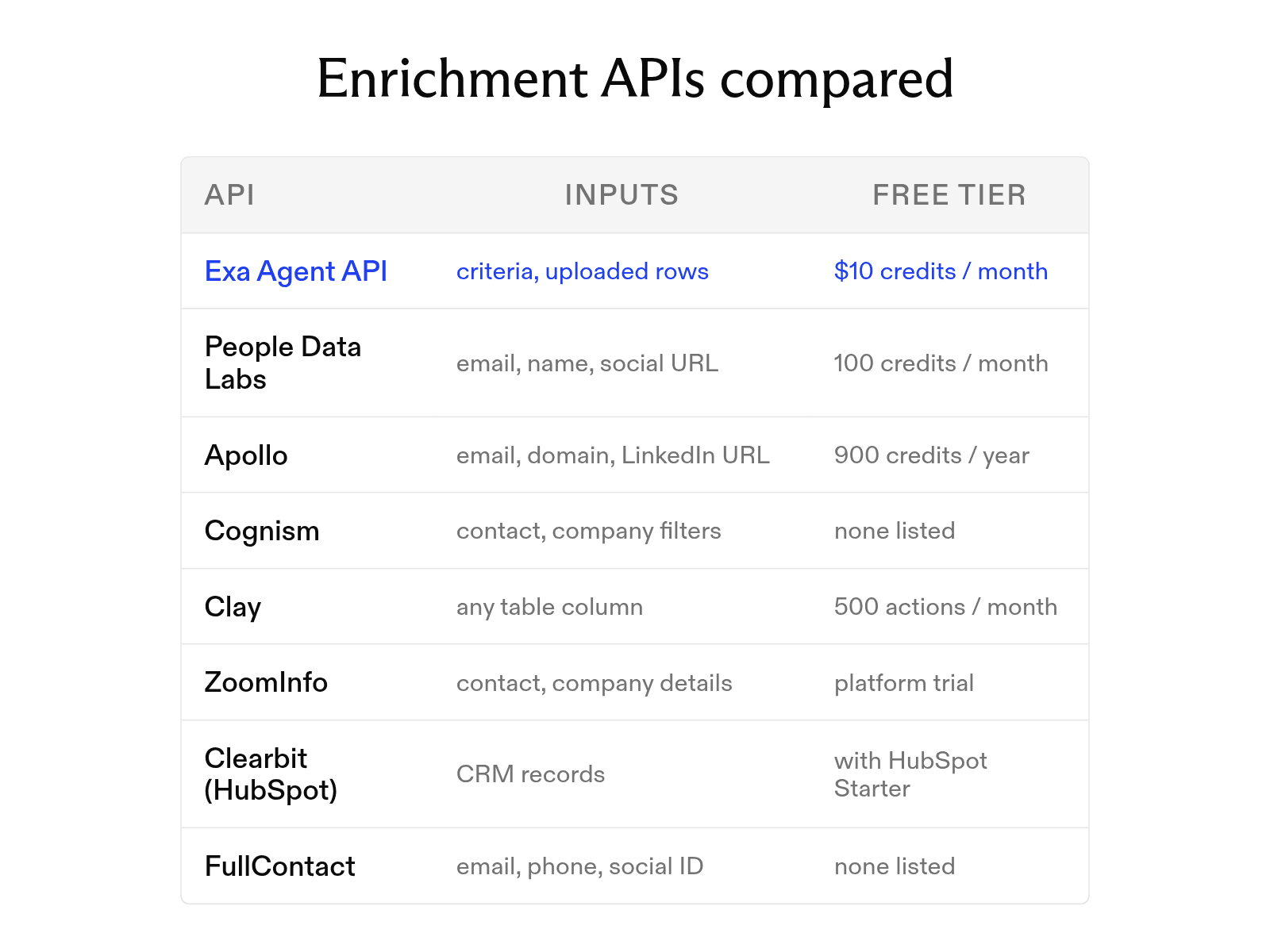

The right enrichment API can turn an email address or company domain into a detailed, useful record, but providers vary widely in coverage, accuracy, price, and developer experience.
At Exa, our Agent API builds lists and enriches them with fields you define.
This guide explains the lookup process, describes the data these APIs return, compares eight providers, starting with Exa's Agent API, and examines a sample response with a confidence score.
How an enrichment API works
Every enrichment call follows three steps, whether for one record or ten thousand.
- Input. You send the identifiers you have: for a person, usually a work email, full name plus company domain, or profile URL; for a company, often just a domain. More identifiers mean a better chance of a correct match.
- Lookup. The provider scores candidate records on how well they match the inputs and picks the best one, or returns nothing if none meets the threshold.
- Response. The matched record comes back as structured JSON, with fields such as job title, employee count, and industry. Most providers include a match score, and many charge only for matches.
What data enrichment APIs return
Enrichment data falls into three types, and most providers are strongest in one.
- Firmographics describe a company: legal name, industry, headcount and revenue ranges, headquarters, founding year, and funding. They drive account scoring and territory routing.
- Contact data describes a person: full name, job title, seniority, department, work email, phone numbers, and social profile URLs. It changes often and carries privacy obligations, so it costs more; several providers charge extra for mobile numbers.
- Technographics describe the tools a company uses, such as its CRM, analytics stack, or cloud provider. Software sellers use them to find companies running competing or complementary products.
Some providers add a fourth group: signals such as hiring activity, funding rounds, and job changes.
Reading a sample response and its confidence score
This illustrative response uses fields from the People Data Labs Person Enrichment API with fictional data.
{
  "status": 200,
  "likelihood": 8,
  "data": {
    "full_name": "jordan sample",
    "job_title": "director of revenue operations",
    "job_company_name": "example analytics",
    "job_company_website": "example.com",
    "job_company_size": "51-200",
    "work_email": "jordan.sample@example.com",
    "location_name": "denver, colorado, united states"
  }
}
likelihood is the confidence score: an integer from 1 to 10 on a logarithmic scale. A 2 means roughly a 10 to 30 percent chance the record matches the requested person. Set min_likelihood in the request to reject weak matches. Empty fields return null.
People Data Labs defines only the ends of the scale and one point near the bottom, so treat 8 as a strong match, not a documented threshold. Before writing the record to a CRM, check that the returned company website matches the email's domain. If not, it may be a job change; verify it manually.
The 8 enrichment APIs compared
Exa and Clay don't return a fixed record format: Exa fills fields you define, and Clay pulls from whichever providers you choose.
- Exa is us. Describe entities in plain language and define fields in a JSON schema; one run can find companies and then identify their decision-makers.
- People Data Labs is a developer-first person and company dataset with per-match billing and a published likelihood score on every response.
- Apollo pairs a sales platform with an API. Email data costs one credit, and a mobile number eight more. With waterfall enrichment on, a phone lookup typically costs 8 to 25 credits, and some vendor configurations charge even when nothing is found.
- Cognism sells API access and bulk delivery as a Data-as-a-Service add-on, with an emphasis on European coverage.
- Clay runs waterfall enrichment across more than 200 data providers from one table.
- ZoomInfo offers an Enterprise API with separate Search, Enrich, Bulk, and Webhooks endpoints.
- Clearbit now lives inside HubSpot, filling contact and company properties on CRM records.
- FullContact combines personal identifiers, such as email, phone, or social handle, into one person record.
| API | Inputs accepted | Data types | Real-time or batch | Free tier |
|---|---|---|---|---|
| Exa | Plain-language criteria, uploaded rows | Fields you define, with citations | Async runs | $10 in credits a month, plus a $10 onboarding bonus |
| People Data Labs | Name, email, phone, social URL, location, employer | Person, company, job postings | Real-time, bulk | 100 credits a month (contact data hidden) |
| Apollo | Name, email, domain, LinkedIn URL | Person, company | Real-time, bulk (10 per request) | 900 credits a year |
| Cognism | Contact and company filters | Person, company, signals | API, scheduled bulk delivery | None listed |
| Clay | Any column in a table | Whatever the chosen providers return | Table runs, webhooks (Growth plan) | 500 actions and 100 data credits a month (200 rows per table) |
| ZoomInfo | Known contact or company details | Person, company, intent | Real-time, bulk, webhooks | None (free platform trial) |
| Clearbit (HubSpot) | CRM contact and company records | Person, company | Inside HubSpot | None (included with paid HubSpot Starter plans and up) |
| FullContact | Email, phone, social ID, domain | Person, company | Real-time | None listed |
Real-time versus batch enrichment
Many providers support both. Choose by how fast you need results and how many records you have.
| Real-time | Batch | |
|---|---|---|
| Latency | Seconds per record, inside a form submit or a lead route | Minutes to hours for the whole file |
| Volume | One record, or a small group per call | Thousands to millions of rows per job |
| Cost | Per match, at list price | Volume discounts, often an annual contract |
| Typical use | Form shortening, lead routing, live scoring | CRM cleanup, market sizing, list refresh |
Real-time suits events like signups, demo requests, and new CRM records; batch suits existing datasets, like last year's trade-show list. Our Agent API sits between: runs are asynchronous, and you can stream events or poll until a run finishes.
How to use Exa for enrichment
Our Agent API lets you enrich records with fields specific to your business. For example, you could start with company domains and research each company’s pricing model, enterprise offering, and open engineering roles.
- Supply your records. Pass existing rows through
input.data, including identifiers such as company names and domains. - Describe the research. Tell the agent what to find and which sources to use. For example: “For each company, check its official website for a public pricing page, an enterprise plan, and current engineering vacancies.”
- Define the fields. Use
outputSchemato specify the JSON structure you need. Allow unknown values so missing evidence doesn’t force an answer. - Retrieve and review results. Poll or stream until the run finishes, then read the JSON in
output.structuredand inspect citations inoutput.groundingwhen provided.
This is useful when qualification depends on questions that require reading several pages. You can use the resulting fields to score accounts, prepare outreach, or update your CRM after reviewing the supporting evidence.
FAQ
What is the difference between data enrichment and lead generation?
Enrichment adds fields to records you have; lead generation finds new ones. Our Agent API can build a list from criteria and enrich each result in the same run.
Is it legal to enrich contact data?
Privacy laws such as GDPR govern personal data in business contact enrichment; the FCRA governs consumer data used for credit, employment, or housing decisions. Review each vendor's terms and consult counsel about your use case.
Cheers,
Keep learning
Browse all Learn articles →
The 6 best people search APIs in 2026
October 6, 2026
AI people search: how it works, and the best tools available in 2026
September 30, 2026
What is a deep research API, and how do you build with one?
October 20, 2026
The 14 best web scraping tools in 2026
October 20, 2026
The 10 best AI agent tools for 2026 (and how tool calling works)
October 19, 2026
The 10 best web crawler tools in 2026 organized by use case
October 19, 2026