

What is x402?
x402 is an open payment standard built on the HTTP402 Payment Required status code. It lets clients pay for API access per-request using USDC stablecoins, with no accounts, API keys, or subscriptions needed. Exa accepts standard per-request payments on Arc, Base, and Solana, and batched gasless Circle Gateway nanopayments on Arc, Base, and World Chain.
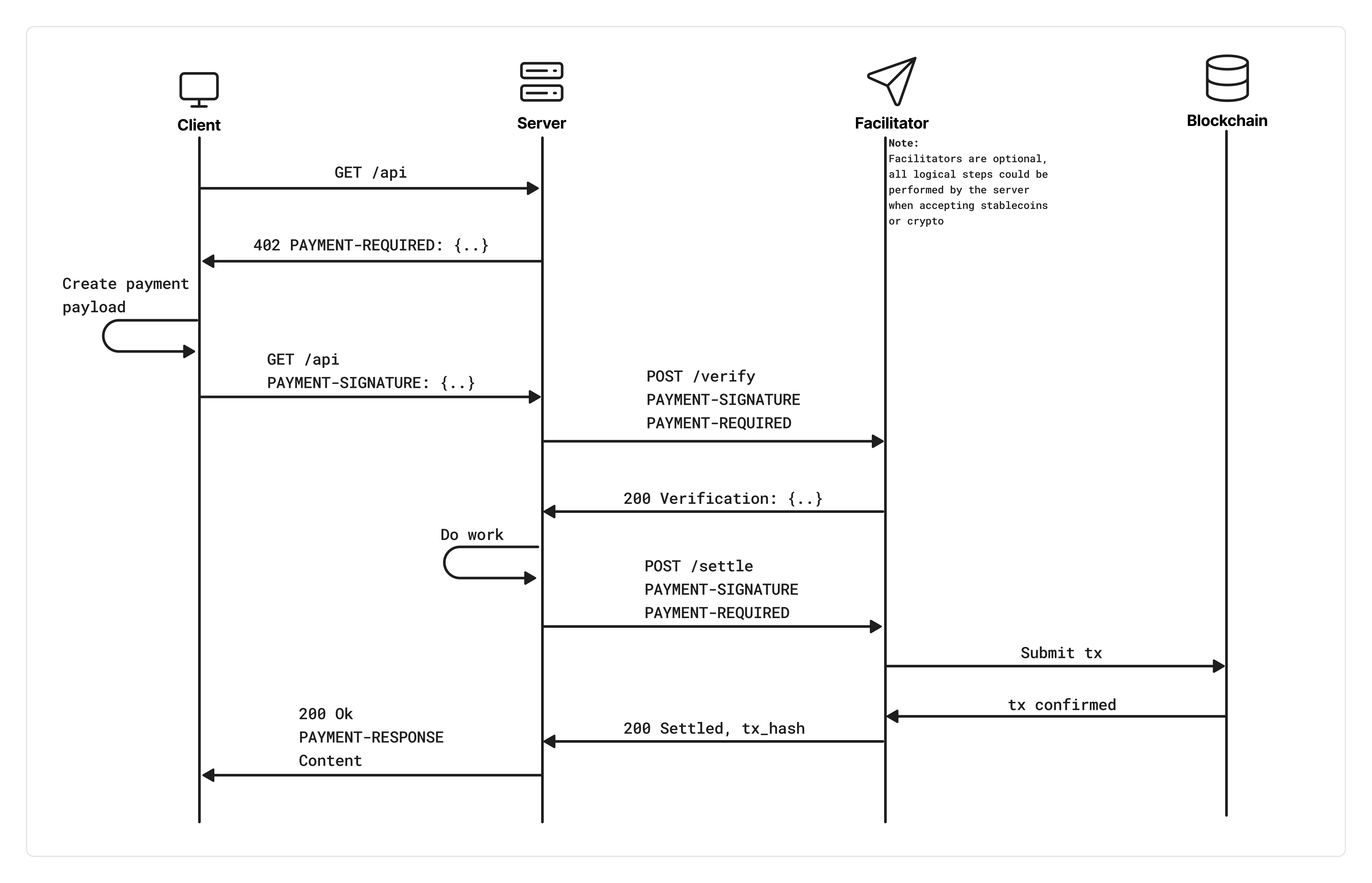
Exa supports x402 on two endpoints: /search and /contents. When you send a request without an API key or payment header, Exa responds with 402 and a PAYMENT-REQUIRED header containing pricing details and the supported payment networks. Your client signs a USDC payment, retries the request with a PAYMENT-SIGNATURE header, and receives the results once settlement confirms on-chain.
This is ideal for AI agents that need to autonomously pay for web search without pre-provisioned credentials.
x402 and API key access are independent. If your request includes an
x-api-key or Authorization: Bearer header, the normal API key billing flow is used and x402 is bypassed entirely.Supported endpoints
All other endpoints are not available via x402.
How it works
Step 1: Discovery
Send a request to a supported endpoint without an API key or payment header:402 response with a base64-encoded PAYMENT-REQUIRED header. Decoded, it looks like:
amount is in USDC atomic units (6 decimals), so "7000" = $0.007.
The client can pay with any advertised accepts entry it supports. Solana entries include facilitator-provided fields such as extra.feePayer; use the exact entry from the PAYMENT-REQUIRED header when constructing the payment.
Step 2: Pay and retry
Sign the payment with your wallet and re-send the request with aPAYMENT-SIGNATURE header containing your base64-encoded payment payload. The x402 client SDKs handle this automatically.
Step 3: Settlement
Exa verifies your payment signature with the facilitator, then starts on-chain settlement in parallel with processing your request. The response is held until settlement confirms. On success, you receive:- HTTP
200with your results - A
PAYMENT-RESPONSEheader containing the settlement receipt (base64-encoded), including the on-chain transaction hash
402 with both PAYMENT-RESPONSE (error details) and PAYMENT-REQUIRED (so you can retry).
Pricing
x402 uses the same bundled pricing as API key billing. Prices are calculated upfront based on your request parameters (not actual results returned).Search (/search)
Adding
contents.summary costs an additional $0.001 per result.
Contents (/contents)
Each content type is charged per page/URL:
If you request no content types (no
text, highlights, or summary), text is enabled by default.
Examples
Quickstart
Install dependencies
No install is needed for cURL, but you’ll need to handle the 402 challenge and payment signing manually. The SDK approach is recommended for production use.
Make a paid search request
cURL requires manual payment signing. For production, use the JavaScript or Python SDK which handles the full 402 > sign > retry flow automatically.
Discovery mode (no wallet needed)
Probe pricing without a wallet by sending unauthenticated requests:Payment networks
Exa advertises every currently supported network in theaccepts array. Choose the entry that matches your wallet and registered x402 client scheme.
All entries use 6-decimal USDC (
1000000 = $1.00). The token contract address for each entry is in its asset field. Arc and Base each appear twice: once as a standard per-request transfer and once as a Circle Gateway entry.
Circle Gateway nanopayments
Circle Gateway batches settlement so you do not send an on-chain transfer per request. Deposit USDC into a Gateway Wallet once. Each payment after that is a gasless signature that Circle verifies against your balance.- Signing domain. Gateway payments are EIP-3009 authorizations signed against the GatewayWallet contract’s EIP-712 domain, advertised via
extra.verifyingContract(plusextra.nameandextra.version), not the USDC token contract. Use Circle’s@circle-fin/x402-batchingclient, which reads that metadata. If you build the payment yourself, use the domain from the entry’sextra. - Validity window. Gateway entries set
maxTimeoutSecondsto about 7 days (Circle’s batch-settlement requirement) instead of 60 seconds. The authorization is still single-use. The facilitator enforces replay protection.
A Gateway-signed payment fails verification if the wallet has no Gateway balance. Use a standard
entry in that case.
Rate limits
x402 has its own rate limiting separate from API key limits:
After 5 unauthenticated
402 discovery requests from the same IP within 60 seconds, further requests return 429 Too Many Requests. Making a successful paid request decrements the counter.
Per-wallet QPS is enforced across all paid requests from the same wallet address.
Headers reference
Request headers
Response headers
Error codes
FAQ
Can I use x402 and an API key together?
Can I use x402 and an API key together?
If your request includes an
x-api-key header or Authorization: Bearer token, the API key flow takes priority and x402 is bypassed. They don’t stack. It’s one or the other per request.What happens if settlement fails after my request was processed?
What happens if settlement fails after my request was processed?
Your response is blocked. You receive a
402 with both PAYMENT-RESPONSE (containing the error) and PAYMENT-REQUIRED (so your client can retry). No results are returned until settlement succeeds.Why is numResults capped at 10?
Why is numResults capped at 10?
x402 requests enforce a maximum of 10 results per search. If you need more, use the API key flow.
Should I use a standard entry or the Circle Gateway entry?
Should I use a standard entry or the Circle Gateway entry?
Use a standard entry for occasional requests from a funded USDC wallet: no setup, one on-chain
settlement per request. Use Circle Gateway when you make many requests (agents, pipelines):
deposit once, then every payment is a gasless signature from your Gateway balance. Both charge
the same Exa price.
Which wallets are supported?
Which wallets are supported?
Any EVM-compatible wallet that can sign EIP-712 typed data on Arc, Base, or World Chain, or a Solana wallet supported by the x402 SVM client for
solana:5eykt4UsFv8P8NJdTREpY1vzqKqZKvdp. The x402 SDK supports viem, ethers, Coinbase Wallet signers, and Solana SVM signers. Gateway payments use Circle’s @circle-fin/x402-batching client. For EVM-based AI agents, Coinbase Agentic Wallets offer TEE-isolated key management so your agent never handles raw private keys directly.Resources
- x402 protocol docs: full protocol specification
- x402 GitHub: open-source SDKs and examples
- @x402/fetch on npm: fetch wrapper for automatic payment handling
- @x402/svm on npm: Solana/SVM exact payment support
- Circle Gateway nanopayments: batched gasless payments from a Gateway balance
- @circle-fin/x402-batching on npm: buyer client for the Circle Gateway entries
- Exa Search API guide: full search parameter reference
- Exa Contents API guide: full contents parameter reference