> ## Documentation Index
> Fetch the complete documentation index at: https://exa.ai/docs/llms.txt
> Use this file to discover all available pages before exploring further.
# Exclude Results
> Avoid duplicate results in your new searches by excluding URLs from previous Websets or CSV files.
## Overview
The Exclude Results feature ensures you don't get duplicate results when creating new searches. By specifying URLs to exclude based on previous Websets or uploaded CSV files, you can focus on discovering fresh, unique results that complement your existing data.
## How it works
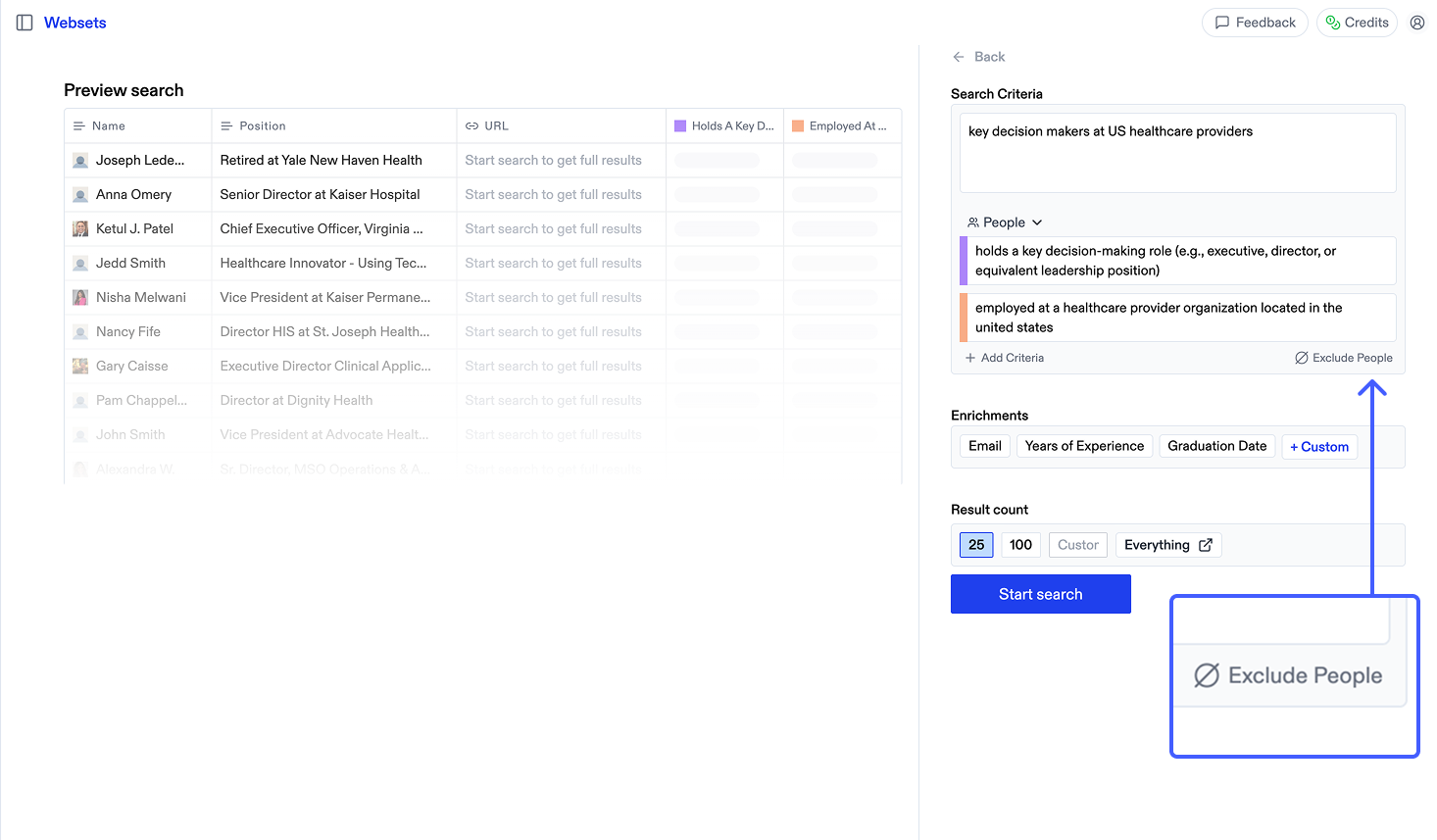 1. Begin creating a new Webset
2. Below the criteria in the sidepanel, click "Exclude"
3. Select from past Websets or upload a CSV with URLs to exclude. You can select multiple sources to exclude from.
4. Start your search, with only new results that don't match your exclusions
The maximum number of results you can exclude is determined by your plan.
1. Begin creating a new Webset
2. Below the criteria in the sidepanel, click "Exclude"
3. Select from past Websets or upload a CSV with URLs to exclude. You can select multiple sources to exclude from.
4. Start your search, with only new results that don't match your exclusions
The maximum number of results you can exclude is determined by your plan.
## When to use exclusions
* Finding leads that aren't already in your CRM
* Following up on previous searches with refined criteria
* Excluding results you already know about