> ## Documentation Index
> Fetch the complete documentation index at: https://exa.ai/docs/llms.txt
> Use this file to discover all available pages before exploring further.
# Pay with x402
> Use Exa's Search and Contents APIs without an API key. Pay per request with USDC via the x402 protocol.
## What is x402?
[x402](https://x402.org) is an open payment standard built on the HTTP `402 Payment Required` status code. It lets clients pay for API access per-request using USDC stablecoins, with no accounts, API keys, or subscriptions needed.
Exa supports x402 on two endpoints: **`/search`** and **`/contents`**. When you send a request without an API key or payment header, Exa responds with `402` and a `PAYMENT-REQUIRED` header containing pricing details. Your client signs a USDC payment, retries the request with a `PAYMENT-SIGNATURE` header, and receives the results once settlement confirms on-chain.
This is ideal for **AI agents** that need to autonomously pay for web search without pre-provisioned credentials.
x402 and API key access are independent. If your request includes an `x-api-key` or `Authorization: Bearer` header, the normal API key billing flow is used and x402 is bypassed entirely.
## Supported endpoints
| Endpoint | Method | Description |
| ----------- | ------ | --------------------------------------------------------------------------------------------------- |
| `/search` | POST | Web search with all search types (`instant`, `auto`, `fast`, `deep`, `deep-lite`, `deep-reasoning`) |
| `/contents` | POST | Content retrieval by URL or document ID |
All other endpoints are **not** available via x402.
## How it works
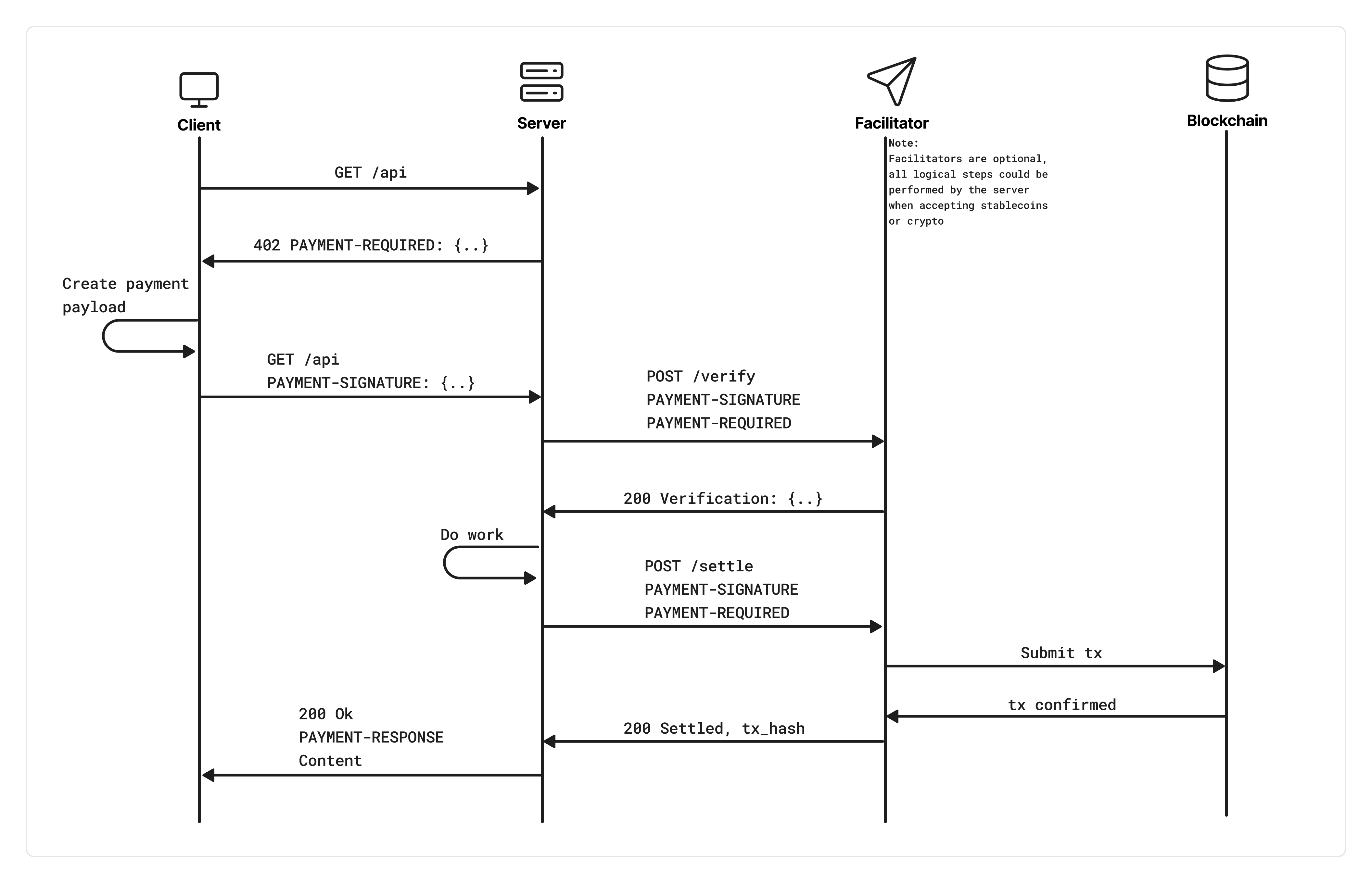 ### Step 1: Discovery
Send a request to a supported endpoint without an API key or payment header:
```bash theme={null}
curl -X POST "https://api.exa.ai/search" \
-H "Content-Type: application/json" \
-d '{"query": "best machine learning frameworks", "numResults": 5}'
```
You'll receive a `402` response with a base64-encoded `PAYMENT-REQUIRED` header. Decoded, it looks like:
```json theme={null}
{
"x402Version": 2,
"resource": {
"url": "https://api.exa.ai/search",
"description": "Exa /search endpoint"
},
"accepts": [
{
"scheme": "exact",
"network": "eip155:8453",
"amount": "7000",
"asset": "0x833589fCD6eDb6E08f4c7C32D4f71b54bdA02913",
"payTo": "0x...",
"maxTimeoutSeconds": 60,
"extra": { "name": "USD Coin", "version": "2" }
}
]
}
```
The `amount` is in USDC atomic units (6 decimals), so `"7000"` = \$0.007.
### Step 2: Pay and retry
Sign the payment with your wallet and re-send the request with a `PAYMENT-SIGNATURE` header containing your base64-encoded payment payload. The x402 client SDKs handle this automatically.
### Step 3: Settlement
Exa verifies your payment signature with the facilitator, then starts on-chain settlement **in parallel** with processing your request. The response is held until settlement confirms. On success, you receive:
* HTTP `200` with your results
* A `PAYMENT-RESPONSE` header containing the settlement receipt (base64-encoded), including the on-chain transaction hash
If settlement fails, you get `402` with both `PAYMENT-RESPONSE` (error details) and `PAYMENT-REQUIRED` (so you can retry).
## Pricing
x402 uses the same bundled pricing as API key billing. Prices are calculated upfront based on your request parameters (not actual results returned).
### Search (`/search`)
| Search type | Base price (up to 10 results) | Per result beyond 10 |
| ------------------------- | ----------------------------- | -------------------- |
| `instant`, `auto`, `fast` | \$0.007 / request | N/A (capped at 10) |
| `deep-lite` | \$0.012 / request | N/A (capped at 10) |
| `deep` | \$0.012 / request | N/A (capped at 10) |
| `deep-reasoning` | \$0.015 / request | N/A (capped at 10) |
Adding `contents.summary` costs an additional **\$0.001 per result**.
x402 requests are capped at **10 results maximum**. If you request more than 10, `numResults` is silently clamped to 10 and pricing is based on 10 results.
### Contents (`/contents`)
Each content type is charged per page/URL:
| Content type | Price per page |
| ------------ | -------------- |
| `text` | \$0.001 |
| `highlights` | \$0.001 |
| `summary` | \$0.001 |
If you request no content types (no `text`, `highlights`, or `summary`), `text` is enabled by default.
### Examples
| Request | Price | USDC atomic |
| -------------------------------------------------- | ------- | ----------- |
| `/search` with 10 results, `type: "auto"` | \$0.007 | 7000 |
| `/search` with 5 results, `type: "fast"` | \$0.007 | 7000 |
| `/search` with 3 results + summary, `type: "auto"` | \$0.010 | 10000 |
| `/search` with 10 results, `type: "deep-lite"` | \$0.012 | 12000 |
| `/search` with 10 results, `type: "deep"` | \$0.012 | 12000 |
| `/contents` for 2 URLs with `text: true` | \$0.002 | 2000 |
| `/contents` for 1 URL with `text` + `summary` | \$0.002 | 2000 |
## Quickstart
### Install dependencies
```bash theme={null}
npm install @x402/fetch @x402/core @x402/evm viem
```
```bash theme={null}
pip install "x402[requests]" eth-account
```
No install needed, but you'll need to handle the 402 challenge and payment signing manually. The SDK approach is recommended for production use.
Don't want to manage private keys? [Coinbase Agentic Wallets](https://docs.cdp.coinbase.com/agent-kit/core-concepts/wallet-management) provide TEE-isolated key management for AI agents. Your agent never sees the private key. The wallet is viem-compatible, so it works directly with `@x402/fetch`.
### Make a paid search request
```typescript theme={null}
import { wrapFetchWithPayment } from "@x402/fetch";
import { x402Client, x402HTTPClient } from "@x402/core/client";
import { ExactEvmScheme } from "@x402/evm/exact/client";
import { privateKeyToAccount } from "viem/accounts";
const signer = privateKeyToAccount(process.env.WALLET_PRIVATE_KEY as `0x${string}`);
const client = new x402Client();
client.register("eip155:*", new ExactEvmScheme(signer));
const fetchWithPayment = wrapFetchWithPayment(fetch, client);
const response = await fetchWithPayment("https://api.exa.ai/search", {
method: "POST",
headers: { "Content-Type": "application/json" },
body: JSON.stringify({
query: "best machine learning frameworks",
numResults: 5,
}),
});
const data = await response.json();
console.log(data.results);
// Check settlement receipt
const httpClient = new x402HTTPClient(client);
const receipt = httpClient.getPaymentSettleResponse(
(name) => response.headers.get(name)
);
console.log("Transaction:", receipt?.transaction);
```
```python theme={null}
import os
from eth_account import Account
from x402.mechanisms.evm import EthAccountSigner
from x402.clients.requests import x402RequestsClient
account = Account.from_key(os.environ["WALLET_PRIVATE_KEY"])
signer = EthAccountSigner(account)
client = x402RequestsClient(signer)
response = client.post("https://api.exa.ai/search", json={
"query": "best machine learning frameworks",
"numResults": 5,
})
data = response.json()
for result in data["results"]:
print(result["url"], result["title"])
```
```bash theme={null}
# Step 1: Discovery, get pricing info
curl -s -o /dev/null -w "%{http_code}" -D - \
-X POST "https://api.exa.ai/search" \
-H "Content-Type: application/json" \
-d '{"query": "best machine learning frameworks", "numResults": 5}'
# Returns 402 with PAYMENT-REQUIRED header containing base64-encoded pricing
# Step 2: Sign the payment with your wallet (use the SDK for this)
# Step 3: Retry with payment signature
curl -X POST "https://api.exa.ai/search" \
-H "Content-Type: application/json" \
-H "PAYMENT-SIGNATURE: " \
-d '{"query": "best machine learning frameworks", "numResults": 5}'
# Returns 200 with results + PAYMENT-RESPONSE header (settlement receipt)
```
cURL requires manual payment signing. For production, use the JavaScript or Python SDK which handles the full 402 > sign > retry flow automatically.
### Discovery mode (no wallet needed)
Probe pricing without a wallet by sending unauthenticated requests:
```typescript theme={null}
const res = await fetch("https://api.exa.ai/search", {
method: "POST",
headers: { "Content-Type": "application/json" },
body: JSON.stringify({ query: "test query", numResults: 3 }),
});
// res.status === 402
const paymentRequired = JSON.parse(
atob(res.headers.get("PAYMENT-REQUIRED")!)
);
console.log("Price:", paymentRequired.accepts[0].amount, "USDC atomic units");
```
```python theme={null}
import base64, json, requests
res = requests.post("https://api.exa.ai/search", json={
"query": "test query",
"numResults": 3,
})
# res.status_code == 402
pricing = json.loads(base64.b64decode(res.headers["PAYMENT-REQUIRED"]))
print("Price:", pricing["accepts"][0]["amount"], "USDC atomic units")
```
```bash theme={null}
curl -s -D - -X POST "https://api.exa.ai/search" \
-H "Content-Type: application/json" \
-d '{"query": "test query", "numResults": 3}'
# Look for the PAYMENT-REQUIRED header in the 402 response
# Decode it: echo "" | base64 -d | jq .
```
## Payment network
| Property | Value |
| ----------------- | -------------------------------------------- |
| Network | Base (Ethereum L2) |
| Chain ID (CAIP-2) | `eip155:8453` |
| Token | USDC |
| USDC contract | `0x833589fCD6eDb6E08f4c7C32D4f71b54bdA02913` |
| USDC decimals | 6 (so `1000000` = \$1.00) |
| Settlement | On-chain via x402 facilitator |
## Rate limits
x402 has its own rate limiting separate from API key limits:
| Limit | Threshold | Window |
| ---------------------------------- | ------------------ | ---------- |
| Unpaid discovery requests (per IP) | 5 requests | 60 seconds |
| Paid requests (per wallet) | 10 requests/second | 1 second |
After 5 unauthenticated `402` discovery requests from the same IP within 60 seconds, further requests return `429 Too Many Requests`. Making a successful paid request decrements the counter.
Per-wallet QPS is enforced across all paid requests from the same wallet address.
## Headers reference
### Request headers
| Header | Description |
| ------------------- | ---------------------------------------- |
| `PAYMENT-SIGNATURE` | Base64-encoded payment payload (x402 v2) |
| `payment-signature` | Alias (also accepted) |
| `x-payment` | Legacy alias (v1 compatibility) |
### Response headers
| Header | When | Description |
| ------------------ | -------------------------------------- | ----------------------------------------------------------------------------- |
| `PAYMENT-REQUIRED` | `402` responses | Base64-encoded `PaymentRequired` object with pricing and payment instructions |
| `PAYMENT-RESPONSE` | `200` or `402` (after payment attempt) | Base64-encoded settlement result with transaction hash or error |
## Error codes
| Status | Tag | Description |
| ------ | -------------------------- | ------------------------------------------------------------------ |
| `402` | `X402_PAYMENT_REQUIRED` | No payment provided. Includes pricing in `PAYMENT-REQUIRED` header |
| `402` | `X402_VERIFICATION_FAILED` | Payment signature did not pass facilitator verification |
| `400` | `X402_INVALID_SIGNATURE` | Malformed or unparseable payment signature |
| `429` | `X402_TOO_MANY_UNPAID` | Too many unpaid discovery requests from this IP |
| `429` | `X402_WALLET_RATE_LIMITED` | Wallet exceeded 10 requests/second |
| `500` | `X402_INTERNAL_ERROR` | Server-side error generating payment requirements |
## FAQ
If your request includes an `x-api-key` header or `Authorization: Bearer` token, the API key flow takes priority and x402 is bypassed. They don't stack. It's one or the other per request.
Your response is blocked. You receive a `402` with both `PAYMENT-RESPONSE` (containing the error) and `PAYMENT-REQUIRED` (so your client can retry). No results are returned until settlement succeeds.
x402 requests enforce a maximum of 10 results per search. If you need more, use the API key flow with a paid plan.
Any EVM-compatible wallet that can sign EIP-712 typed data on Base. The x402 SDK supports `viem`, `ethers`, and Coinbase Wallet signers. For AI agents, [Coinbase Agentic Wallets](https://docs.cdp.coinbase.com/agent-kit/core-concepts/wallet-management) offer TEE-isolated key management so your agent never handles raw private keys directly.
## Resources
* [x402 protocol docs](https://docs.x402.org): full protocol specification
* [x402 GitHub](https://github.com/coinbase/x402): open-source SDKs and examples
* [@x402/fetch on npm](https://www.npmjs.com/package/@x402/fetch): fetch wrapper for automatic payment handling
* [Exa Search API guide](/reference/search-api-guide): full search parameter reference
* [Exa Contents API guide](/reference/contents-api-guide): full contents parameter reference
### Step 1: Discovery
Send a request to a supported endpoint without an API key or payment header:
```bash theme={null}
curl -X POST "https://api.exa.ai/search" \
-H "Content-Type: application/json" \
-d '{"query": "best machine learning frameworks", "numResults": 5}'
```
You'll receive a `402` response with a base64-encoded `PAYMENT-REQUIRED` header. Decoded, it looks like:
```json theme={null}
{
"x402Version": 2,
"resource": {
"url": "https://api.exa.ai/search",
"description": "Exa /search endpoint"
},
"accepts": [
{
"scheme": "exact",
"network": "eip155:8453",
"amount": "7000",
"asset": "0x833589fCD6eDb6E08f4c7C32D4f71b54bdA02913",
"payTo": "0x...",
"maxTimeoutSeconds": 60,
"extra": { "name": "USD Coin", "version": "2" }
}
]
}
```
The `amount` is in USDC atomic units (6 decimals), so `"7000"` = \$0.007.
### Step 2: Pay and retry
Sign the payment with your wallet and re-send the request with a `PAYMENT-SIGNATURE` header containing your base64-encoded payment payload. The x402 client SDKs handle this automatically.
### Step 3: Settlement
Exa verifies your payment signature with the facilitator, then starts on-chain settlement **in parallel** with processing your request. The response is held until settlement confirms. On success, you receive:
* HTTP `200` with your results
* A `PAYMENT-RESPONSE` header containing the settlement receipt (base64-encoded), including the on-chain transaction hash
If settlement fails, you get `402` with both `PAYMENT-RESPONSE` (error details) and `PAYMENT-REQUIRED` (so you can retry).
## Pricing
x402 uses the same bundled pricing as API key billing. Prices are calculated upfront based on your request parameters (not actual results returned).
### Search (`/search`)
| Search type | Base price (up to 10 results) | Per result beyond 10 |
| ------------------------- | ----------------------------- | -------------------- |
| `instant`, `auto`, `fast` | \$0.007 / request | N/A (capped at 10) |
| `deep-lite` | \$0.012 / request | N/A (capped at 10) |
| `deep` | \$0.012 / request | N/A (capped at 10) |
| `deep-reasoning` | \$0.015 / request | N/A (capped at 10) |
Adding `contents.summary` costs an additional **\$0.001 per result**.
x402 requests are capped at **10 results maximum**. If you request more than 10, `numResults` is silently clamped to 10 and pricing is based on 10 results.
### Contents (`/contents`)
Each content type is charged per page/URL:
| Content type | Price per page |
| ------------ | -------------- |
| `text` | \$0.001 |
| `highlights` | \$0.001 |
| `summary` | \$0.001 |
If you request no content types (no `text`, `highlights`, or `summary`), `text` is enabled by default.
### Examples
| Request | Price | USDC atomic |
| -------------------------------------------------- | ------- | ----------- |
| `/search` with 10 results, `type: "auto"` | \$0.007 | 7000 |
| `/search` with 5 results, `type: "fast"` | \$0.007 | 7000 |
| `/search` with 3 results + summary, `type: "auto"` | \$0.010 | 10000 |
| `/search` with 10 results, `type: "deep-lite"` | \$0.012 | 12000 |
| `/search` with 10 results, `type: "deep"` | \$0.012 | 12000 |
| `/contents` for 2 URLs with `text: true` | \$0.002 | 2000 |
| `/contents` for 1 URL with `text` + `summary` | \$0.002 | 2000 |
## Quickstart
### Install dependencies
```bash theme={null}
npm install @x402/fetch @x402/core @x402/evm viem
```
```bash theme={null}
pip install "x402[requests]" eth-account
```
No install needed, but you'll need to handle the 402 challenge and payment signing manually. The SDK approach is recommended for production use.
Don't want to manage private keys? [Coinbase Agentic Wallets](https://docs.cdp.coinbase.com/agent-kit/core-concepts/wallet-management) provide TEE-isolated key management for AI agents. Your agent never sees the private key. The wallet is viem-compatible, so it works directly with `@x402/fetch`.
### Make a paid search request
```typescript theme={null}
import { wrapFetchWithPayment } from "@x402/fetch";
import { x402Client, x402HTTPClient } from "@x402/core/client";
import { ExactEvmScheme } from "@x402/evm/exact/client";
import { privateKeyToAccount } from "viem/accounts";
const signer = privateKeyToAccount(process.env.WALLET_PRIVATE_KEY as `0x${string}`);
const client = new x402Client();
client.register("eip155:*", new ExactEvmScheme(signer));
const fetchWithPayment = wrapFetchWithPayment(fetch, client);
const response = await fetchWithPayment("https://api.exa.ai/search", {
method: "POST",
headers: { "Content-Type": "application/json" },
body: JSON.stringify({
query: "best machine learning frameworks",
numResults: 5,
}),
});
const data = await response.json();
console.log(data.results);
// Check settlement receipt
const httpClient = new x402HTTPClient(client);
const receipt = httpClient.getPaymentSettleResponse(
(name) => response.headers.get(name)
);
console.log("Transaction:", receipt?.transaction);
```
```python theme={null}
import os
from eth_account import Account
from x402.mechanisms.evm import EthAccountSigner
from x402.clients.requests import x402RequestsClient
account = Account.from_key(os.environ["WALLET_PRIVATE_KEY"])
signer = EthAccountSigner(account)
client = x402RequestsClient(signer)
response = client.post("https://api.exa.ai/search", json={
"query": "best machine learning frameworks",
"numResults": 5,
})
data = response.json()
for result in data["results"]:
print(result["url"], result["title"])
```
```bash theme={null}
# Step 1: Discovery, get pricing info
curl -s -o /dev/null -w "%{http_code}" -D - \
-X POST "https://api.exa.ai/search" \
-H "Content-Type: application/json" \
-d '{"query": "best machine learning frameworks", "numResults": 5}'
# Returns 402 with PAYMENT-REQUIRED header containing base64-encoded pricing
# Step 2: Sign the payment with your wallet (use the SDK for this)
# Step 3: Retry with payment signature
curl -X POST "https://api.exa.ai/search" \
-H "Content-Type: application/json" \
-H "PAYMENT-SIGNATURE: " \
-d '{"query": "best machine learning frameworks", "numResults": 5}'
# Returns 200 with results + PAYMENT-RESPONSE header (settlement receipt)
```
cURL requires manual payment signing. For production, use the JavaScript or Python SDK which handles the full 402 > sign > retry flow automatically.
### Discovery mode (no wallet needed)
Probe pricing without a wallet by sending unauthenticated requests:
```typescript theme={null}
const res = await fetch("https://api.exa.ai/search", {
method: "POST",
headers: { "Content-Type": "application/json" },
body: JSON.stringify({ query: "test query", numResults: 3 }),
});
// res.status === 402
const paymentRequired = JSON.parse(
atob(res.headers.get("PAYMENT-REQUIRED")!)
);
console.log("Price:", paymentRequired.accepts[0].amount, "USDC atomic units");
```
```python theme={null}
import base64, json, requests
res = requests.post("https://api.exa.ai/search", json={
"query": "test query",
"numResults": 3,
})
# res.status_code == 402
pricing = json.loads(base64.b64decode(res.headers["PAYMENT-REQUIRED"]))
print("Price:", pricing["accepts"][0]["amount"], "USDC atomic units")
```
```bash theme={null}
curl -s -D - -X POST "https://api.exa.ai/search" \
-H "Content-Type: application/json" \
-d '{"query": "test query", "numResults": 3}'
# Look for the PAYMENT-REQUIRED header in the 402 response
# Decode it: echo "" | base64 -d | jq .
```
## Payment network
| Property | Value |
| ----------------- | -------------------------------------------- |
| Network | Base (Ethereum L2) |
| Chain ID (CAIP-2) | `eip155:8453` |
| Token | USDC |
| USDC contract | `0x833589fCD6eDb6E08f4c7C32D4f71b54bdA02913` |
| USDC decimals | 6 (so `1000000` = \$1.00) |
| Settlement | On-chain via x402 facilitator |
## Rate limits
x402 has its own rate limiting separate from API key limits:
| Limit | Threshold | Window |
| ---------------------------------- | ------------------ | ---------- |
| Unpaid discovery requests (per IP) | 5 requests | 60 seconds |
| Paid requests (per wallet) | 10 requests/second | 1 second |
After 5 unauthenticated `402` discovery requests from the same IP within 60 seconds, further requests return `429 Too Many Requests`. Making a successful paid request decrements the counter.
Per-wallet QPS is enforced across all paid requests from the same wallet address.
## Headers reference
### Request headers
| Header | Description |
| ------------------- | ---------------------------------------- |
| `PAYMENT-SIGNATURE` | Base64-encoded payment payload (x402 v2) |
| `payment-signature` | Alias (also accepted) |
| `x-payment` | Legacy alias (v1 compatibility) |
### Response headers
| Header | When | Description |
| ------------------ | -------------------------------------- | ----------------------------------------------------------------------------- |
| `PAYMENT-REQUIRED` | `402` responses | Base64-encoded `PaymentRequired` object with pricing and payment instructions |
| `PAYMENT-RESPONSE` | `200` or `402` (after payment attempt) | Base64-encoded settlement result with transaction hash or error |
## Error codes
| Status | Tag | Description |
| ------ | -------------------------- | ------------------------------------------------------------------ |
| `402` | `X402_PAYMENT_REQUIRED` | No payment provided. Includes pricing in `PAYMENT-REQUIRED` header |
| `402` | `X402_VERIFICATION_FAILED` | Payment signature did not pass facilitator verification |
| `400` | `X402_INVALID_SIGNATURE` | Malformed or unparseable payment signature |
| `429` | `X402_TOO_MANY_UNPAID` | Too many unpaid discovery requests from this IP |
| `429` | `X402_WALLET_RATE_LIMITED` | Wallet exceeded 10 requests/second |
| `500` | `X402_INTERNAL_ERROR` | Server-side error generating payment requirements |
## FAQ
If your request includes an `x-api-key` header or `Authorization: Bearer` token, the API key flow takes priority and x402 is bypassed. They don't stack. It's one or the other per request.
Your response is blocked. You receive a `402` with both `PAYMENT-RESPONSE` (containing the error) and `PAYMENT-REQUIRED` (so your client can retry). No results are returned until settlement succeeds.
x402 requests enforce a maximum of 10 results per search. If you need more, use the API key flow with a paid plan.
Any EVM-compatible wallet that can sign EIP-712 typed data on Base. The x402 SDK supports `viem`, `ethers`, and Coinbase Wallet signers. For AI agents, [Coinbase Agentic Wallets](https://docs.cdp.coinbase.com/agent-kit/core-concepts/wallet-management) offer TEE-isolated key management so your agent never handles raw private keys directly.
## Resources
* [x402 protocol docs](https://docs.x402.org): full protocol specification
* [x402 GitHub](https://github.com/coinbase/x402): open-source SDKs and examples
* [@x402/fetch on npm](https://www.npmjs.com/package/@x402/fetch): fetch wrapper for automatic payment handling
* [Exa Search API guide](/reference/search-api-guide): full search parameter reference
* [Exa Contents API guide](/reference/contents-api-guide): full contents parameter reference