> ## Documentation Index
> Fetch the complete documentation index at: https://exa.ai/docs/llms.txt
> Use this file to discover all available pages before exploring further.
# How to Evaluate Exa Search
> Comprehensive guide to benchmarking Exa's search API: methodology, optimal settings, datasets, and quality-latency tradeoffs
## Overview
Evaluating search APIs requires careful methodology to ensure fair, reproducible comparisons. This guide provides a framework for assessing Exa's search capabilities across multiple dimensions:
* **Retrieval Quality**: Accuracy and relevance of returned results
* **Latency**: Response time from query to results
* **Freshness**: Ability to retrieve up-to-date information
* **Cost Efficiency**: Value delivered per API call
* **Agentic Suitability**: Performance in multi-step reasoning workflows
Exa is designed to excel across different use cases:
* **Deep Research**: Multi-hop queries requiring comprehensive context and query expansion
* **Agentic Workflows**: Complex tasks involving multiple search iterations and reasoning steps
* **Low-Latency QA**: Fast factual question-answering for real-time applications
* **Semantic Discovery**: Finding conceptually related content beyond keyword matching
### Best Practice: Start with Defaults
**The most important recommendation for fair evaluation: use Exa's default settings.**
Adding restrictive parameters (date filters, domain restrictions, text inclusion/exclusion) often causes agents to over-optimize in non-meaningful ways, unnecessarily limiting results and reducing quality without providing valuable insights. Unless your evaluation specifically tests a filtered use case, avoid adding constraints that don't reflect real-world usage.
**Recommended minimal configuration:**
```python theme={null}
# Option 1: Request highlights (recommended default for evals)
exa.search(
query,
type="auto", # or "fast" (for `Deep`, see Option 3)
num_results=10,
contents={"highlights": True}
)
# Option 2 (Deprecated): Use context string for RAG
# Note: The `context` parameter is deprecated. Use `text` or `highlights` instead.
# exa.search(
# query,
# type="deep",
# additional_queries=["variation 1", "variation 2"],
# num_results=10,
# contents={"context": {"max_characters": 20000}} # Deprecated
# )
# Option 3: Use full text (may result in very long content)
# exa.search(
# query,
# type="auto",
# num_results=10,
# contents={"text": True}
# )
```
Use `contents={"highlights": True}` as the default for evals — it's the highest-quality option for comparing across queries. Only add additional parameters (date filters, domain restrictions, etc.) when they're essential to your specific evaluation objective.
### Compare Within Latency Classes
**Critical: Always find the closest competitor in terms of P50 latency for meaningful comparisons.**
Don't compare systems with vastly different latency profiles — a 500ms API serves different use cases than a 5000ms API. Instead, benchmark within similar latency ranges:
* **For Exa Fast (\<500ms)**: Compare to other sub-1s APIs with similar latency
* **For Exa Auto (\~1s)**: Compare to mid-latency systems (800ms-1500ms)
* **For Exa Deep (>2s)**: Compare to other multi-second agentic/research systems
Comparing across latency classes (e.g., `Fast` vs `Deep`) is not meaningful — they're optimized for different requirements and use cases.
## Search Types: Understanding the Quality-Latency Spectrum
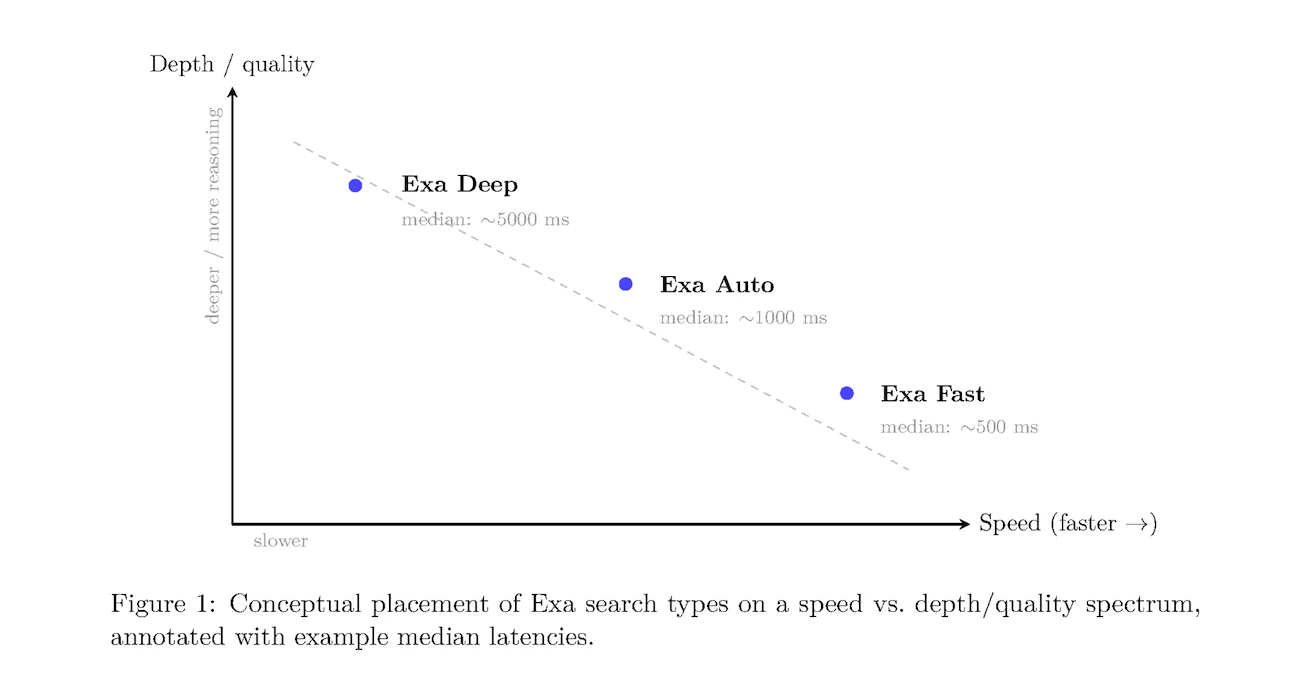
Exa offers four search types, each optimized for different evaluation scenarios:
 ### Fast Search
**Optimized for**: Speed-critical applications
**Characteristics**:
* Median latency: \~500ms (excluding network and optional features)
* Streamlined search and reranking models
* Best for single-step factual queries
**When to benchmark with Fast**:
* Low-latency QA datasets (SimpleQA, WebWalkerQA)
* Real-time applications (voice agents, autocomplete)
* High-volume agentic workflows where latency accumulates
**Example configuration**:
```python theme={null}
result = exa.search(
"latest AI breakthroughs in 2025",
type="fast",
num_results=10,
contents={"text": {"max_characters": 15000}}
)
```
### Auto Search (Default)
**Optimized for**: Balanced performance without manual tuning
**Characteristics**:
* Median latency: \~1000ms
* Intelligently combines multiple search methods
* Reranker model adapts to query type
**When to benchmark with Auto**:
* General-purpose search evaluations
* When query types vary significantly
* Production workloads requiring versatility
**Example configuration**:
```python theme={null}
result = exa.search(
"companies building climate tech solutions",
type="auto", # or omit - auto is default
num_results=10,
contents={"text": {"max_characters": 15000}}
)
```
### Deep Search
Learn more about Deep search in our [Deep Search changelog](/changelog/new-deep-search-type).
**Optimized for**: Comprehensive research and multi-hop queries
**Characteristics**:
* Median latency: \~5000ms
* Automatic query expansion or custom query variations via `additional_queries` (Python) / `additionalQueries` (JavaScript)
* Rich contextual summaries for each result
* Parallel search across multiple query formulations
**Using query variations**: Provide 2-3 query variations using `additional_queries` (Python) or `additionalQueries` (JavaScript) for best results. If not provided, Deep search will automatically generate variations.
**When to benchmark with Deep**:
* Agentic workflows (FRAMES, MultiLoKo, BrowseComp)
* Complex research tasks requiring multiple perspectives
* Scenarios where comprehensive coverage matters more than speed
**Example configuration**:
```python theme={null}
result = exa.search(
"impact of quantum computing on cryptography",
type="deep",
additional_queries=[
"quantum threats to encryption",
"post-quantum cryptography research"
],
num_results=10,
contents={"text": True}
)
```
### Instant Search
**Optimized for**: Real-time applications where latency matters most
**Characteristics**:
* Lowest-latency current search type
* Good fit for chat, voice, and autocomplete-style interactions
* Best when you need fresh results fast and can trade some quality for speed
**When to benchmark with Instant**:
* Voice agents
* Real-time web grounding
* Interactive copilots where every few hundred milliseconds matter
If you're reproducing an older benchmark that still uses legacy search-type settings, prefer `auto` as the default for new evaluations, `instant` or `fast` for latency-sensitive paths, and `deep` variants for synthesized research workflows.
## Evaluating Exa with Tool Calling
For evaluating Exa in agentic workflows where LLMs autonomously call search tools, proper tool calling setup is critical. Tool calling allows agents to dynamically invoke Exa search based on user queries and reasoning steps.
### Why Tool Calling Matters for Evaluation
When benchmarking agentic systems:
* **Agents decide when to search**: The LLM determines if/when to call Exa based on the task
* **Dynamic parameter selection**: Agents may choose search parameters (though we recommend minimal defaults)
* **Multi-step workflows**: Agents can make multiple Exa calls in sequence or parallel
### Tool Calling Best Practices for Evaluation
1. **Keep tool definitions minimal**: Don't expose too many parameters to the agent — this encourages over-filtering
2. **Use consistent tool schemas**: Standardize tool definitions across all evaluated systems
3. **Monitor tool call patterns**: Track how often and when agents invoke Exa vs competitors
### Implementation Guides
See our detailed guides for implementing Exa with popular LLM providers:
* **[Anthropic Tool Calling](/reference/anthropic-tool-calling)** - Using Claude with Exa search integration
* **[OpenAI Tool Calling](/reference/openai-tool-calling)** - Integrating Exa with GPT models
* **[OpenAI Responses API](/reference/openai-responses-api-with-exa)** - Recommended for new OpenAI projects
These guides show how to define Exa search as a tool and handle the agent's tool call responses properly.
***
## Evaluation Methodology
### Core Principles for Fair Benchmarking
To ensure reproducible, meaningful comparisons:
1. **Use default settings**: Start with minimal parameters (`type`, `num_results`, `text`). Avoid adding restrictive filters (date ranges, domains, text inclusion/exclusion) unless they're core to your evaluation — these often cause over-optimization that artificially limits results without meaningful benefit.
2. **Standardize queries**: Use identical query sets across all systems
3. **Control downstream processing**: Use the same LLM for answer synthesis and grading
4. **Disable prompt engineering**: Evaluate base API performance without query optimization
5. **Measure consistently**: Track P50 latency, accuracy, and coverage using identical metrics
6. **Document configurations**: Record all parameter settings for reproducibility
### Four-Phase Evaluation Workflow
#### Phase 1: Scope Definition
Define evaluation objectives:
* What capabilities are you testing? (factual QA, research depth, freshness, etc.)
* What latency requirements matter for your use case?
* Are you evaluating single-step retrieval or multi-step agentic workflows?
#### Phase 2: Dataset Selection
Choose benchmarks aligned with your scope (see Datasets section below):
* **Low-latency factual QA**: SimpleQA, WebWalkerQA
* **Single-step retrieval**: FRAMES (single-step slice), Seal0
* **Agentic workflows**: FRAMES (agentic slice), MultiLoKo, BrowseComp
* **Complex reasoning**: HLE (hard, long, emerging questions)
* **Freshness**: FreshQA, time-sensitive queries
#### Phase 3: Run Configurations
Execute standardized retrieval-synthesis-grading loop:
```python theme={null}
# 1. Retrieval step
results = exa.search(
query,
type="auto", # or "fast", "deep"
num_results=10,
contents={"text": {"max_characters": 15000}}
)
# 2. Answer synthesis (downstream LLM restricted to retrieved context)
context = "\n\n".join([r.text for r in results.results])
answer = llm.generate(
f"Answer the question using only the provided context.\n\n"
f"Context: {context}\n\n"
f"Question: {query}\n\n"
f"Answer:"
)
# 3. Grading (LLM-based correctness evaluation)
grade = grading_llm.evaluate(
question=query,
expected_answer=ground_truth,
generated_answer=answer
)
# Returns: "correct", "partial", or "incorrect"
```
#### Phase 4: Results Analysis
Aggregate metrics:
* **Accuracy**: Percentage of correct answers
* **Partial-credit accuracy**: Weighted score (e.g., correct=1.0, partial=0.5, incorrect=0.0)
* **Retrieval coverage**: Percentage of queries where relevant information was retrieved
* **P50 latency**: Median response time across all queries
* **Cost per query**: Total API cost divided by number of queries
## Optimal Exa Settings for Evaluation
### Configuration Parameters
| Parameter | Purpose | Evaluation Recommendations |
| ------------------------------------------ | -------------------------------------- | -------------------------------------------------------------------------------------------------------------------------- |
| `type` | Search method | Match to benchmark type (fast/auto/deep) |
| `num_results` | Number of results | Fix at 10 for consistency across comparisons |
| `text` | Retrieve full content | Set to `true` for RAG-style evaluation |
| `context` | **Deprecated.** Combined result string | Use `text` or `highlights` instead |
| `maxAgeHours` | Content freshness control | Omit for default behavior (livecrawl as fallback); use `0` for freshness tests (always livecrawl) |
| `additional_queries` / `additionalQueries` | Query variations (Deep only) | Provide 2-3 variations for best Deep search results. Use `additional_queries` in Python, `additionalQueries` in JavaScript |
### Recommended Configuration Templates
#### Fast-Baseline Configuration
For latency-sensitive evaluations:
```python Python theme={null}
result = exa.search(
query,
type="auto",
num_results=10,
contents={"text": {"max_characters": 15000}}
)
```
```javascript JavaScript theme={null}
const result = await exa.search(query, {
type: "auto",
numResults: 10,
contents: {text: {maxCharacters: 15000}}
});
```
```bash cURL theme={null}
curl -X POST https://api.exa.ai/search \
-H "x-api-key: YOUR_API_KEY" \
-H "Content-Type: application/json" \
-d '{
"query": "your query here",
"type": "auto",
"num_results": 10,
"contents": {"text": {"max_characters": 15000}}
}'
```
#### Auto-Quality Configuration
For balanced evaluations:
```python Python theme={null}
result = exa.search(
query,
type="auto",
num_results=10,
contents={"text": {"max_characters": 15000}}
)
```
```javascript JavaScript theme={null}
const result = await exa.search(query, {
type: "auto",
numResults: 10,
contents: {text: {maxCharacters: 15000}}
});
```
#### Highlights Configuration
For targeted excerpts, use the default boolean form — it's the highest-quality option.
```python Python theme={null}
result = exa.search(
query,
type="auto",
num_results=10,
contents={"highlights": True}
)
```
```javascript JavaScript theme={null}
const result = await exa.search(query, {
type: "auto",
numResults: 10,
contents: {highlights: true}
});
```
#### Deep-Comprehensive Configuration
For agentic and research evaluations:
```python Python theme={null}
result = exa.search(
query,
type="deep",
additional_queries=[variation1, variation2],
num_results=10,
contents={"text": True}
)
```
```javascript JavaScript theme={null}
const result = await exa.search(query, {
type: "deep",
additionalQueries: [variation1, variation2],
numResults: 10,
contents: {text: true}
});
```
## Choosing Datasets for Evaluation
### Benchmark-to-Search-Type Mapping
| Benchmark | Description | Recommended Search Type | Focus Area |
| ------------------------ | ---------------------------------------- | ------------------------------- | ---------------------------- |
| **SimpleQA** | Single-step factual questions | `Fast`, `Auto` | Low-latency QA accuracy |
| **FRAMES** (single-step) | Straightforward retrieval tasks | `Fast`, `Auto` | Single-hop retrieval quality |
| **FRAMES** (agentic) | Multi-step reasoning requiring iteration | `Deep` | Agentic workflow performance |
| **MultiLoKo** | Multi-hop knowledge queries | `Deep` | Complex reasoning chains |
| **BrowseComp** | Web browsing comprehension | `Deep` | Context understanding |
| **Seal0** | General search quality | `Fast`, `Auto`, `Deep` | Overall performance |
| **WebWalkerQA** | Navigation-style queries | `Fast`, `Auto` | Real-world search scenarios |
| **HLE** | Hard, long, emerging questions | `Deep` | Difficult edge cases |
| **FreshQA** | Time-sensitive queries | All types with `maxAgeHours: 0` | Freshness/timeliness |
### Dataset Characteristics
#### SimpleQA
* **Purpose**: Tests fast, factual question-answering
* **Query style**: "What is the capital of France?", "Who invented the telephone?"
* **Evaluation focus**: Accuracy and latency for straightforward queries
* **Exa configuration**: Fast search with cached content
#### FRAMES
* **Purpose**: Evaluates both single-step and multi-step retrieval
* **Two slices**:
* Single-step: Direct queries answerable from one search
* Agentic: Complex queries requiring multiple search iterations
* **Evaluation focus**: Versatility across task complexity
* **Exa configuration**: `Fast`/`Auto` for single-step, `Deep` for agentic
#### MultiLoKo & BrowseComp
* **Purpose**: Multi-hop reasoning and deep comprehension
* **Query style**: Questions requiring synthesis across multiple sources
* **Evaluation focus**: Quality of context and reasoning support
* **Exa configuration**: `Deep` search with query expansion
#### Seal0
* **Purpose**: General search quality benchmark
* **Query style**: Diverse real-world queries
* **Evaluation focus**: Overall retrieval accuracy
* **Exa configuration**: All search types (compare performance)
#### HLE (Hard, Long, Emerging)
* **Purpose**: Stress-test with difficult queries
* **Query style**: Complex, lengthy queries about recent topics
* **Evaluation focus**: Handling edge cases and emerging information
* **Exa configuration**: `Deep` search with `maxAgeHours: 0`
## Benchmark Results
### Low-Latency Search Engines
Performance on speed-critical tasks (latency \<1s):
### Fast Search
**Optimized for**: Speed-critical applications
**Characteristics**:
* Median latency: \~500ms (excluding network and optional features)
* Streamlined search and reranking models
* Best for single-step factual queries
**When to benchmark with Fast**:
* Low-latency QA datasets (SimpleQA, WebWalkerQA)
* Real-time applications (voice agents, autocomplete)
* High-volume agentic workflows where latency accumulates
**Example configuration**:
```python theme={null}
result = exa.search(
"latest AI breakthroughs in 2025",
type="fast",
num_results=10,
contents={"text": {"max_characters": 15000}}
)
```
### Auto Search (Default)
**Optimized for**: Balanced performance without manual tuning
**Characteristics**:
* Median latency: \~1000ms
* Intelligently combines multiple search methods
* Reranker model adapts to query type
**When to benchmark with Auto**:
* General-purpose search evaluations
* When query types vary significantly
* Production workloads requiring versatility
**Example configuration**:
```python theme={null}
result = exa.search(
"companies building climate tech solutions",
type="auto", # or omit - auto is default
num_results=10,
contents={"text": {"max_characters": 15000}}
)
```
### Deep Search
Learn more about Deep search in our [Deep Search changelog](/changelog/new-deep-search-type).
**Optimized for**: Comprehensive research and multi-hop queries
**Characteristics**:
* Median latency: \~5000ms
* Automatic query expansion or custom query variations via `additional_queries` (Python) / `additionalQueries` (JavaScript)
* Rich contextual summaries for each result
* Parallel search across multiple query formulations
**Using query variations**: Provide 2-3 query variations using `additional_queries` (Python) or `additionalQueries` (JavaScript) for best results. If not provided, Deep search will automatically generate variations.
**When to benchmark with Deep**:
* Agentic workflows (FRAMES, MultiLoKo, BrowseComp)
* Complex research tasks requiring multiple perspectives
* Scenarios where comprehensive coverage matters more than speed
**Example configuration**:
```python theme={null}
result = exa.search(
"impact of quantum computing on cryptography",
type="deep",
additional_queries=[
"quantum threats to encryption",
"post-quantum cryptography research"
],
num_results=10,
contents={"text": True}
)
```
### Instant Search
**Optimized for**: Real-time applications where latency matters most
**Characteristics**:
* Lowest-latency current search type
* Good fit for chat, voice, and autocomplete-style interactions
* Best when you need fresh results fast and can trade some quality for speed
**When to benchmark with Instant**:
* Voice agents
* Real-time web grounding
* Interactive copilots where every few hundred milliseconds matter
If you're reproducing an older benchmark that still uses legacy search-type settings, prefer `auto` as the default for new evaluations, `instant` or `fast` for latency-sensitive paths, and `deep` variants for synthesized research workflows.
## Evaluating Exa with Tool Calling
For evaluating Exa in agentic workflows where LLMs autonomously call search tools, proper tool calling setup is critical. Tool calling allows agents to dynamically invoke Exa search based on user queries and reasoning steps.
### Why Tool Calling Matters for Evaluation
When benchmarking agentic systems:
* **Agents decide when to search**: The LLM determines if/when to call Exa based on the task
* **Dynamic parameter selection**: Agents may choose search parameters (though we recommend minimal defaults)
* **Multi-step workflows**: Agents can make multiple Exa calls in sequence or parallel
### Tool Calling Best Practices for Evaluation
1. **Keep tool definitions minimal**: Don't expose too many parameters to the agent — this encourages over-filtering
2. **Use consistent tool schemas**: Standardize tool definitions across all evaluated systems
3. **Monitor tool call patterns**: Track how often and when agents invoke Exa vs competitors
### Implementation Guides
See our detailed guides for implementing Exa with popular LLM providers:
* **[Anthropic Tool Calling](/reference/anthropic-tool-calling)** - Using Claude with Exa search integration
* **[OpenAI Tool Calling](/reference/openai-tool-calling)** - Integrating Exa with GPT models
* **[OpenAI Responses API](/reference/openai-responses-api-with-exa)** - Recommended for new OpenAI projects
These guides show how to define Exa search as a tool and handle the agent's tool call responses properly.
***
## Evaluation Methodology
### Core Principles for Fair Benchmarking
To ensure reproducible, meaningful comparisons:
1. **Use default settings**: Start with minimal parameters (`type`, `num_results`, `text`). Avoid adding restrictive filters (date ranges, domains, text inclusion/exclusion) unless they're core to your evaluation — these often cause over-optimization that artificially limits results without meaningful benefit.
2. **Standardize queries**: Use identical query sets across all systems
3. **Control downstream processing**: Use the same LLM for answer synthesis and grading
4. **Disable prompt engineering**: Evaluate base API performance without query optimization
5. **Measure consistently**: Track P50 latency, accuracy, and coverage using identical metrics
6. **Document configurations**: Record all parameter settings for reproducibility
### Four-Phase Evaluation Workflow
#### Phase 1: Scope Definition
Define evaluation objectives:
* What capabilities are you testing? (factual QA, research depth, freshness, etc.)
* What latency requirements matter for your use case?
* Are you evaluating single-step retrieval or multi-step agentic workflows?
#### Phase 2: Dataset Selection
Choose benchmarks aligned with your scope (see Datasets section below):
* **Low-latency factual QA**: SimpleQA, WebWalkerQA
* **Single-step retrieval**: FRAMES (single-step slice), Seal0
* **Agentic workflows**: FRAMES (agentic slice), MultiLoKo, BrowseComp
* **Complex reasoning**: HLE (hard, long, emerging questions)
* **Freshness**: FreshQA, time-sensitive queries
#### Phase 3: Run Configurations
Execute standardized retrieval-synthesis-grading loop:
```python theme={null}
# 1. Retrieval step
results = exa.search(
query,
type="auto", # or "fast", "deep"
num_results=10,
contents={"text": {"max_characters": 15000}}
)
# 2. Answer synthesis (downstream LLM restricted to retrieved context)
context = "\n\n".join([r.text for r in results.results])
answer = llm.generate(
f"Answer the question using only the provided context.\n\n"
f"Context: {context}\n\n"
f"Question: {query}\n\n"
f"Answer:"
)
# 3. Grading (LLM-based correctness evaluation)
grade = grading_llm.evaluate(
question=query,
expected_answer=ground_truth,
generated_answer=answer
)
# Returns: "correct", "partial", or "incorrect"
```
#### Phase 4: Results Analysis
Aggregate metrics:
* **Accuracy**: Percentage of correct answers
* **Partial-credit accuracy**: Weighted score (e.g., correct=1.0, partial=0.5, incorrect=0.0)
* **Retrieval coverage**: Percentage of queries where relevant information was retrieved
* **P50 latency**: Median response time across all queries
* **Cost per query**: Total API cost divided by number of queries
## Optimal Exa Settings for Evaluation
### Configuration Parameters
| Parameter | Purpose | Evaluation Recommendations |
| ------------------------------------------ | -------------------------------------- | -------------------------------------------------------------------------------------------------------------------------- |
| `type` | Search method | Match to benchmark type (fast/auto/deep) |
| `num_results` | Number of results | Fix at 10 for consistency across comparisons |
| `text` | Retrieve full content | Set to `true` for RAG-style evaluation |
| `context` | **Deprecated.** Combined result string | Use `text` or `highlights` instead |
| `maxAgeHours` | Content freshness control | Omit for default behavior (livecrawl as fallback); use `0` for freshness tests (always livecrawl) |
| `additional_queries` / `additionalQueries` | Query variations (Deep only) | Provide 2-3 variations for best Deep search results. Use `additional_queries` in Python, `additionalQueries` in JavaScript |
### Recommended Configuration Templates
#### Fast-Baseline Configuration
For latency-sensitive evaluations:
```python Python theme={null}
result = exa.search(
query,
type="auto",
num_results=10,
contents={"text": {"max_characters": 15000}}
)
```
```javascript JavaScript theme={null}
const result = await exa.search(query, {
type: "auto",
numResults: 10,
contents: {text: {maxCharacters: 15000}}
});
```
```bash cURL theme={null}
curl -X POST https://api.exa.ai/search \
-H "x-api-key: YOUR_API_KEY" \
-H "Content-Type: application/json" \
-d '{
"query": "your query here",
"type": "auto",
"num_results": 10,
"contents": {"text": {"max_characters": 15000}}
}'
```
#### Auto-Quality Configuration
For balanced evaluations:
```python Python theme={null}
result = exa.search(
query,
type="auto",
num_results=10,
contents={"text": {"max_characters": 15000}}
)
```
```javascript JavaScript theme={null}
const result = await exa.search(query, {
type: "auto",
numResults: 10,
contents: {text: {maxCharacters: 15000}}
});
```
#### Highlights Configuration
For targeted excerpts, use the default boolean form — it's the highest-quality option.
```python Python theme={null}
result = exa.search(
query,
type="auto",
num_results=10,
contents={"highlights": True}
)
```
```javascript JavaScript theme={null}
const result = await exa.search(query, {
type: "auto",
numResults: 10,
contents: {highlights: true}
});
```
#### Deep-Comprehensive Configuration
For agentic and research evaluations:
```python Python theme={null}
result = exa.search(
query,
type="deep",
additional_queries=[variation1, variation2],
num_results=10,
contents={"text": True}
)
```
```javascript JavaScript theme={null}
const result = await exa.search(query, {
type: "deep",
additionalQueries: [variation1, variation2],
numResults: 10,
contents: {text: true}
});
```
## Choosing Datasets for Evaluation
### Benchmark-to-Search-Type Mapping
| Benchmark | Description | Recommended Search Type | Focus Area |
| ------------------------ | ---------------------------------------- | ------------------------------- | ---------------------------- |
| **SimpleQA** | Single-step factual questions | `Fast`, `Auto` | Low-latency QA accuracy |
| **FRAMES** (single-step) | Straightforward retrieval tasks | `Fast`, `Auto` | Single-hop retrieval quality |
| **FRAMES** (agentic) | Multi-step reasoning requiring iteration | `Deep` | Agentic workflow performance |
| **MultiLoKo** | Multi-hop knowledge queries | `Deep` | Complex reasoning chains |
| **BrowseComp** | Web browsing comprehension | `Deep` | Context understanding |
| **Seal0** | General search quality | `Fast`, `Auto`, `Deep` | Overall performance |
| **WebWalkerQA** | Navigation-style queries | `Fast`, `Auto` | Real-world search scenarios |
| **HLE** | Hard, long, emerging questions | `Deep` | Difficult edge cases |
| **FreshQA** | Time-sensitive queries | All types with `maxAgeHours: 0` | Freshness/timeliness |
### Dataset Characteristics
#### SimpleQA
* **Purpose**: Tests fast, factual question-answering
* **Query style**: "What is the capital of France?", "Who invented the telephone?"
* **Evaluation focus**: Accuracy and latency for straightforward queries
* **Exa configuration**: Fast search with cached content
#### FRAMES
* **Purpose**: Evaluates both single-step and multi-step retrieval
* **Two slices**:
* Single-step: Direct queries answerable from one search
* Agentic: Complex queries requiring multiple search iterations
* **Evaluation focus**: Versatility across task complexity
* **Exa configuration**: `Fast`/`Auto` for single-step, `Deep` for agentic
#### MultiLoKo & BrowseComp
* **Purpose**: Multi-hop reasoning and deep comprehension
* **Query style**: Questions requiring synthesis across multiple sources
* **Evaluation focus**: Quality of context and reasoning support
* **Exa configuration**: `Deep` search with query expansion
#### Seal0
* **Purpose**: General search quality benchmark
* **Query style**: Diverse real-world queries
* **Evaluation focus**: Overall retrieval accuracy
* **Exa configuration**: All search types (compare performance)
#### HLE (Hard, Long, Emerging)
* **Purpose**: Stress-test with difficult queries
* **Query style**: Complex, lengthy queries about recent topics
* **Evaluation focus**: Handling edge cases and emerging information
* **Exa configuration**: `Deep` search with `maxAgeHours: 0`
## Benchmark Results
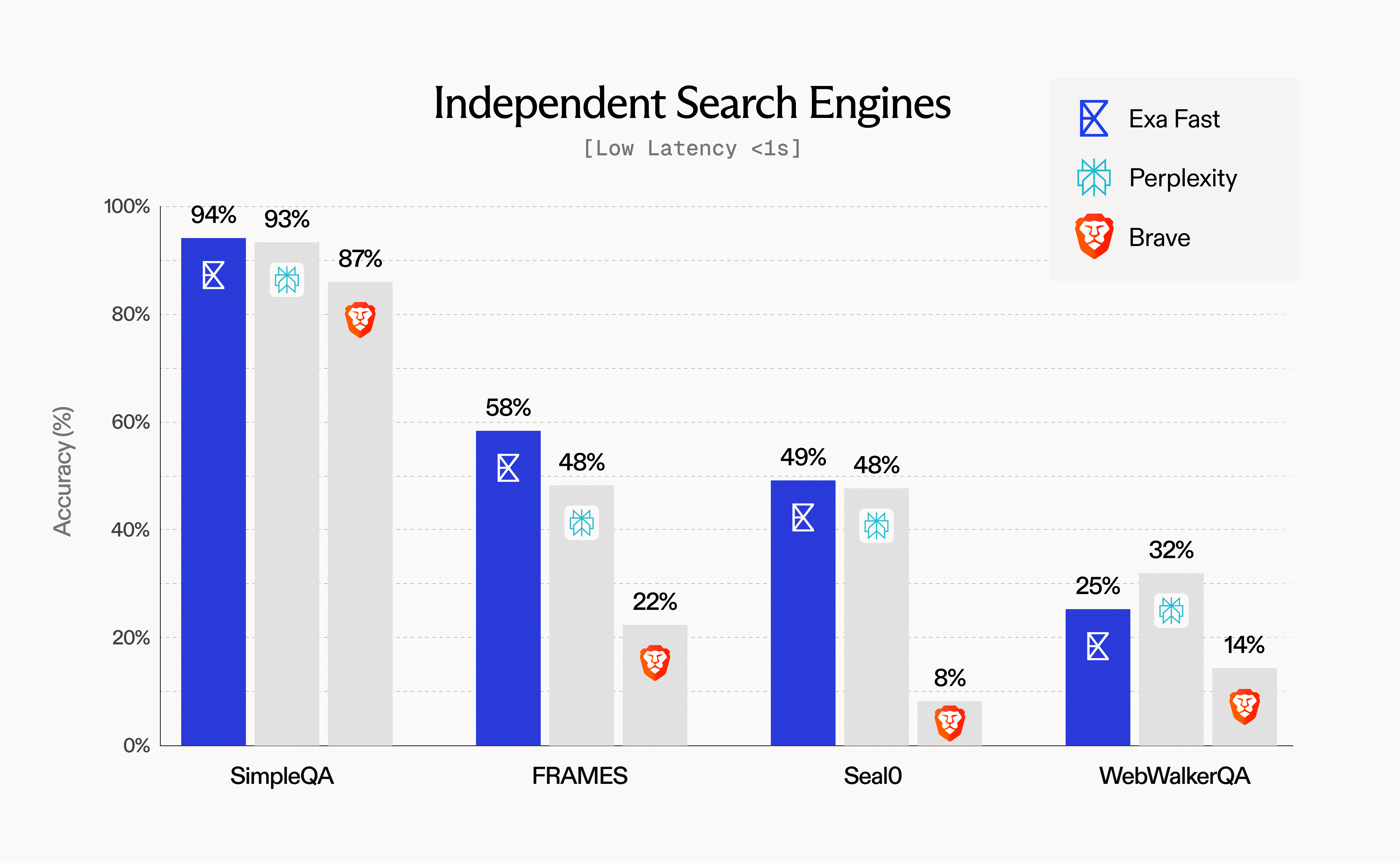
### Low-Latency Search Engines
Performance on speed-critical tasks (latency \<1s):
 **Key findings**:
* Exa Fast achieves 94% accuracy on SimpleQA with median latency \<500ms
* Strong performance across multiple benchmarks while maintaining speed advantage
* Ideal for real-time applications and high-volume agent workflows
### Agentic Search APIs
Performance on complex, multi-step tasks (latency >2s):
**Key findings**:
* Exa Fast achieves 94% accuracy on SimpleQA with median latency \<500ms
* Strong performance across multiple benchmarks while maintaining speed advantage
* Ideal for real-time applications and high-volume agent workflows
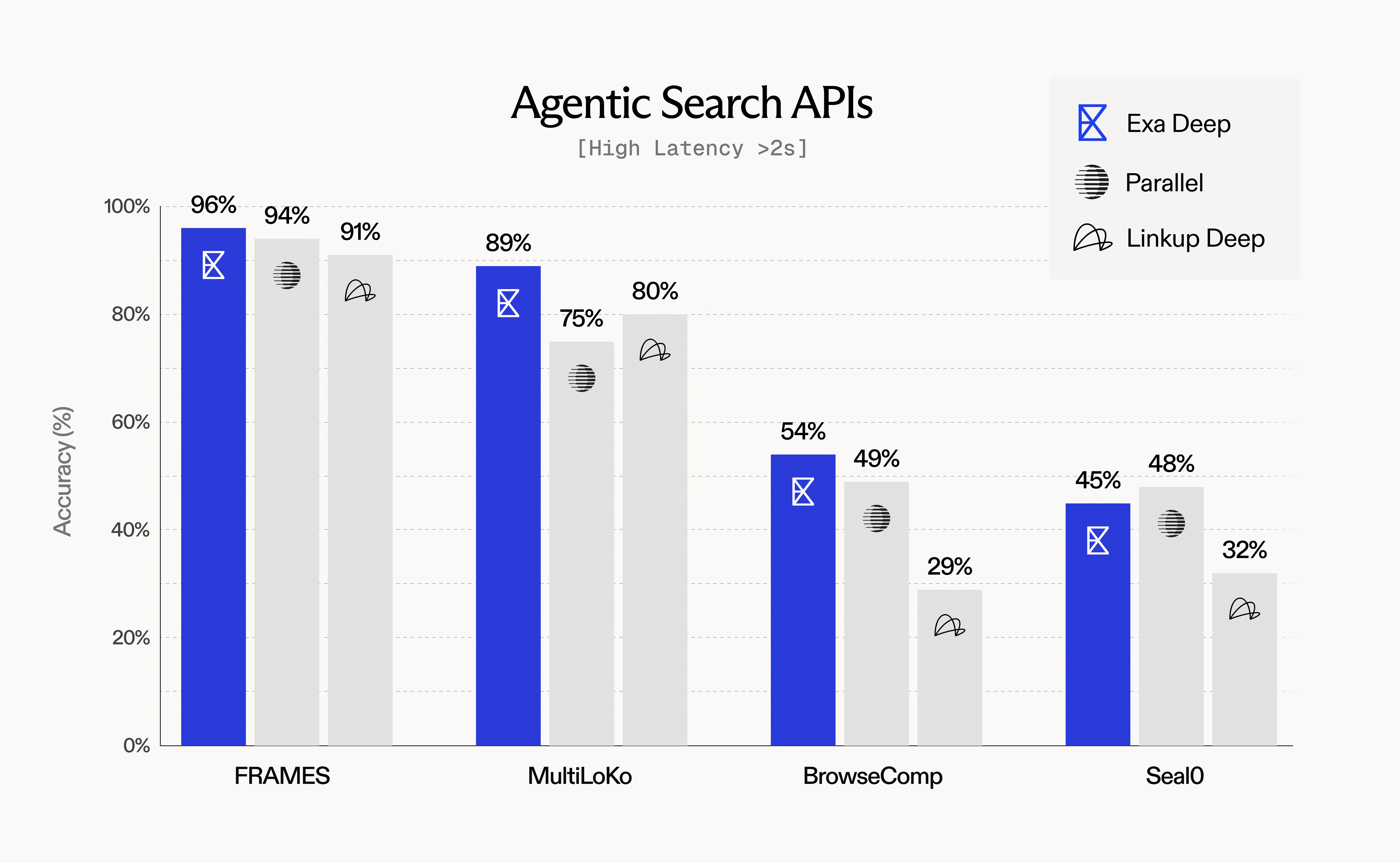
### Agentic Search APIs
Performance on complex, multi-step tasks (latency >2s):
 **Key findings**:
* Exa Deep leads on FRAMES (96%) and MultiLoKo (89%) benchmarks
* Query expansion and rich context enable superior agentic performance
* Higher latency justified by comprehensive, high-quality results
## Quality-Latency Tradeoffs
### Understanding the Spectrum
Different use cases require different points on the quality-latency spectrum:
| Use Case | Priority | Recommended Type | Expected Latency | Quality Characteristics |
| ---------------------- | -------- | ---------------- | ---------------- | ---------------------------- |
| Voice agents | Speed | `Fast` | \<500ms | Good factual accuracy |
| Chatbot grounding | Balanced | `Auto` | \~1000ms | Versatile, high quality |
| Research assistant | Depth | `Deep` | \~5000ms | Comprehensive, multi-faceted |
| Batch enrichment | Quality | `Deep` | \~5000ms | Maximum coverage |
| Real-time autocomplete | Speed | `Fast` | \<500ms | Relevant suggestions |
### Interpreting Tradeoffs
When analyzing evaluation results:
1. **Don't compare across latency classes**: `Fast` search at 500ms vs `Deep` search at 5000ms serve different purposes. **Always find the closest competitor in terms of latency for meaningful comparisons** — compare systems with similar P50 latency ranges.
2. **Benchmark within peer groups**:
* Compare Exa Fast (\<500ms) to other sub-1s APIs
* Compare Exa Auto (\~1s) to similar mid-latency systems
* Compare Exa Deep (>2s) to other agentic/research-oriented systems
3. **Consider total workflow time**: For multi-step agents, `Fast` search may complete the entire workflow faster than `Deep` search on a single query
4. **Account for quality requirements**: If accuracy >90% is required, accept higher latency; if \<1s is required, accept some quality tradeoff
### Factors That Impact Latency
Beyond search type selection, several parameters affect response time:
| Parameter | Latency Impact | Recommendation |
| ----------------------------------------------- | -------------- | ----------------------------------- |
| `maxAgeHours: 0` | +500-2000ms | Use only when freshness is critical |
| `maxAgeHours: 24` | Variable | Balanced freshness/speed |
| AI-generated summaries | +300-800ms | Evaluate necessity vs speed |
| `num_results > 10` | +50-200ms | Keep at 10 for fair comparisons |
| Complex date filters | +100-300ms | Simplify when possible |
| Text filtering (`include_text`, `exclude_text`) | +100-500ms | Use sparingly |
## Running Production-Grade Evaluations
### Example: SimpleQA Evaluation Script
```python Python theme={null}
from exa_py import Exa
import json
from datetime import datetime
exa = Exa(api_key="YOUR_API_KEY")
def evaluate_simpleqa(dataset_path, config):
"""
Run SimpleQA evaluation with specified configuration.
Args:
dataset_path: Path to SimpleQA JSON file
config: Dict with keys: type, num_results, text
"""
with open(dataset_path) as f:
questions = json.load(f)
results = []
latencies = []
for item in questions:
query = item['question']
ground_truth = item['answer']
# Retrieval
start = datetime.now()
search_result = exa.search(
query,
type=config['type'],
num_results=config['num_results'],
contents={'text': config['text']}
)
latency = (datetime.now() - start).total_seconds() * 1000
latencies.append(latency)
# Synthesis (using your LLM)
context = "\n\n".join([r.text for r in search_result.results])
answer = your_llm.generate(
f"Answer concisely using only the context.\n\n"
f"Context: {context}\n\n"
f"Question: {query}\n\n"
f"Answer:"
)
# Grading (using your grading LLM)
grade = grading_llm.evaluate(
question=query,
expected=ground_truth,
generated=answer
)
results.append({
'query': query,
'grade': grade,
'latency_ms': latency
})
# Calculate metrics
accuracy = sum(1 for r in results if r['grade'] == 'correct') / len(results)
p50_latency = sorted(latencies)[len(latencies) // 2]
return {
'accuracy': accuracy,
'p50_latency_ms': p50_latency,
'total_queries': len(results),
'config': config
}
# Run evaluation
config = {
'type': 'auto',
'num_results': 10,
'text': {'max_characters': 15000}
}
results = evaluate_simpleqa('simpleqa.json', config)
print(f"Accuracy: {results['accuracy']:.2%}")
print(f"P50 Latency: {results['p50_latency_ms']:.0f}ms")
```
```javascript JavaScript theme={null}
import Exa from 'exa-js';
import fs from 'fs/promises';
const exa = new Exa("YOUR_API_KEY");
async function evaluateSimpleQA(datasetPath, config) {
const data = JSON.parse(await fs.readFile(datasetPath, 'utf8'));
const results = [];
const latencies = [];
for (const item of data) {
const { question, answer: groundTruth } = item;
// Retrieval
const start = Date.now();
const searchResult = await exa.search(question, {
type: config.type,
numResults: config.numResults,
contents: {text: config.text}
});
const latency = Date.now() - start;
latencies.push(latency);
// Synthesis
const context = searchResult.results
.map(r => r.text)
.join('\n\n');
const answer = await yourLLM.generate(
`Answer concisely using only the context.\n\n` +
`Context: ${context}\n\n` +
`Question: ${question}\n\n` +
`Answer:`
);
// Grading
const grade = await gradingLLM.evaluate({
question,
expected: groundTruth,
generated: answer
});
results.push({ question, grade, latency });
}
// Calculate metrics
const accuracy = results.filter(r => r.grade === 'correct').length / results.length;
const p50Latency = latencies.sort((a, b) => a - b)[Math.floor(latencies.length / 2)];
return { accuracy, p50Latency, totalQueries: results.length, config };
}
// Run evaluation
const config = {
type: 'auto',
numResults: 10,
text: {maxCharacters: 15000}
};
const results = await evaluateSimpleQA('simpleqa.json', config);
console.log(`Accuracy: ${(results.accuracy * 100).toFixed(1)}%`);
console.log(`P50 Latency: ${results.p50Latency}ms`);
```
### Multi-Configuration Comparison
Best practice: Run multiple configurations to understand tradeoffs:
```python theme={null}
configs = [
{'name': 'Fast', 'type': 'fast'},
{'name': 'Auto', 'type': 'auto'},
{'name': 'Deep', 'type': 'deep'},
]
for config in configs:
results = evaluate_simpleqa('simpleqa.json', config)
print(f"{config['name']}: {results['accuracy']:.1%} @ {results['p50_latency_ms']:.0f}ms")
```
Example output:
```
`Fast`: 94.2% @ 450ms
`Auto`: 95.8% @ 1050ms
`Deep`: 97.2% @ 4950ms
```
## Recommendations
### For Low-Latency QA Benchmarks
**Datasets**: SimpleQA, WebWalkerQA, Seal0 (single-step)
**Configuration**:
* Use `type="fast"` or `type="auto"`
* Fix `num_results=10`
* Use `text={"max_characters": 15000}` for consistent context length
**Expected performance**:
* Accuracy: 90-95% on factual queries
* Latency: 400-600ms (Fast), 900-1200ms (Auto)
### For Agentic Workflow Benchmarks
**Datasets**: FRAMES (agentic), MultiLoKo, BrowseComp, HLE
**Configuration**:
* Use `type="deep"`
* Provide 2-3 query variations via `additional_queries` (Python) / `additionalQueries` (JavaScript) for best results
* Use `text=True` for rich content retrieval
* Omit `maxAgeHours` for default freshness behavior, or set `maxAgeHours=0` for always-fresh content
**For tool calling evaluations**: See the [Evaluating Exa with Tool Calling](#evaluating-exa-with-tool-calling) section below for guidance on setting up agents to autonomously invoke Exa search.
**Expected performance**:
* Accuracy: 85-96% on complex multi-hop queries
* Latency: 4000-6000ms
* Higher comprehensive coverage vs single-query search
### For Freshness Benchmarks
**Datasets**: FreshQA, time-sensitive custom queries
**Configuration**:
* Use any search type based on latency requirements
* Set `maxAgeHours=0` (always livecrawl) or omit for default behavior
* Include recent date filters if needed
**Expected performance**:
* Freshness: Up-to-date information from recent sources
* Latency: +500-2000ms vs cached content
### For Production Deployment
1. **Run comparative benchmarks** across `Fast`, `Auto`, and `Deep` to understand your quality-latency frontier
2. **Match search type to use case**:
* Real-time user-facing: `Fast`
* General chatbot/assistant: `Auto`
* Deep research/agent workflows: `Deep`
3. **Monitor in production**: Track accuracy, latency, and cost metrics continuously
4. **Optimize parameters**: Adjust `maxAgeHours`, `num_results`, and content options based on actual usage patterns
5. **Document your evaluation**: Record configurations, datasets, and results for reproducibility
### For Meaningful Cross-System Comparisons
1. **Standardize everything**:
* Identical query sets
* Same downstream LLM for synthesis
* Same grading model/rubric
* Fixed `num_results` across systems
2. **Compare within latency classes** — find the closest competitor in terms of P50 latency:
* For Exa Fast (\<500ms): Compare to other sub-1s APIs with similar latency
* For Exa Auto (\~1s): Compare to mid-latency systems (800ms-1500ms)
* For Exa Deep (>2s): Compare to other multi-second agentic/research systems
3. **Account for feature differences**:
* Some systems don't offer content retrieval
* Some don't support livecrawling (`maxAgeHours`)
* Some have different context limits
4. **Measure what matters for your use case**:
* If latency \<500ms is required, only benchmark Fast-class systems
* If accuracy >95% is required, accept higher latency configurations
***
## Additional Resources
* [Search API Guide](/reference/search-api-guide) - Deep dive into search types and integration guidance
* [Contents API Guide](/reference/contents-api-guide) - Feature overview and use cases
* [Livecrawling Contents](/reference/livecrawling-contents) - When and how to use livecrawling
* [API Reference: Search](/reference/search) - Complete parameter documentation
For questions about evaluation methodology or custom benchmark needs, [join our Discord community](https://discord.com/invite/HCShtBqbfV) or [reach out to our team](https://exa.ai).
**Key findings**:
* Exa Deep leads on FRAMES (96%) and MultiLoKo (89%) benchmarks
* Query expansion and rich context enable superior agentic performance
* Higher latency justified by comprehensive, high-quality results
## Quality-Latency Tradeoffs
### Understanding the Spectrum
Different use cases require different points on the quality-latency spectrum:
| Use Case | Priority | Recommended Type | Expected Latency | Quality Characteristics |
| ---------------------- | -------- | ---------------- | ---------------- | ---------------------------- |
| Voice agents | Speed | `Fast` | \<500ms | Good factual accuracy |
| Chatbot grounding | Balanced | `Auto` | \~1000ms | Versatile, high quality |
| Research assistant | Depth | `Deep` | \~5000ms | Comprehensive, multi-faceted |
| Batch enrichment | Quality | `Deep` | \~5000ms | Maximum coverage |
| Real-time autocomplete | Speed | `Fast` | \<500ms | Relevant suggestions |
### Interpreting Tradeoffs
When analyzing evaluation results:
1. **Don't compare across latency classes**: `Fast` search at 500ms vs `Deep` search at 5000ms serve different purposes. **Always find the closest competitor in terms of latency for meaningful comparisons** — compare systems with similar P50 latency ranges.
2. **Benchmark within peer groups**:
* Compare Exa Fast (\<500ms) to other sub-1s APIs
* Compare Exa Auto (\~1s) to similar mid-latency systems
* Compare Exa Deep (>2s) to other agentic/research-oriented systems
3. **Consider total workflow time**: For multi-step agents, `Fast` search may complete the entire workflow faster than `Deep` search on a single query
4. **Account for quality requirements**: If accuracy >90% is required, accept higher latency; if \<1s is required, accept some quality tradeoff
### Factors That Impact Latency
Beyond search type selection, several parameters affect response time:
| Parameter | Latency Impact | Recommendation |
| ----------------------------------------------- | -------------- | ----------------------------------- |
| `maxAgeHours: 0` | +500-2000ms | Use only when freshness is critical |
| `maxAgeHours: 24` | Variable | Balanced freshness/speed |
| AI-generated summaries | +300-800ms | Evaluate necessity vs speed |
| `num_results > 10` | +50-200ms | Keep at 10 for fair comparisons |
| Complex date filters | +100-300ms | Simplify when possible |
| Text filtering (`include_text`, `exclude_text`) | +100-500ms | Use sparingly |
## Running Production-Grade Evaluations
### Example: SimpleQA Evaluation Script
```python Python theme={null}
from exa_py import Exa
import json
from datetime import datetime
exa = Exa(api_key="YOUR_API_KEY")
def evaluate_simpleqa(dataset_path, config):
"""
Run SimpleQA evaluation with specified configuration.
Args:
dataset_path: Path to SimpleQA JSON file
config: Dict with keys: type, num_results, text
"""
with open(dataset_path) as f:
questions = json.load(f)
results = []
latencies = []
for item in questions:
query = item['question']
ground_truth = item['answer']
# Retrieval
start = datetime.now()
search_result = exa.search(
query,
type=config['type'],
num_results=config['num_results'],
contents={'text': config['text']}
)
latency = (datetime.now() - start).total_seconds() * 1000
latencies.append(latency)
# Synthesis (using your LLM)
context = "\n\n".join([r.text for r in search_result.results])
answer = your_llm.generate(
f"Answer concisely using only the context.\n\n"
f"Context: {context}\n\n"
f"Question: {query}\n\n"
f"Answer:"
)
# Grading (using your grading LLM)
grade = grading_llm.evaluate(
question=query,
expected=ground_truth,
generated=answer
)
results.append({
'query': query,
'grade': grade,
'latency_ms': latency
})
# Calculate metrics
accuracy = sum(1 for r in results if r['grade'] == 'correct') / len(results)
p50_latency = sorted(latencies)[len(latencies) // 2]
return {
'accuracy': accuracy,
'p50_latency_ms': p50_latency,
'total_queries': len(results),
'config': config
}
# Run evaluation
config = {
'type': 'auto',
'num_results': 10,
'text': {'max_characters': 15000}
}
results = evaluate_simpleqa('simpleqa.json', config)
print(f"Accuracy: {results['accuracy']:.2%}")
print(f"P50 Latency: {results['p50_latency_ms']:.0f}ms")
```
```javascript JavaScript theme={null}
import Exa from 'exa-js';
import fs from 'fs/promises';
const exa = new Exa("YOUR_API_KEY");
async function evaluateSimpleQA(datasetPath, config) {
const data = JSON.parse(await fs.readFile(datasetPath, 'utf8'));
const results = [];
const latencies = [];
for (const item of data) {
const { question, answer: groundTruth } = item;
// Retrieval
const start = Date.now();
const searchResult = await exa.search(question, {
type: config.type,
numResults: config.numResults,
contents: {text: config.text}
});
const latency = Date.now() - start;
latencies.push(latency);
// Synthesis
const context = searchResult.results
.map(r => r.text)
.join('\n\n');
const answer = await yourLLM.generate(
`Answer concisely using only the context.\n\n` +
`Context: ${context}\n\n` +
`Question: ${question}\n\n` +
`Answer:`
);
// Grading
const grade = await gradingLLM.evaluate({
question,
expected: groundTruth,
generated: answer
});
results.push({ question, grade, latency });
}
// Calculate metrics
const accuracy = results.filter(r => r.grade === 'correct').length / results.length;
const p50Latency = latencies.sort((a, b) => a - b)[Math.floor(latencies.length / 2)];
return { accuracy, p50Latency, totalQueries: results.length, config };
}
// Run evaluation
const config = {
type: 'auto',
numResults: 10,
text: {maxCharacters: 15000}
};
const results = await evaluateSimpleQA('simpleqa.json', config);
console.log(`Accuracy: ${(results.accuracy * 100).toFixed(1)}%`);
console.log(`P50 Latency: ${results.p50Latency}ms`);
```
### Multi-Configuration Comparison
Best practice: Run multiple configurations to understand tradeoffs:
```python theme={null}
configs = [
{'name': 'Fast', 'type': 'fast'},
{'name': 'Auto', 'type': 'auto'},
{'name': 'Deep', 'type': 'deep'},
]
for config in configs:
results = evaluate_simpleqa('simpleqa.json', config)
print(f"{config['name']}: {results['accuracy']:.1%} @ {results['p50_latency_ms']:.0f}ms")
```
Example output:
```
`Fast`: 94.2% @ 450ms
`Auto`: 95.8% @ 1050ms
`Deep`: 97.2% @ 4950ms
```
## Recommendations
### For Low-Latency QA Benchmarks
**Datasets**: SimpleQA, WebWalkerQA, Seal0 (single-step)
**Configuration**:
* Use `type="fast"` or `type="auto"`
* Fix `num_results=10`
* Use `text={"max_characters": 15000}` for consistent context length
**Expected performance**:
* Accuracy: 90-95% on factual queries
* Latency: 400-600ms (Fast), 900-1200ms (Auto)
### For Agentic Workflow Benchmarks
**Datasets**: FRAMES (agentic), MultiLoKo, BrowseComp, HLE
**Configuration**:
* Use `type="deep"`
* Provide 2-3 query variations via `additional_queries` (Python) / `additionalQueries` (JavaScript) for best results
* Use `text=True` for rich content retrieval
* Omit `maxAgeHours` for default freshness behavior, or set `maxAgeHours=0` for always-fresh content
**For tool calling evaluations**: See the [Evaluating Exa with Tool Calling](#evaluating-exa-with-tool-calling) section below for guidance on setting up agents to autonomously invoke Exa search.
**Expected performance**:
* Accuracy: 85-96% on complex multi-hop queries
* Latency: 4000-6000ms
* Higher comprehensive coverage vs single-query search
### For Freshness Benchmarks
**Datasets**: FreshQA, time-sensitive custom queries
**Configuration**:
* Use any search type based on latency requirements
* Set `maxAgeHours=0` (always livecrawl) or omit for default behavior
* Include recent date filters if needed
**Expected performance**:
* Freshness: Up-to-date information from recent sources
* Latency: +500-2000ms vs cached content
### For Production Deployment
1. **Run comparative benchmarks** across `Fast`, `Auto`, and `Deep` to understand your quality-latency frontier
2. **Match search type to use case**:
* Real-time user-facing: `Fast`
* General chatbot/assistant: `Auto`
* Deep research/agent workflows: `Deep`
3. **Monitor in production**: Track accuracy, latency, and cost metrics continuously
4. **Optimize parameters**: Adjust `maxAgeHours`, `num_results`, and content options based on actual usage patterns
5. **Document your evaluation**: Record configurations, datasets, and results for reproducibility
### For Meaningful Cross-System Comparisons
1. **Standardize everything**:
* Identical query sets
* Same downstream LLM for synthesis
* Same grading model/rubric
* Fixed `num_results` across systems
2. **Compare within latency classes** — find the closest competitor in terms of P50 latency:
* For Exa Fast (\<500ms): Compare to other sub-1s APIs with similar latency
* For Exa Auto (\~1s): Compare to mid-latency systems (800ms-1500ms)
* For Exa Deep (>2s): Compare to other multi-second agentic/research systems
3. **Account for feature differences**:
* Some systems don't offer content retrieval
* Some don't support livecrawling (`maxAgeHours`)
* Some have different context limits
4. **Measure what matters for your use case**:
* If latency \<500ms is required, only benchmark Fast-class systems
* If accuracy >95% is required, accept higher latency configurations
***
## Additional Resources
* [Search API Guide](/reference/search-api-guide) - Deep dive into search types and integration guidance
* [Contents API Guide](/reference/contents-api-guide) - Feature overview and use cases
* [Livecrawling Contents](/reference/livecrawling-contents) - When and how to use livecrawling
* [API Reference: Search](/reference/search) - Complete parameter documentation
For questions about evaluation methodology or custom benchmark needs, [join our Discord community](https://discord.com/invite/HCShtBqbfV) or [reach out to our team](https://exa.ai).