> ## Documentation Index
> Fetch the complete documentation index at: https://exa.ai/docs/llms.txt
> Use this file to discover all available pages before exploring further.
# Pay with x402
> Use Exa's Search and Contents APIs without an API key. Pay per request with USDC on Base or Solana via the x402 protocol.
## What is x402?
[x402](https://x402.org) is an open payment standard built on the HTTP `402 Payment Required` status code. It lets clients pay for API access per-request using USDC stablecoins on Base or Solana, with no accounts, API keys, or subscriptions needed.
Exa supports x402 on two endpoints: **`/search`** and **`/contents`**. When you send a request without an API key or payment header, Exa responds with `402` and a `PAYMENT-REQUIRED` header containing pricing details and the supported payment networks. Your client signs a USDC payment, retries the request with a `PAYMENT-SIGNATURE` header, and receives the results once settlement confirms on-chain.
This is ideal for **AI agents** that need to autonomously pay for web search without pre-provisioned credentials.
x402 and API key access are independent. If your request includes an `x-api-key` or `Authorization: Bearer` header, the normal API key billing flow is used and x402 is bypassed entirely.
## Supported endpoints
| Endpoint | Method | Description |
| ----------- | ------ | --------------------------------------------------------------------------------------------------- |
| `/search` | POST | Web search with all search types (`instant`, `auto`, `fast`, `deep`, `deep-lite`, `deep-reasoning`) |
| `/contents` | POST | Content retrieval by URL or document ID |
All other endpoints are **not** available via x402.
## How it works
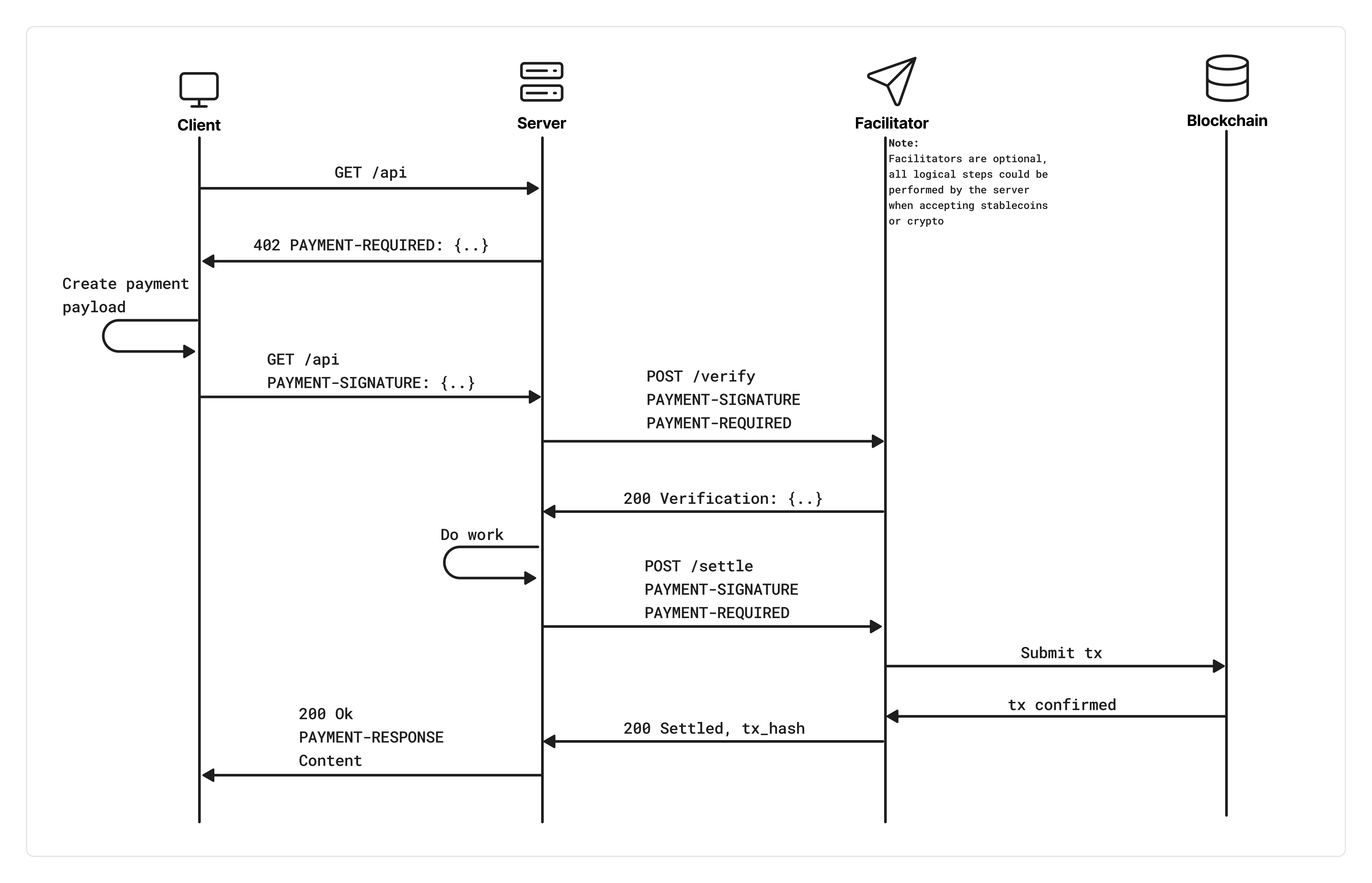 ### Step 1: Discovery
Send a request to a supported endpoint without an API key or payment header:
```bash theme={null}
curl -X POST "https://api.exa.ai/search" \
-H "Content-Type: application/json" \
-d '{"query": "best machine learning frameworks", "numResults": 5}'
```
You'll receive a `402` response with a base64-encoded `PAYMENT-REQUIRED` header. Decoded, it looks like:
```json theme={null}
{
"x402Version": 2,
"resource": {
"url": "https://api.exa.ai/search",
"description": "Exa /search endpoint"
},
"accepts": [
{
"scheme": "exact",
"network": "eip155:8453",
"amount": "7000",
"asset": "0x833589fCD6eDb6E08f4c7C32D4f71b54bdA02913",
"payTo": "0x...",
"maxTimeoutSeconds": 60,
"extra": { "name": "USD Coin", "version": "2" }
},
{
"scheme": "exact",
"network": "solana:5eykt4UsFv8P8NJdTREpY1vzqKqZKvdp",
"amount": "7000",
"asset": "EPjFWdd5AufqSSqeM2qN1xzybapC8G4wEGGkZwyTDt1v",
"payTo": "...",
"maxTimeoutSeconds": 60,
"extra": { "name": "USD Coin", "version": "2", "feePayer": "..." }
}
]
}
```
The `amount` is in USDC atomic units (6 decimals), so `"7000"` = \$0.007.
The client can pay with any advertised `accepts` entry it supports. Solana entries include facilitator-provided fields such as `extra.feePayer`; use the exact entry from the `PAYMENT-REQUIRED` header when constructing the payment.
### Step 2: Pay and retry
Sign the payment with your wallet and re-send the request with a `PAYMENT-SIGNATURE` header containing your base64-encoded payment payload. The x402 client SDKs handle this automatically.
### Step 3: Settlement
Exa verifies your payment signature with the facilitator, then starts on-chain settlement **in parallel** with processing your request. The response is held until settlement confirms. On success, you receive:
* HTTP `200` with your results
* A `PAYMENT-RESPONSE` header containing the settlement receipt (base64-encoded), including the on-chain transaction hash
If settlement fails, you get `402` with both `PAYMENT-RESPONSE` (error details) and `PAYMENT-REQUIRED` (so you can retry).
## Pricing
x402 uses the same bundled pricing as API key billing. Prices are calculated upfront based on your request parameters (not actual results returned).
### Search (`/search`)
| Search type | Base price (up to 10 results) | Per result beyond 10 |
| ------------------------- | ----------------------------- | -------------------- |
| `instant`, `auto`, `fast` | \$0.007 / request | N/A (capped at 10) |
| `deep-lite` | \$0.012 / request | N/A (capped at 10) |
| `deep` | \$0.012 / request | N/A (capped at 10) |
| `deep-reasoning` | \$0.015 / request | N/A (capped at 10) |
Adding `contents.summary` costs an additional **\$0.001 per result**.
x402 requests are capped at **10 results maximum**. If you request more than 10, `numResults` is silently clamped to 10 and pricing is based on 10 results.
### Contents (`/contents`)
Each content type is charged per page/URL:
| Content type | Price per page |
| ------------ | -------------- |
| `text` | \$0.001 |
| `highlights` | \$0.001 |
| `summary` | \$0.001 |
If you request no content types (no `text`, `highlights`, or `summary`), `text` is enabled by default.
### Examples
| Request | Price | USDC atomic |
| -------------------------------------------------- | ------- | ----------- |
| `/search` with 10 results, `type: "auto"` | \$0.007 | 7000 |
| `/search` with 5 results, `type: "fast"` | \$0.007 | 7000 |
| `/search` with 3 results + summary, `type: "auto"` | \$0.010 | 10000 |
| `/search` with 10 results, `type: "deep-lite"` | \$0.012 | 12000 |
| `/search` with 10 results, `type: "deep"` | \$0.012 | 12000 |
| `/contents` for 2 URLs with `text: true` | \$0.002 | 2000 |
| `/contents` for 1 URL with `text` + `summary` | \$0.002 | 2000 |
## Quickstart
### Install dependencies
```bash JavaScript theme={null}
npm install @x402/fetch @x402/core @x402/evm viem
# For Solana support, also install:
npm install @x402/svm @solana/kit @scure/base
```
```bash Python theme={null}
pip install "x402[requests,evm]"
# For Solana support, also install:
pip install "x402[svm]" "solana<0.40"
```
No install is needed for cURL, but you'll need to handle the 402 challenge and payment signing manually. The SDK approach is recommended for production use.
Don't want to manage private keys? [Coinbase Agentic Wallets](https://docs.cdp.coinbase.com/agent-kit/core-concepts/wallet-management) provide TEE-isolated key management for AI agents. Your agent never sees the private key. The wallet is viem-compatible, so it works directly with `@x402/fetch`.
### Make a paid search request
```typescript JavaScript theme={null}
import { wrapFetchWithPayment } from "@x402/fetch";
import { x402Client, x402HTTPClient } from "@x402/core/client";
import { ExactEvmScheme } from "@x402/evm/exact/client";
// For Solana support, also import:
// import { ExactSvmScheme } from "@x402/svm/exact/client";
import { privateKeyToAccount } from "viem/accounts";
const signer = privateKeyToAccount(process.env.WALLET_PRIVATE_KEY as `0x${string}`);
const client = new x402Client();
client.register("eip155:*", new ExactEvmScheme(signer));
// Register a Solana signer too if you want the client to use Solana accept
// entries such as `solana:5eykt4UsFv8P8NJdTREpY1vzqKqZKvdp`:
// client.register("solana:*", new ExactSvmScheme(svmSigner));
const fetchWithPayment = wrapFetchWithPayment(fetch, client);
const response = await fetchWithPayment("https://api.exa.ai/search", {
method: "POST",
headers: { "Content-Type": "application/json" },
body: JSON.stringify({
query: "best machine learning frameworks",
numResults: 5,
}),
});
const data = await response.json();
console.log(data.results);
// Check settlement receipt
const httpClient = new x402HTTPClient(client);
const receipt = httpClient.getPaymentSettleResponse(
(name) => response.headers.get(name)
);
console.log("Transaction:", receipt?.transaction);
```
```python Python theme={null}
import os
import requests
from eth_account import Account
from x402 import x402ClientSync
from x402.http.clients import wrapRequestsWithPayment
from x402.mechanisms.evm.exact import register_exact_evm_client
from x402.mechanisms.evm.signers import EthAccountSigner
account = Account.from_key(os.environ["WALLET_PRIVATE_KEY"])
client = x402ClientSync()
register_exact_evm_client(
client,
EthAccountSigner(account),
networks="eip155:*",
)
session = wrapRequestsWithPayment(requests.Session(), client)
response = session.post("https://api.exa.ai/search", json={
"query": "best machine learning frameworks",
"numResults": 5,
})
data = response.json()
for result in data["results"]:
print(result["url"], result["title"])
print("Payment response:", response.headers.get("PAYMENT-RESPONSE"))
```
```bash cURL theme={null}
# Step 1: Discovery, get pricing info
curl -s -o /dev/null -w "%{http_code}" -D - \
-X POST "https://api.exa.ai/search" \
-H "Content-Type: application/json" \
-d '{"query": "best machine learning frameworks", "numResults": 5}'
# Returns 402 with PAYMENT-REQUIRED header containing base64-encoded pricing
# Step 2: Sign the payment with your wallet (use the SDK for this)
# Step 3: Retry with payment signature
curl -X POST "https://api.exa.ai/search" \
-H "Content-Type: application/json" \
-H "PAYMENT-SIGNATURE: " \
-d '{"query": "best machine learning frameworks", "numResults": 5}'
# Returns 200 with results + PAYMENT-RESPONSE header (settlement receipt)
```
cURL requires manual payment signing. For production, use the JavaScript or Python SDK which handles the full 402 > sign > retry flow automatically.
### Discovery mode (no wallet needed)
Probe pricing without a wallet by sending unauthenticated requests:
```typescript JavaScript theme={null}
const res = await fetch("https://api.exa.ai/search", {
method: "POST",
headers: { "Content-Type": "application/json" },
body: JSON.stringify({ query: "test query", numResults: 3 }),
});
// res.status === 402
const paymentRequired = JSON.parse(
atob(res.headers.get("PAYMENT-REQUIRED")!)
);
console.log(
paymentRequired.accepts.map(({ network, amount }) => ({
network,
amount,
}))
);
```
```python Python theme={null}
import base64, json, requests
res = requests.post("https://api.exa.ai/search", json={
"query": "test query",
"numResults": 3,
})
# res.status_code == 402
pricing = json.loads(base64.b64decode(res.headers["PAYMENT-REQUIRED"]))
print([(accept["network"], accept["amount"]) for accept in pricing["accepts"]])
```
```bash cURL theme={null}
curl -s -D - -X POST "https://api.exa.ai/search" \
-H "Content-Type: application/json" \
-d '{"query": "test query", "numResults": 3}'
# Look for the PAYMENT-REQUIRED header in the 402 response
# Decode it: echo "" | base64 -d
```
## Payment networks
Exa advertises every currently supported network in the `accepts` array. Choose the entry that matches your wallet and registered x402 client scheme.
| Network | Identifier | Token | Asset |
| ------------------ | ----------------------------------------- | ----- | ---------------------------------------------- |
| Base (Ethereum L2) | `eip155:8453` | USDC | `0x833589fCD6eDb6E08f4c7C32D4f71b54bdA02913` |
| Solana mainnet | `solana:5eykt4UsFv8P8NJdTREpY1vzqKqZKvdp` | USDC | `EPjFWdd5AufqSSqeM2qN1xzybapC8G4wEGGkZwyTDt1v` |
Both use 6-decimal USDC (`1000000` = \$1.00) and settle on-chain via an x402 facilitator.
## Rate limits
x402 has its own rate limiting separate from API key limits:
| Limit | Threshold | Window |
| ---------------------------------- | ------------------ | ---------- |
| Unpaid discovery requests (per IP) | 5 requests | 60 seconds |
| Paid requests (per wallet) | 10 requests/second | 1 second |
After 5 unauthenticated `402` discovery requests from the same IP within 60 seconds, further requests return `429 Too Many Requests`. Making a successful paid request decrements the counter.
Per-wallet QPS is enforced across all paid requests from the same wallet address.
## Headers reference
### Request headers
| Header | Description |
| ------------------- | ---------------------------------------- |
| `PAYMENT-SIGNATURE` | Base64-encoded payment payload (x402 v2) |
| `payment-signature` | Alias (also accepted) |
| `x-payment` | Legacy alias (v1 compatibility) |
### Response headers
| Header | When | Description |
| ------------------ | -------------------------------------- | ----------------------------------------------------------------------------- |
| `PAYMENT-REQUIRED` | `402` responses | Base64-encoded `PaymentRequired` object with pricing and payment instructions |
| `PAYMENT-RESPONSE` | `200` or `402` (after payment attempt) | Base64-encoded settlement result with transaction hash or error |
## Error codes
| Status | Tag | Description |
| ------ | -------------------------- | ------------------------------------------------------------------ |
| `402` | `X402_PAYMENT_REQUIRED` | No payment provided. Includes pricing in `PAYMENT-REQUIRED` header |
| `402` | `X402_VERIFICATION_FAILED` | Payment signature did not pass facilitator verification |
| `400` | `X402_INVALID_SIGNATURE` | Malformed or unparseable payment signature |
| `429` | `X402_TOO_MANY_UNPAID` | Too many unpaid discovery requests from this IP |
| `429` | `X402_WALLET_RATE_LIMITED` | Wallet exceeded 10 requests/second |
| `500` | `X402_INTERNAL_ERROR` | Server-side error generating payment requirements |
## FAQ
If your request includes an `x-api-key` header or `Authorization: Bearer` token, the API key flow takes priority and x402 is bypassed. They don't stack. It's one or the other per request.
Your response is blocked. You receive a `402` with both `PAYMENT-RESPONSE` (containing the error) and `PAYMENT-REQUIRED` (so your client can retry). No results are returned until settlement succeeds.
x402 requests enforce a maximum of 10 results per search. If you need more, use the API key flow with a paid plan.
Any EVM-compatible wallet that can sign EIP-712 typed data on Base, or a Solana wallet supported by the x402 SVM client for `solana:5eykt4UsFv8P8NJdTREpY1vzqKqZKvdp`. The x402 SDK supports `viem`, `ethers`, Coinbase Wallet signers, and Solana SVM signers. For EVM-based AI agents, [Coinbase Agentic Wallets](https://docs.cdp.coinbase.com/agent-kit/core-concepts/wallet-management) offer TEE-isolated key management so your agent never handles raw private keys directly.
## Resources
* [x402 protocol docs](https://docs.x402.org): full protocol specification
* [x402 GitHub](https://github.com/coinbase/x402): open-source SDKs and examples
* [@x402/fetch on npm](https://www.npmjs.com/package/@x402/fetch): fetch wrapper for automatic payment handling
* [@x402/svm on npm](https://www.npmjs.com/package/@x402/svm): Solana/SVM exact payment support
* [Exa Search API guide](/docs/search/quickstart): full search parameter reference
* [Exa Contents API guide](/docs/contents/quickstart): full contents parameter reference
### Step 1: Discovery
Send a request to a supported endpoint without an API key or payment header:
```bash theme={null}
curl -X POST "https://api.exa.ai/search" \
-H "Content-Type: application/json" \
-d '{"query": "best machine learning frameworks", "numResults": 5}'
```
You'll receive a `402` response with a base64-encoded `PAYMENT-REQUIRED` header. Decoded, it looks like:
```json theme={null}
{
"x402Version": 2,
"resource": {
"url": "https://api.exa.ai/search",
"description": "Exa /search endpoint"
},
"accepts": [
{
"scheme": "exact",
"network": "eip155:8453",
"amount": "7000",
"asset": "0x833589fCD6eDb6E08f4c7C32D4f71b54bdA02913",
"payTo": "0x...",
"maxTimeoutSeconds": 60,
"extra": { "name": "USD Coin", "version": "2" }
},
{
"scheme": "exact",
"network": "solana:5eykt4UsFv8P8NJdTREpY1vzqKqZKvdp",
"amount": "7000",
"asset": "EPjFWdd5AufqSSqeM2qN1xzybapC8G4wEGGkZwyTDt1v",
"payTo": "...",
"maxTimeoutSeconds": 60,
"extra": { "name": "USD Coin", "version": "2", "feePayer": "..." }
}
]
}
```
The `amount` is in USDC atomic units (6 decimals), so `"7000"` = \$0.007.
The client can pay with any advertised `accepts` entry it supports. Solana entries include facilitator-provided fields such as `extra.feePayer`; use the exact entry from the `PAYMENT-REQUIRED` header when constructing the payment.
### Step 2: Pay and retry
Sign the payment with your wallet and re-send the request with a `PAYMENT-SIGNATURE` header containing your base64-encoded payment payload. The x402 client SDKs handle this automatically.
### Step 3: Settlement
Exa verifies your payment signature with the facilitator, then starts on-chain settlement **in parallel** with processing your request. The response is held until settlement confirms. On success, you receive:
* HTTP `200` with your results
* A `PAYMENT-RESPONSE` header containing the settlement receipt (base64-encoded), including the on-chain transaction hash
If settlement fails, you get `402` with both `PAYMENT-RESPONSE` (error details) and `PAYMENT-REQUIRED` (so you can retry).
## Pricing
x402 uses the same bundled pricing as API key billing. Prices are calculated upfront based on your request parameters (not actual results returned).
### Search (`/search`)
| Search type | Base price (up to 10 results) | Per result beyond 10 |
| ------------------------- | ----------------------------- | -------------------- |
| `instant`, `auto`, `fast` | \$0.007 / request | N/A (capped at 10) |
| `deep-lite` | \$0.012 / request | N/A (capped at 10) |
| `deep` | \$0.012 / request | N/A (capped at 10) |
| `deep-reasoning` | \$0.015 / request | N/A (capped at 10) |
Adding `contents.summary` costs an additional **\$0.001 per result**.
x402 requests are capped at **10 results maximum**. If you request more than 10, `numResults` is silently clamped to 10 and pricing is based on 10 results.
### Contents (`/contents`)
Each content type is charged per page/URL:
| Content type | Price per page |
| ------------ | -------------- |
| `text` | \$0.001 |
| `highlights` | \$0.001 |
| `summary` | \$0.001 |
If you request no content types (no `text`, `highlights`, or `summary`), `text` is enabled by default.
### Examples
| Request | Price | USDC atomic |
| -------------------------------------------------- | ------- | ----------- |
| `/search` with 10 results, `type: "auto"` | \$0.007 | 7000 |
| `/search` with 5 results, `type: "fast"` | \$0.007 | 7000 |
| `/search` with 3 results + summary, `type: "auto"` | \$0.010 | 10000 |
| `/search` with 10 results, `type: "deep-lite"` | \$0.012 | 12000 |
| `/search` with 10 results, `type: "deep"` | \$0.012 | 12000 |
| `/contents` for 2 URLs with `text: true` | \$0.002 | 2000 |
| `/contents` for 1 URL with `text` + `summary` | \$0.002 | 2000 |
## Quickstart
### Install dependencies
```bash JavaScript theme={null}
npm install @x402/fetch @x402/core @x402/evm viem
# For Solana support, also install:
npm install @x402/svm @solana/kit @scure/base
```
```bash Python theme={null}
pip install "x402[requests,evm]"
# For Solana support, also install:
pip install "x402[svm]" "solana<0.40"
```
No install is needed for cURL, but you'll need to handle the 402 challenge and payment signing manually. The SDK approach is recommended for production use.
Don't want to manage private keys? [Coinbase Agentic Wallets](https://docs.cdp.coinbase.com/agent-kit/core-concepts/wallet-management) provide TEE-isolated key management for AI agents. Your agent never sees the private key. The wallet is viem-compatible, so it works directly with `@x402/fetch`.
### Make a paid search request
```typescript JavaScript theme={null}
import { wrapFetchWithPayment } from "@x402/fetch";
import { x402Client, x402HTTPClient } from "@x402/core/client";
import { ExactEvmScheme } from "@x402/evm/exact/client";
// For Solana support, also import:
// import { ExactSvmScheme } from "@x402/svm/exact/client";
import { privateKeyToAccount } from "viem/accounts";
const signer = privateKeyToAccount(process.env.WALLET_PRIVATE_KEY as `0x${string}`);
const client = new x402Client();
client.register("eip155:*", new ExactEvmScheme(signer));
// Register a Solana signer too if you want the client to use Solana accept
// entries such as `solana:5eykt4UsFv8P8NJdTREpY1vzqKqZKvdp`:
// client.register("solana:*", new ExactSvmScheme(svmSigner));
const fetchWithPayment = wrapFetchWithPayment(fetch, client);
const response = await fetchWithPayment("https://api.exa.ai/search", {
method: "POST",
headers: { "Content-Type": "application/json" },
body: JSON.stringify({
query: "best machine learning frameworks",
numResults: 5,
}),
});
const data = await response.json();
console.log(data.results);
// Check settlement receipt
const httpClient = new x402HTTPClient(client);
const receipt = httpClient.getPaymentSettleResponse(
(name) => response.headers.get(name)
);
console.log("Transaction:", receipt?.transaction);
```
```python Python theme={null}
import os
import requests
from eth_account import Account
from x402 import x402ClientSync
from x402.http.clients import wrapRequestsWithPayment
from x402.mechanisms.evm.exact import register_exact_evm_client
from x402.mechanisms.evm.signers import EthAccountSigner
account = Account.from_key(os.environ["WALLET_PRIVATE_KEY"])
client = x402ClientSync()
register_exact_evm_client(
client,
EthAccountSigner(account),
networks="eip155:*",
)
session = wrapRequestsWithPayment(requests.Session(), client)
response = session.post("https://api.exa.ai/search", json={
"query": "best machine learning frameworks",
"numResults": 5,
})
data = response.json()
for result in data["results"]:
print(result["url"], result["title"])
print("Payment response:", response.headers.get("PAYMENT-RESPONSE"))
```
```bash cURL theme={null}
# Step 1: Discovery, get pricing info
curl -s -o /dev/null -w "%{http_code}" -D - \
-X POST "https://api.exa.ai/search" \
-H "Content-Type: application/json" \
-d '{"query": "best machine learning frameworks", "numResults": 5}'
# Returns 402 with PAYMENT-REQUIRED header containing base64-encoded pricing
# Step 2: Sign the payment with your wallet (use the SDK for this)
# Step 3: Retry with payment signature
curl -X POST "https://api.exa.ai/search" \
-H "Content-Type: application/json" \
-H "PAYMENT-SIGNATURE: " \
-d '{"query": "best machine learning frameworks", "numResults": 5}'
# Returns 200 with results + PAYMENT-RESPONSE header (settlement receipt)
```
cURL requires manual payment signing. For production, use the JavaScript or Python SDK which handles the full 402 > sign > retry flow automatically.
### Discovery mode (no wallet needed)
Probe pricing without a wallet by sending unauthenticated requests:
```typescript JavaScript theme={null}
const res = await fetch("https://api.exa.ai/search", {
method: "POST",
headers: { "Content-Type": "application/json" },
body: JSON.stringify({ query: "test query", numResults: 3 }),
});
// res.status === 402
const paymentRequired = JSON.parse(
atob(res.headers.get("PAYMENT-REQUIRED")!)
);
console.log(
paymentRequired.accepts.map(({ network, amount }) => ({
network,
amount,
}))
);
```
```python Python theme={null}
import base64, json, requests
res = requests.post("https://api.exa.ai/search", json={
"query": "test query",
"numResults": 3,
})
# res.status_code == 402
pricing = json.loads(base64.b64decode(res.headers["PAYMENT-REQUIRED"]))
print([(accept["network"], accept["amount"]) for accept in pricing["accepts"]])
```
```bash cURL theme={null}
curl -s -D - -X POST "https://api.exa.ai/search" \
-H "Content-Type: application/json" \
-d '{"query": "test query", "numResults": 3}'
# Look for the PAYMENT-REQUIRED header in the 402 response
# Decode it: echo "" | base64 -d
```
## Payment networks
Exa advertises every currently supported network in the `accepts` array. Choose the entry that matches your wallet and registered x402 client scheme.
| Network | Identifier | Token | Asset |
| ------------------ | ----------------------------------------- | ----- | ---------------------------------------------- |
| Base (Ethereum L2) | `eip155:8453` | USDC | `0x833589fCD6eDb6E08f4c7C32D4f71b54bdA02913` |
| Solana mainnet | `solana:5eykt4UsFv8P8NJdTREpY1vzqKqZKvdp` | USDC | `EPjFWdd5AufqSSqeM2qN1xzybapC8G4wEGGkZwyTDt1v` |
Both use 6-decimal USDC (`1000000` = \$1.00) and settle on-chain via an x402 facilitator.
## Rate limits
x402 has its own rate limiting separate from API key limits:
| Limit | Threshold | Window |
| ---------------------------------- | ------------------ | ---------- |
| Unpaid discovery requests (per IP) | 5 requests | 60 seconds |
| Paid requests (per wallet) | 10 requests/second | 1 second |
After 5 unauthenticated `402` discovery requests from the same IP within 60 seconds, further requests return `429 Too Many Requests`. Making a successful paid request decrements the counter.
Per-wallet QPS is enforced across all paid requests from the same wallet address.
## Headers reference
### Request headers
| Header | Description |
| ------------------- | ---------------------------------------- |
| `PAYMENT-SIGNATURE` | Base64-encoded payment payload (x402 v2) |
| `payment-signature` | Alias (also accepted) |
| `x-payment` | Legacy alias (v1 compatibility) |
### Response headers
| Header | When | Description |
| ------------------ | -------------------------------------- | ----------------------------------------------------------------------------- |
| `PAYMENT-REQUIRED` | `402` responses | Base64-encoded `PaymentRequired` object with pricing and payment instructions |
| `PAYMENT-RESPONSE` | `200` or `402` (after payment attempt) | Base64-encoded settlement result with transaction hash or error |
## Error codes
| Status | Tag | Description |
| ------ | -------------------------- | ------------------------------------------------------------------ |
| `402` | `X402_PAYMENT_REQUIRED` | No payment provided. Includes pricing in `PAYMENT-REQUIRED` header |
| `402` | `X402_VERIFICATION_FAILED` | Payment signature did not pass facilitator verification |
| `400` | `X402_INVALID_SIGNATURE` | Malformed or unparseable payment signature |
| `429` | `X402_TOO_MANY_UNPAID` | Too many unpaid discovery requests from this IP |
| `429` | `X402_WALLET_RATE_LIMITED` | Wallet exceeded 10 requests/second |
| `500` | `X402_INTERNAL_ERROR` | Server-side error generating payment requirements |
## FAQ
If your request includes an `x-api-key` header or `Authorization: Bearer` token, the API key flow takes priority and x402 is bypassed. They don't stack. It's one or the other per request.
Your response is blocked. You receive a `402` with both `PAYMENT-RESPONSE` (containing the error) and `PAYMENT-REQUIRED` (so your client can retry). No results are returned until settlement succeeds.
x402 requests enforce a maximum of 10 results per search. If you need more, use the API key flow with a paid plan.
Any EVM-compatible wallet that can sign EIP-712 typed data on Base, or a Solana wallet supported by the x402 SVM client for `solana:5eykt4UsFv8P8NJdTREpY1vzqKqZKvdp`. The x402 SDK supports `viem`, `ethers`, Coinbase Wallet signers, and Solana SVM signers. For EVM-based AI agents, [Coinbase Agentic Wallets](https://docs.cdp.coinbase.com/agent-kit/core-concepts/wallet-management) offer TEE-isolated key management so your agent never handles raw private keys directly.
## Resources
* [x402 protocol docs](https://docs.x402.org): full protocol specification
* [x402 GitHub](https://github.com/coinbase/x402): open-source SDKs and examples
* [@x402/fetch on npm](https://www.npmjs.com/package/@x402/fetch): fetch wrapper for automatic payment handling
* [@x402/svm on npm](https://www.npmjs.com/package/@x402/svm): Solana/SVM exact payment support
* [Exa Search API guide](/docs/search/quickstart): full search parameter reference
* [Exa Contents API guide](/docs/contents/quickstart): full contents parameter reference