> ## Documentation Index
> Fetch the complete documentation index at: https://exa.ai/docs/llms.txt
> Use this file to discover all available pages before exploring further.
# fx by Vercel Labs
> Add Exa web search to fx, Vercel Labs' native coding agent, with the hosted Exa MCP server.
[fx](https://fx.sh) is a native coding agent and CLI from Vercel Labs, and an MCP client. Add Exa's hosted MCP server to give it live web search and page reading.
 ## Installation
```bash theme={null}
curl -fsSL https://fx.sh/setup.sh | bash
```
Then sign in with `fx login`. See the [fx docs](https://fx.sh/docs) for provider options.
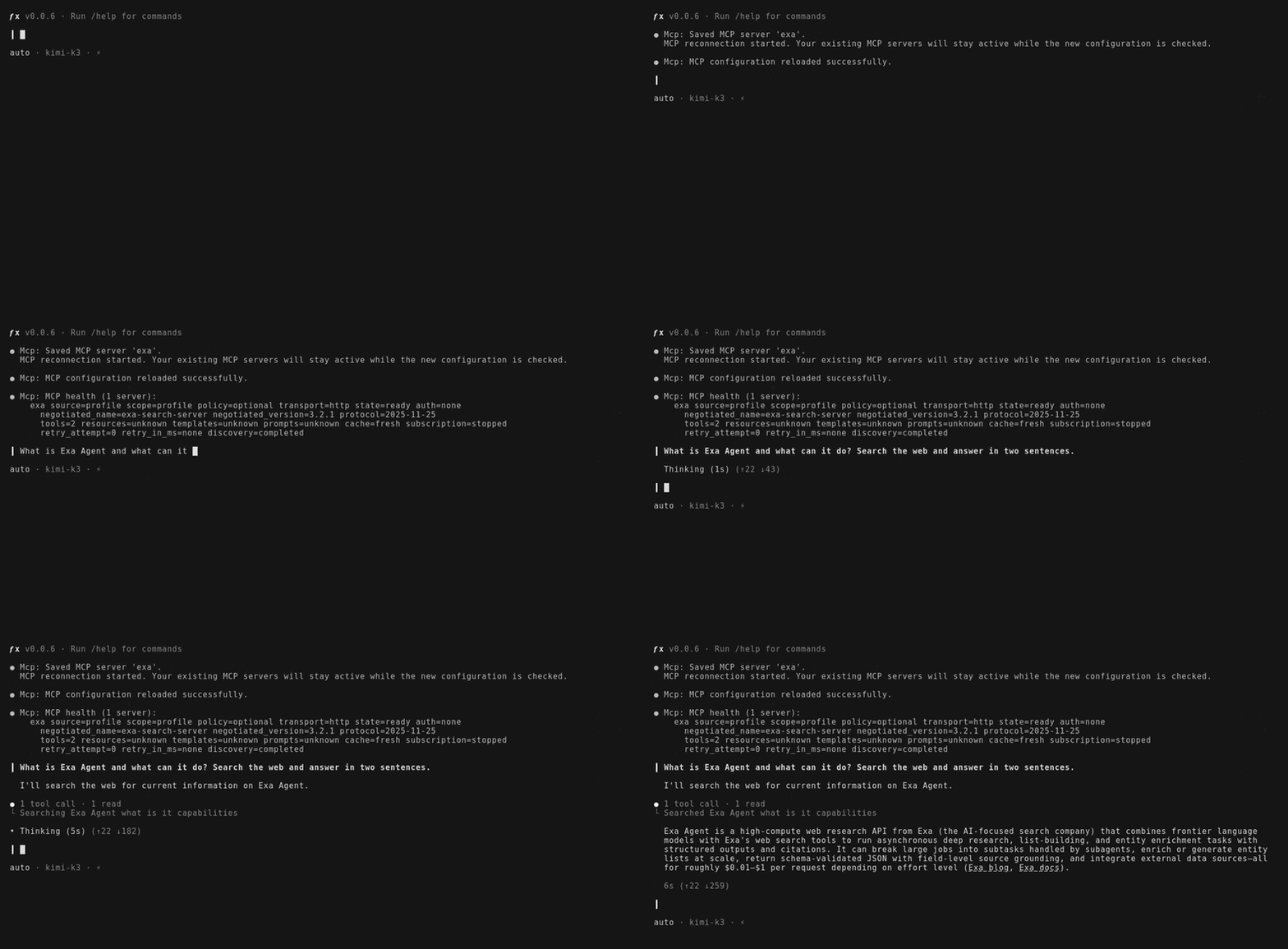
Start fx by running `fx`, then add the Exa MCP server from the interactive shell:
```text theme={null}
/mcp add --transport http exa https://mcp.exa.ai/mcp
```
fx saves the server to `~/.fx/mcp.json` and reloads MCP.
```text theme={null}
/mcp list
```
## Configure by hand
fx reads MCP servers only from `~/.fx/mcp.json`, so you can also add Exa there directly:
```json ~/.fx/mcp.json theme={null}
{
"mcp": {
"exa": {
"type": "http",
"url": "https://mcp.exa.ai/mcp"
}
}
}
```
Run `/mcp reload` to apply the change without restarting fx.
The free plan covers casual use. Add your own [Exa API key](https://dashboard.exa.ai/api-keys) to lift the rate limits:
```json ~/.fx/mcp.json theme={null}
{
"mcp": {
"exa": {
"type": "http",
"url": "https://mcp.exa.ai/mcp",
"header_env": {
"x-api-key": "EXA_API_KEY"
}
}
}
}
```
`header_env` maps a header name to an environment variable, so the key stays out of the config file.
## Tool discovery
fx discovers MCP tools lazily: the server's tools are not in the model's context until a turn needs them, so adding Exa costs nothing on turns that don't search the web.
Review the available tools, configuration options, and other clients.
## Installation
```bash theme={null}
curl -fsSL https://fx.sh/setup.sh | bash
```
Then sign in with `fx login`. See the [fx docs](https://fx.sh/docs) for provider options.
Start fx by running `fx`, then add the Exa MCP server from the interactive shell:
```text theme={null}
/mcp add --transport http exa https://mcp.exa.ai/mcp
```
fx saves the server to `~/.fx/mcp.json` and reloads MCP.
```text theme={null}
/mcp list
```
## Configure by hand
fx reads MCP servers only from `~/.fx/mcp.json`, so you can also add Exa there directly:
```json ~/.fx/mcp.json theme={null}
{
"mcp": {
"exa": {
"type": "http",
"url": "https://mcp.exa.ai/mcp"
}
}
}
```
Run `/mcp reload` to apply the change without restarting fx.
The free plan covers casual use. Add your own [Exa API key](https://dashboard.exa.ai/api-keys) to lift the rate limits:
```json ~/.fx/mcp.json theme={null}
{
"mcp": {
"exa": {
"type": "http",
"url": "https://mcp.exa.ai/mcp",
"header_env": {
"x-api-key": "EXA_API_KEY"
}
}
}
}
```
`header_env` maps a header name to an environment variable, so the key stays out of the config file.
## Tool discovery
fx discovers MCP tools lazily: the server's tools are not in the model's context until a turn needs them, so adding Exa costs nothing on turns that don't search the web.
Review the available tools, configuration options, and other clients.