> ## Documentation Index
> Fetch the complete documentation index at: https://exa.ai/docs/llms.txt
> Use this file to discover all available pages before exploring further.
# ElevenLabs
> Give ElevenLabs voice agents real-time web search with Exa.
***
ElevenLabs voice agents can search the web mid-conversation using Exa as a **webhook tool**. When the agent decides it needs current information, ElevenLabs makes an HTTP POST directly to Exa's `/search` endpoint — no server or middleware required on your side.
There are two ways to connect Exa to ElevenLabs:
| Approach | Setup | Flexibility |
| ------------------------------------ | --------------------------------- | ------------------------------------------------------------- |
| **Webhook tool** (recommended) | Configure via API or dashboard | Full control over search params, content options, and headers |
| **Built-in Exa integration** (alpha) | One-click in ElevenLabs dashboard | Simpler but limited configuration |
This guide covers the webhook tool approach, which gives you full control over how Exa is called. Everything below can also be done through the [ElevenLabs dashboard](https://elevenlabs.io/app/conversational-ai) UI — but the API examples here are designed to be agent-friendly, so you can feed this page to a coding agent and have it deploy the integration for you.
## How it works
1. User speaks to the voice agent
2. The LLM decides to call `web_search` based on the tool description
3. ElevenLabs POSTs to `https://api.exa.ai/search` with headers and body you configured
4. LLM-determined params (the search `query`) get merged with your constant values (`type`, `numResults`, `contents`)
5. Exa results flow back to the LLM, which responds conversationally
No server, no callback URL, no listener. ElevenLabs is the HTTP client calling Exa directly. Tool calls have a 20-second timeout.
## Prerequisites
* An [Exa API key](https://dashboard.exa.ai/api-keys)
* An [ElevenLabs API key](https://elevenlabs.io/app/settings/api-keys)
## Get started
Use the ElevenLabs [Create Tool API](https://elevenlabs.io/docs/api-reference/tools/create) to register a webhook tool that points to Exa's search endpoint.
The key concept: properties with `constant_value` are fixed (sent on every request), while properties with `description` are determined by the LLM at runtime.
```bash bash theme={null}
curl -X POST "https://api.elevenlabs.io/v1/convai/tools" \
-H "xi-api-key: $ELEVENLABS_API_KEY" \
-H "Content-Type: application/json" \
-d '{
"tool_config": {
"type": "webhook",
"name": "web_search",
"description": "Search the web using Exa. Use this when the user asks anything that needs current or factual information.",
"api_schema": {
"url": "https://api.exa.ai/search",
"method": "POST",
"request_headers": {
"x-api-key": "YOUR_EXA_API_KEY",
"Content-Type": "application/json",
"x-exa-integration": "elevenlabs"
},
"request_body_schema": {
"type": "object",
"properties": {
"query": {
"type": "string",
"description": "Natural language search query. Be specific."
},
"type": {
"type": "string",
"constant_value": "instant"
},
"numResults": {
"type": "integer",
"constant_value": 5
},
"contents": {
"type": "object",
"properties": {
"highlights": {
"type": "boolean",
"constant_value": true
}
}
}
},
"required": ["query"]
}
}
}
}'
```
This creates a tool where:
* `query` — the LLM fills this based on conversation context
* `type: "instant"` — uses Exa's fastest search mode (\~150ms)
* `numResults: 5` — returns 5 results per search
* `contents.highlights: true` — returns token-efficient highlighted snippets (best for voice latency)
Save the returned `id` — you'll need it to wire the tool to an agent.
If you already have an agent, you can skip step 2 and add the tool to your existing agent in the ElevenLabs dashboard under **Agent > Tools**, or via the [Update Agent API](https://elevenlabs.io/docs/api-reference/agents/update). The tool won't do anything until it's attached to an agent.
Create a conversational agent and attach the webhook tool by its ID.
```bash bash theme={null}
curl -X POST "https://api.elevenlabs.io/v1/convai/agents/create" \
-H "xi-api-key: $ELEVENLABS_API_KEY" \
-H "Content-Type: application/json" \
-d '{
"name": "Exa Search Assistant",
"conversation_config": {
"agent": {
"prompt": {
"prompt": "You are a helpful voice assistant with real-time web search powered by Exa. When users ask questions that need current information, use the web_search tool.\n\nGuidelines:\n- Search proactively for time-sensitive or factual questions.\n- Summarize results conversationally — do not read URLs aloud.\n- Cite sources naturally.\n- Keep responses concise — this is voice.",
"tool_ids": ["YOUR_TOOL_ID"]
},
"first_message": "Hey! I can search the web for you in real-time. What would you like to know?"
}
}
}'
```
The response includes an `agent_id`. Open the agent in the ElevenLabs dashboard to test it:
```
https://elevenlabs.io/app/conversational-ai/agents/YOUR_AGENT_ID
```
Add the agent to any webpage with two lines of HTML:
```html html theme={null}
```
## Full Python example
This script creates both the webhook tool and agent in one run:
```python python theme={null}
import os
import requests
ELEVENLABS_API_KEY = os.environ["ELEVENLABS_API_KEY"]
EXA_API_KEY = os.environ["EXA_API_KEY"]
BASE = "https://api.elevenlabs.io/v1/convai"
HEADERS = {"xi-api-key": ELEVENLABS_API_KEY, "Content-Type": "application/json"}
# 1. Create webhook tool
tool_resp = requests.post(f"{BASE}/tools", headers=HEADERS, json={
"tool_config": {
"type": "webhook",
"name": "web_search",
"description": (
"Search the web using Exa. Use this when the user asks anything "
"that needs current or factual information."
),
"api_schema": {
"url": "https://api.exa.ai/search",
"method": "POST",
"request_headers": {
"x-api-key": EXA_API_KEY,
"Content-Type": "application/json",
"x-exa-integration": "elevenlabs",
},
"request_body_schema": {
"type": "object",
"properties": {
"query": {
"type": "string",
"description": "Natural language search query. Be specific.",
},
"type": {"type": "string", "constant_value": "instant"},
"numResults": {"type": "integer", "constant_value": 5},
"contents": {
"type": "object",
"properties": {
"highlights": {
"type": "boolean",
"constant_value": True,
}
},
},
},
"required": ["query"],
},
},
}
})
tool_resp.raise_for_status()
tool_id = tool_resp.json()["id"]
print(f"Tool created: {tool_id}")
# 2. Create agent
agent_resp = requests.post(f"{BASE}/agents/create", headers=HEADERS, json={
"name": "Exa Search Assistant",
"conversation_config": {
"agent": {
"prompt": {
"prompt": (
"You are a helpful voice assistant with real-time web search "
"powered by Exa. When users ask questions that need current "
"information, use the web_search tool.\n\n"
"Guidelines:\n"
"- Search proactively for time-sensitive or factual questions.\n"
"- Summarize results conversationally — do not read URLs aloud.\n"
"- Cite sources naturally.\n"
"- Keep responses concise — this is voice."
),
"tool_ids": [tool_id],
},
"first_message": "Hey! I can search the web for you. What would you like to know?",
}
},
})
agent_resp.raise_for_status()
agent_id = agent_resp.json()["agent_id"]
print(f"Agent created: {agent_id}")
print(f"Dashboard: https://elevenlabs.io/app/conversational-ai/agents/{agent_id}")
```
Run it:
```bash bash theme={null}
export ELEVENLABS_API_KEY="your-key"
export EXA_API_KEY="your-key"
python elevenlabs_exa_webhook.py
```
## Customizing search parameters
The webhook tool body schema maps directly to [Exa's search API](/reference/search). Here are common configurations:
### Search type
Control the speed/quality tradeoff with the `type` constant:
| Type | Latency | Best for |
| --------- | ------- | --------------------------------- |
| `instant` | \~150ms | Voice conversations (recommended) |
| `auto` | \~1s | General use |
For voice agents, start with `instant`. Use `auto` when you want Exa to choose the best current search mode for each query.
### Content options
Choose how results are returned via the `contents` object:
```json json theme={null}
{
"contents": {
"type": "object",
"properties": {
"highlights": {
"type": "boolean",
"constant_value": true
}
}
}
}
```
* **`highlights`** — Token-efficient excerpts. Best for voice agents where you want relevant snippets without overwhelming the LLM context. Pass `true` for the highest-quality default.
* **`text`** — Full page markdown. Use when the agent needs complete page content. Set `maxCharacters` to limit length.
* **`summary`** — LLM-generated summary of each page. Higher latency but provides synthesized content.
For voice agents, `highlights: true` is the recommended default — it balances relevance with response speed.
### Filtering results
Add domain or date filters as constants:
```json json theme={null}
{
"includeDomains": {
"type": "array",
"constant_value": ["reuters.com", "apnews.com", "bbc.com"]
}
}
```
```json json theme={null}
{
"startPublishedDate": {
"type": "string",
"constant_value": "2025-01-01T00:00:00.000Z"
}
}
```
### Number of results
Adjust `numResults` based on your use case. For voice, 3-5 results keep responses fast. For research-oriented agents, 10+ gives broader coverage.
## Schema reference
ElevenLabs webhook tools use a JSON schema with these property types:
* **`constant_value`** — Fixed value sent on every request. The LLM never sees or modifies it. Works for strings, numbers, booleans.
* **`description`** — The LLM determines the value at runtime based on this description. Use for dynamic params like `query`.
* **Nested objects** — Use `type: "object"` with `properties` to build nested structures like `contents.highlights`.
Each parameter has a mode toggle in the dashboard — **Fixed** or **LLM**:
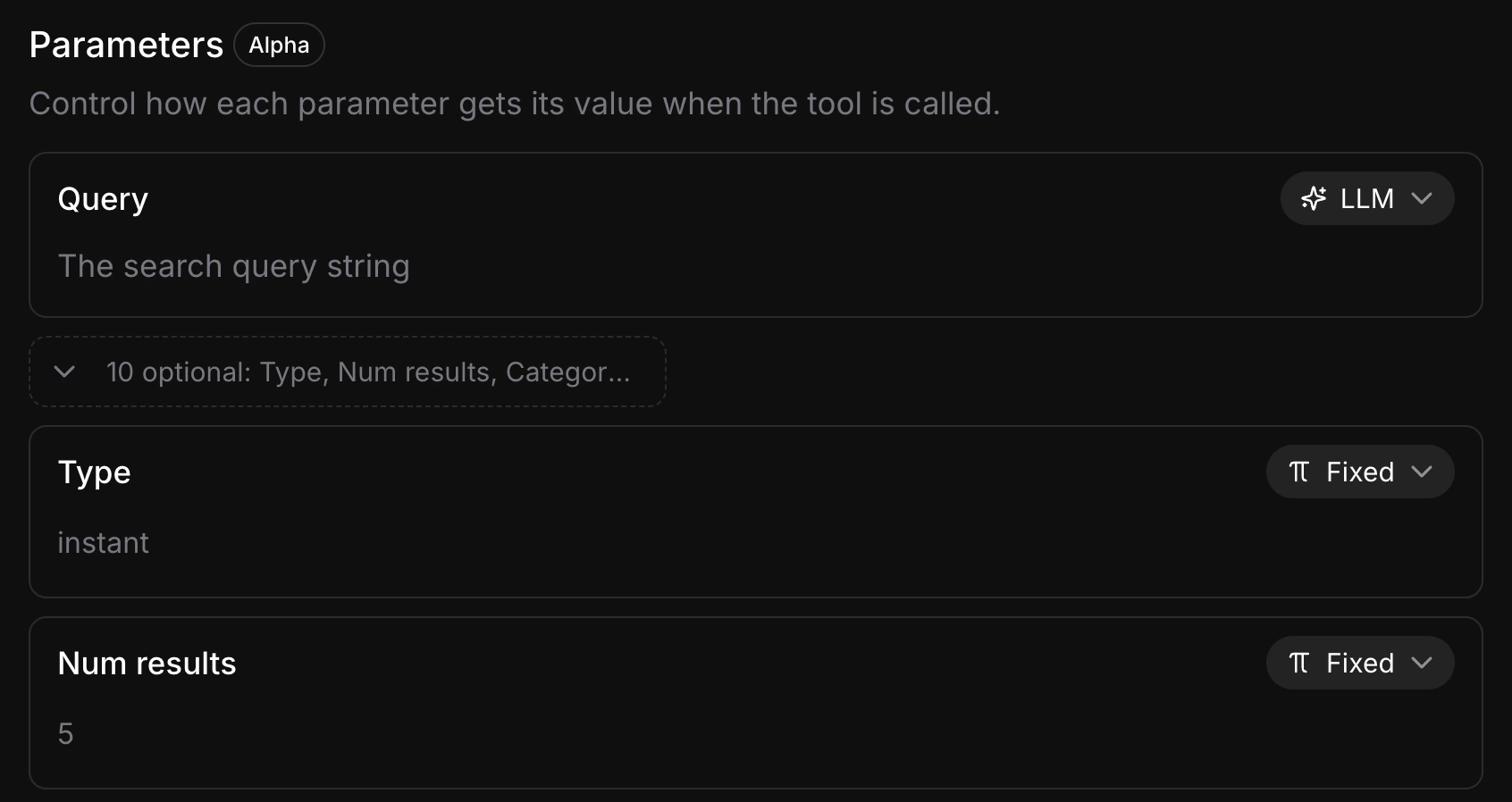 Parameters set to **Fixed** (marked with `constant_value` in the API) are sent as-is on every request. Parameters set to **LLM** (marked with `description`) let the model choose the value at runtime. Keep as many parameters Fixed as possible — every LLM-determined parameter adds a tool-calling step that increases response latency.
For the full ElevenLabs webhook tool schema, see the [ElevenLabs server tools documentation](https://elevenlabs.io/docs/conversational-ai/customization/tools/server-tools).
## Built-in Exa integration (alpha)
ElevenLabs also offers a built-in Exa integration available in the agent dashboard under **Tools > Integrations**. This is simpler to set up, but customizing search parameters is harder compared to the webhook tool approach.
For full control over search type, content options, and filtering, the webhook tool approach described above is recommended.
Parameters set to **Fixed** (marked with `constant_value` in the API) are sent as-is on every request. Parameters set to **LLM** (marked with `description`) let the model choose the value at runtime. Keep as many parameters Fixed as possible — every LLM-determined parameter adds a tool-calling step that increases response latency.
For the full ElevenLabs webhook tool schema, see the [ElevenLabs server tools documentation](https://elevenlabs.io/docs/conversational-ai/customization/tools/server-tools).
## Built-in Exa integration (alpha)
ElevenLabs also offers a built-in Exa integration available in the agent dashboard under **Tools > Integrations**. This is simpler to set up, but customizing search parameters is harder compared to the webhook tool approach.
For full control over search type, content options, and filtering, the webhook tool approach described above is recommended.